
Pulsar Audio Pulsar 1178
Professional music gear - detailed information and where to buy
Pulsar Audio
Pulsar 1178
Product Info
* Prices may vary. Check retailer for current pricing and availability.
Product Description
- The most versatile FET compressor A compressor that eats transients for breakfast
- the 1178 is a rare and expensive legend of the recording studio
- cleaner and more versatile than its older brother
- the 1176. The 1178 has been used by great producers including Chris Lord-Alge (My Chemical Romance)
- Bob Clearmountain (Rolling Stones
- Christina Aguilera)
- Yvan Bing (Phil Collins) and Nigel Godrich (Radiohead). The Pulsar Audio 1178 software meticulously recreates the original 1178 hardware in its tonal colour and compression character. But Pulsar Audio have taken the 1178 further than the original unit
- adding all the features you would expect from a modern
- versatile plug-in
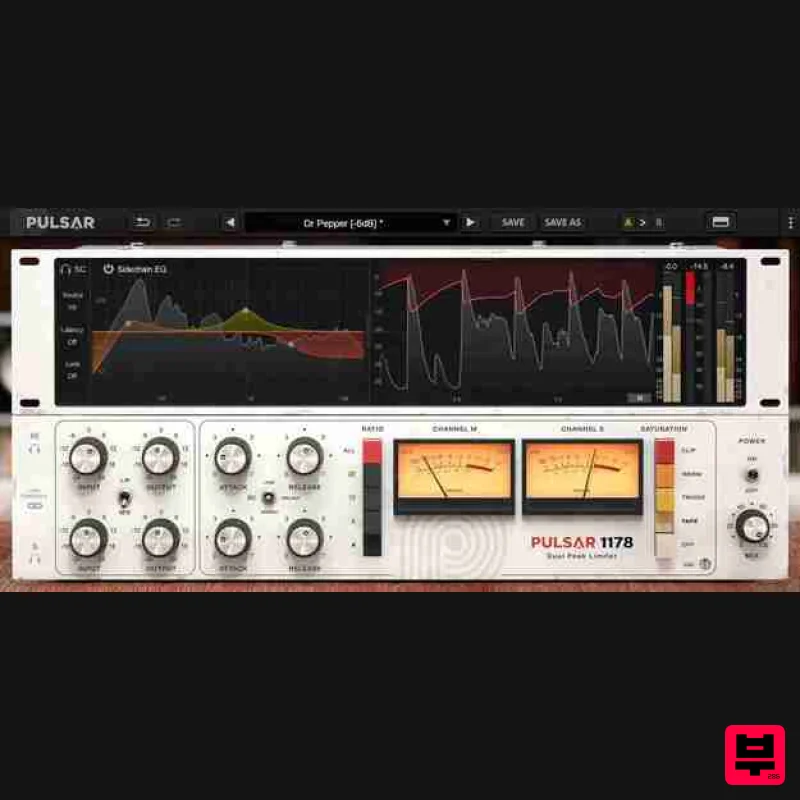
- including a full sidechain EQ for added control
- an optional saturation stage for warmth and character
- and precise metering. Improving on a classic Pulsar 1178 has a fast and bright character
- making it great for dealing with unruly transients in tracking and mixing. While these qualities make it the ideal choice to the transients of a drum room to get a nasty rocky bounce
- the extended attack range also allows gentle dynamic contouring and can provide unique mid-band definition and intelligibility on a vocal. When it comes to compression
- having more control over the sidechain signal can bring a mix to the next level. The dynamics of a drum groove hinge on how compression is triggered by both the kick drum and the snare. With Pulsar 1178’s full-featured sidechain EQ section
- you can make each one hit just the right amount of gain reduction. Keeping an eye on dynamics is key to a well-balanced mix. Pulsar 1178’s accurate and modern metering section helps in this important task. Peak meters allow insight into overall dynamics; RMS meters let you monitor loudness and match levels
- and a scrolling view helps visualize how the attack and release settings are affecting the gain reduction. Add grit and drive to the usually-transparent 1178 with four flavours of saturation: Tape
- Triode
- Warm and Clip modes open up new ways of managing dynamics and spectral envelope. These modes are fully-integrated in the compressor’s gain reduction system
- allowing a unique vibe
- unachievable with pre or post saturation. How does it sound? Snappy with a rich sound: More transparent than an 1176
- the 1178 allows incredibly fast control over transients when compared to other compressor models. Add the all-buttons-in mode and Pulsar’s added saturation models
- and you can access characterful
- colourful tones as well Vocals: The 1178 is a great way to get vocals to pop out of a mix and sound very aggressive. Bob Clearmountain has used these circuits to do the business on vocals from Mick Jagger
- Christina Aguilera and more Drum overheads: The 1178 has the speed to catch crashes in a flash
- and also opens up the top end of a signal in a very natural-sounding way. Chris Lord-Alge uses this combination to great effect on “lacklustre overheads”. With lookahead
- you can get surgical with your drum transients too Bass: Whether you’re catching transients
- controlling dynamics
- or all-out up the signal
- bass is prime fodder for the 1178. Using the added Saturation circuits
- you can really introduce extra grit
- helping the bass to pop through a mix and survive on speakers Acoustic guitar: Guitar transients can be particularly fast and harsh
- and the 1178 is a great tool to dampen lively picking
- as well as to make the body of the sound bounce and respond. Fast processing and natural release helps to add life to a mix but retain a natural guitar tone Buss and master compression: Transparency and speed make the 1178 a good candidate for buss compression and even mastering compression (as on Robert Plant’s album Angel Dance). The added sidechain EQ is helpful in controlling the entire frequency spectrum – not just heavy bass Features Topology Preservation Technology guarantees a perfect emulation of the original device’s behaviour Saturation stage featuring four saturation flavours: Tape
- Warm
- Triode and Clip Mid-Side processing enabling a signal’s mono and stereo information to be processed separately with different settings Look-ahead or Look-behind delay stages
- up to 20ms for the former or up to 10ms for the latter Powerful sidechain EQ to help perfectly tailor your signal and arrive at the ideal detection response External sidechain opens a very wide range of applications: ducking
- de-essing
- filtering the sidechain signal with your favourite EQ
- or even applying dynamic processing Advanced metering section. Gain reduction
- input level and output level are all visible in different ways GUI with draggable resize handles that streamlines based on output configuration System Requirements Windows Windows 7 with SP1 / Windows 8.1 / Windows 10 (all 64-bit only) CPU: Intel Core i3 / i5 / i7 / i9 / Xeon or AMD Quad-Core minimum Memory: 4 GB RAM & 1 GB free disk space GPU: OpengGL 2.0 compatible GPU Monitor: Minimum 1024×768 Resolution (recommended 1920×1080) & 60 Hz Refresh rate Compatible Plugin Formats (32 & 64-bit): AAX Native VST 2.4 VST 3 Mac macOS 10.9 and higher (M1 Apple Silicon supported) (64-bit only) CPU: Intel Core i3 / i5 / i7 / Xeon / Apple Silicon (M1) Memory: 4 GB RAM & 1 GB free disk space GPU: OpengGL 2.0 compatible GPU Monitor: Minimum 1024×768 Resolution (recommended 1920×1080) & 60 Hz Refresh rate Compatible Plugin Formats (64-bit only): AAX Native Audio Unit VST 2.4 VST 3 Activation: You need to have an account at ilok.com to be able to use Pulsar software. The Mac version of this software is 64-bit only and will not function on 32-bit systems. IntegrAudio.com "If you don’t have a FET compressor or a dedicated saturator plugin yet
- we would definitely recommend you give this one a try." Important Note: You need to have an account at ilok.com to be able to use Pulsar software. Please note: is used as an example as the installation process is the same for all Pulsar Audio products. Mac iLok Registration 1. Go to the iLok website and create a new account if you are not currently registered and do not have the iLok License Manager installed on your computer. Note: Skip to the 'Pulsar Software Installation' procedure if you are already an iLok registered user. 2. Download and install the iLok License Manager. Pulsar Software Installation 1. Download the .dmg file from within your Plugin Boutique User Account and open it > Double-click the .pkg file to begin the installation. 2. Click 'Continue'. 3. Click 'Continue'. 4. Click 'Agree'. 5. Click 'Install'. 6. Enter your computer Username and Password > Click 'Install Software'. 7. Click 'Close'. iLok Activation 1. Open the iLok License Manager > Click 'Sign In'. 2. Enter your iLok User ID and Password > Click 'Sign In'. 3. Click the redeem icon in the top right-hand corner of the iLok License Manager window. 4. Enter the Activation Code in of your Plugin Boutique User Account > Click 'Next'. 5. Select your account that you wish to redeem your product to > Click 'Redeem'. 6. Click 'Ok'. 7. Select your redeemed product > Click the tick icon in the top-right hand corner of the iLok License Manager. 8. Select your computer from the list of activation locations > Click 'Activate'. 9. Click 'Ok'. Your product is now activated and ready to use within your DAW. Windows iLok Registration 1. Go to the iLok website and create a new account if you are not currently registered and do not have the iLok License Manager installed on your computer. Note: Skip to the 'Pulsar Software Installation' procedure if you are already an iLok registered user. 2. Download and install the iLok License Manager. Pulsar Software Installation 1. Download the installer file from your Plugin Boutique User Account. 2. Double-click the .zip folder to reveal the installer file > Double-click the .exe installer file to begin the installation process. 3. Select 'I Accept the Agreement' > Click 'Next'. 4. Select the components you wish to install > Click 'Next'. (Note: Untick 'PACE iLok license support' if you already have it installed on your computer). 5. Click 'Next'. 6. Click 'Install'. 7. Click 'Finish'. iLok Activation 1. Open the iLok License Manager > Click 'Sign In'. 2. Enter your iLok User ID and Password > Click 'Sign In'. 3. Click the redeem icon in the top right-hand corner of the iLok License Manager window. 4. Enter the Activation Code in of your Plugin Boutique User Account > Click 'Next'. 5. Select your account that you wish to redeem your product to > Click 'Redeem'. 6. Click 'Ok'. 7. Select your redeemed product > Click the tick icon in the top-right hand corner of the iLok License Manager. 8. Select your computer from the list of activation locations > Click 'Activate'. 9. Click 'Ok'. Your product is now activated and ready to use within your DAW.
Additional Information
About the Pulsar Audio Pulsar 1178
Discover the distinctive sound and feel of the Pulsar Audio Pulsar 1178, a standout choice among Compressor.
Why Choose the Pulsar Audio Pulsar 1178?
- •Authentic Pulsar Audio craftsmanship and design
- •Versatile sound suitable for multiple musical genres
- •Professional build quality and reliable performance
- •Part of Pulsar Audio's respected Compressor lineup
Compare & Explore
Browse our complete selection of Pulsar Audio instruments or explore other Compressor options. Use our comparison tools to find the perfect match for your musical style and budget.
Similar Products

Initial Audio IA-LA1
Compressor

Soundspear Supertube
Compressor

PSP Audioware PSP Vintage Warmer 2
Compressor

Korneff Audio Pawn Shop Comp
Compressor

W. A. Production BIGGIFIER
Compressor

DDMF LinComp
Compressor

MeldaProduction MEssentialsFXBundle
Compressor

DDMF Comprezzore
Compressor

