
PSP Audioware PSP StereoAligner2
Professional music gear - detailed information and where to buy
PSP Audioware
PSP StereoAligner2
Product Info
* Prices may vary. Check retailer for current pricing and availability.
Product Description
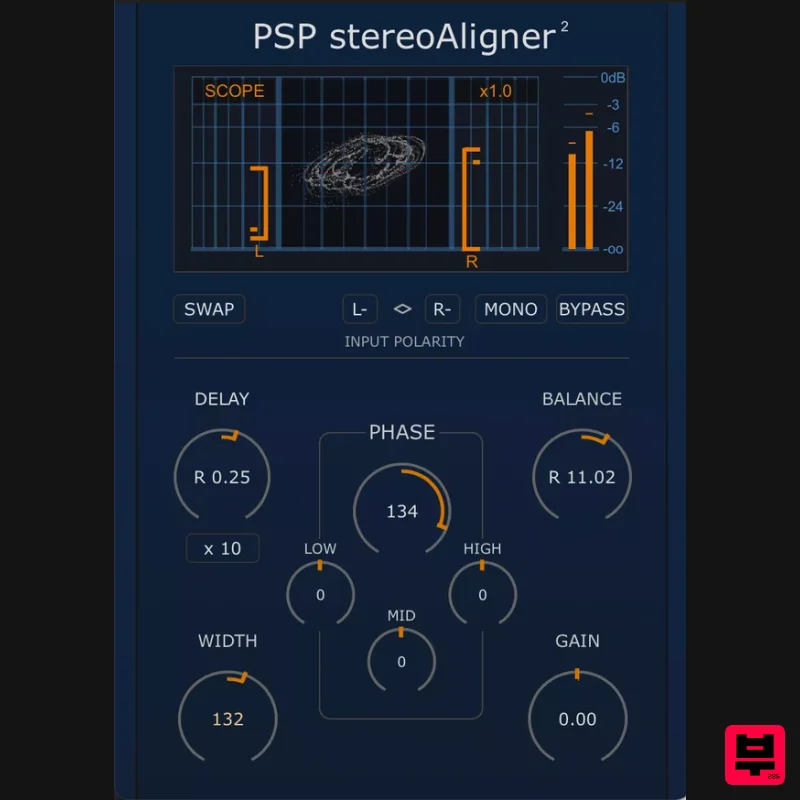
- Perfect Phase. Perfect Timing. Perfect Stereo. PSP stereoAligner2 is a powerful tool designed to correct and refine the stereo image of any dual-channel recording. Whether you're working with spaced microphones
- synthetic stereo sources
- or complex mix elements
- stereoAligner2 gives you precise control over time alignment
- variable phase adjustment
- polarity
- width
- balance
- and gain. With its intuitive visual interface
- including a built-in goniometer (X-Y scope) and peak metering
- PSP stereoAligner2 makes it easy to diagnose and correct stereo problems quickly. Shape the stereo field with sample-accurate delay correction
- independent low/mid/high phase adjustments
- channel swapping
- polarity flips
- and width manipulation — all processed in pristine 64-bit double-precision. Perfect for stereo microphone recordings
- mix repair
- and creative stereo shaping
- PSP stereoAligner2 provides a complete toolkit for achieving a coherent
- balanced
- and mono-compatible stereo image. Features Precise control of the phase between the left and right channel to fix inter-channel phase issues or to obtain a proper mono output out of a stereo recording. Precise control of the inter-channel delay to fix inter-channel latency issues due to asymmetric distances between sound source and microphones. Control of the stereo balance whenever a stereo track has improperly adjusted levels between channels. Individual left or right and common left and right polarity flip to fix issues with polarity settings like with a kick/snare front and back microphones or due to a construction of a microphone. Channel swap to deal with swapped channels
- routing issues on recording or just to choose the best track's stereo layout in the mix. Goniometer (X-Y scope) to control the stereophonic properties of the output signal. Peak level meter to control the overall output digital peak level. PC Windows 7 – Windows 11 VST
- VST 3 and AAX The latest iLok License Manager application installed Mac macOS 10.14 – macOS Tahoe (Apple Silicon Supported) VST
- VST 3
- AAX and AU The latest iLok License Manager application installed Please Note: PSP VintageWarmer2 is used as an example. Activation 1. Visit the PSP Registration Centre and create/log into your PSPaudioware account. 2. Select the Manual Product Activation link and copy and paste/manually enter the serial number that is provided with your User Account. > click 'Activate!.' 3. Your PSP product will now show up in your PSP customer account. Your 30-digit iLok activation code will also be listed under authorization (PACE). Download the relevant installer. iLok Registration 1. Go to the iLok website and create a new account if you are not currently registered and do not have the iLok Licence Manager installed on your computer. 2. Download and install the iLok License Manager. 3. Open your iLok license manager application > click 'Sign In'. 4. Enter your iLok registered User ID and password > click ‘Sign In'. 5. Once you are signed in
- click the ‘Redeem’ icon which is located at the top-right corner of the iLok Licence Manager’s interface. 6. Copy and paste/manually enter the 30-digit code from your PSP Audioware account into the available Activation Code boxes
- and then click ‘Next'. 7. Select your activation destination > Click 'Activate'. 8. Click 'Ok'. Installation Mac 1. Open the recently downloaded .dmg file to begin the installation. 2. Click 'Continue'. 3. Click 'Continue'. 4. Click 'Continue'. 5. Click 'Agree'. 6. Click 'Continue'. 7. Click 'Install'. 8. Click 'Close'. 9. Open your DAW > Open your newly installed software. Your software is now activated and ready to use. PC 1. Open the recently downloaded .exe file to begin the installation. 2. Click 'Next >'. 3. Select 'I Accept the Agreement' > Click 'Next'. 4. Click 'Next >'. 5. Click 'Next'. 6. Click 'Next'. 7. Click 'Next' to begin the installation. 8. Click 'Finish'. 9. Open your DAW > Open your newly installed software. Your software is now activated and ready to use.
Additional Information
About the PSP Audioware PSP StereoAligner2
The PSP Audioware PSP StereoAligner2 represents excellent craftsmanship in the Utility category.
Why Choose the PSP Audioware PSP StereoAligner2?
- •Authentic PSP Audioware craftsmanship and design
- •Versatile sound suitable for multiple musical genres
- •Professional build quality and reliable performance
- •Part of PSP Audioware's respected Utility lineup
Compare & Explore
Browse our complete selection of PSP Audioware instruments or explore other Utility options. Use our comparison tools to find the perfect match for your musical style and budget.
Similar Products

Audible Genius Building Blocks 2
Utility

DDMF TheStrip
Utility

Blue Cat Audio Blue Cat's Connector
Utility

Audible Genius Building Blocks 1
Utility

Acoustica Spin It Again
Utility

Inphonik RX950
Utility

Soundspear Luxor
Utility

Tonalic Tonalic Arranger - 30 Day Subscription
Utility

