
PSP Audioware PSP PianoVerb2
Professional music gear - detailed information and where to buy
PSP Audioware
PSP PianoVerb2
Product Info
* Prices may vary. Check retailer for current pricing and availability.
Product Description
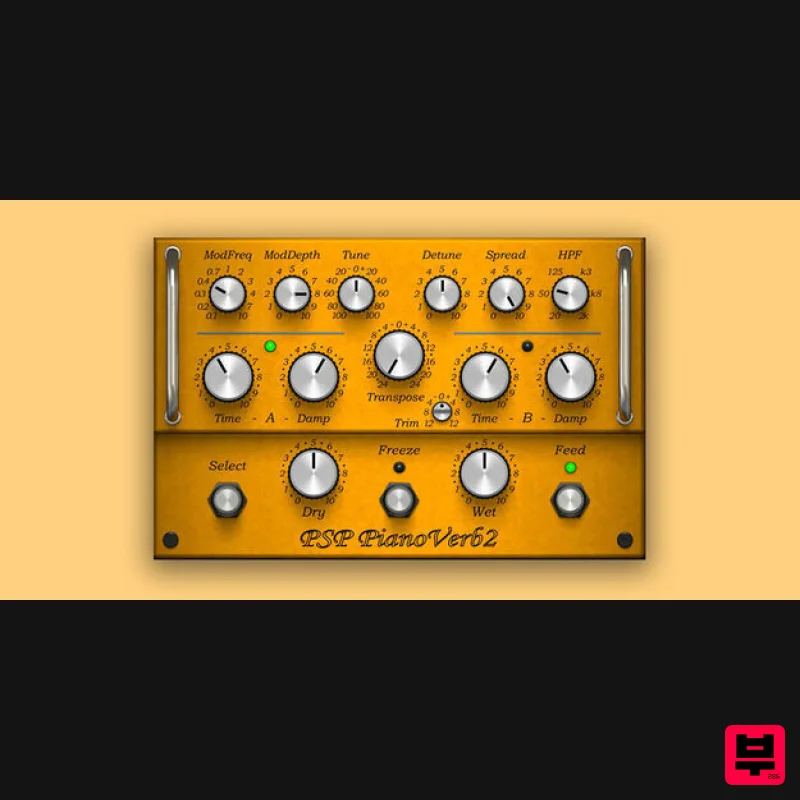
- PSP PianoVerb2 is a redesigned and improved creative resonant reverb plug-in based on the famed freeware plug-in PSP PianoVerb. This new version offers a redesigned GUI with a brand new resizing feature and a new preset management system. Like the original PianoVerb
- it creates its unique sound with twelve resonant filters that mimic the behavior of piano strings. The ability to transpose
- tune and detune the set of strings allow you to set up PianoVerb2 to deliver a wide range of reverberations ranging from traditional wide spread reverb to unique and unusual resonances. With the addition of a brand new modulation section and the ability to set up multiple settings of time and damping and decay freezing (via the A/B comparison function) this plug-in delivers amazing options for creative use. Add to that some other amazing new additions such as a high pass filter section
- independent dry/wet controls
- and a reverb tail freeze control
- it's easy to see how PianoVerb2 has become a comprehensive and truly unique algorithmic reverb. Whenever you want to add some natural resonance to a weak piano track
- vitalize your lead guitar with a bit of sustain
- or simply add a touch of a unique reverb to a track
- PSP PianoVerb2 can do the job! <iframe allow="autoplay" frameborder="no" height="450" src="https: //w.soundcloud.com/player/?url=https%3A//api.soundcloud.com/playlists/1530192487&color=%23ff5500&auto_play=false&hide_related=false&show_comments=false&show_user=true&show_reposts=false&show_teaser=true" width="100%"></iframe> PSPaudioware · PSP PianoVerb2 System Requirements In order to run PSP L'otary2 in 30-day trial mode or activate it
- you need an iLok user ID which you can create for free at www.ilok.com
- and you need to install the free iLok License Manager application but you don't need any hardware dongle. You can activate the license in 3 separate locations
- each of which can be either a computer or an iLok dongle (2nd generation or above). You can move these licenses at any time using PACE's iLok License Manager software. PC VST3: Windows 7 – Windows 11 64-bit VST3 compatible application VST: Windows 7 – Windows 11 64-bit VST compatible application AAX: Windows 7 – Windows 11 Pro Tools All DAWs: The latest iLok License Manager application installed Mac OS X: Audio Unit: macOS 10.14 – macOS 14 Sonoma 64-bit AudioUnit compatible host application VST: macOS 10.14 – macOS 14 Sonoma 64-bit VST compatible host application VST3: macOS 10.14 – macOS 14 Sonoma 64-bit VST3 compatible host application AAX: macOS 10.14 – macOS 14 Sonoma Pro Tools All DAWs: The latest iLok License Manager application installed Awards PSP PianoVerb2 Review At Music Radar If you've ever listened to the undamped strings of a piano resonating in sympathy with the sounds in a room
- then you already have some understanding of what PSP's PianoVerb2 is all about. Some years ago
- the Polish company developed their intriguing reverb concept as a freeware plugin
- and now i... Read More Please Note: PSP VintageWarmer2 is used as an example. Activation 1. Visit the PSP Registration Centre and create/log into your PSPaudioware account. 2. Select the Manual Product Activation link and copy and paste/manually enter the serial number that is provided with your User Account. > click 'Activate!.' 3. Your PSP product will now show up in your PSP customer account. Your 30-digit iLok activation code will also be listed under authorization (PACE). Download the relevant installer. iLok Registration 1. Go to the iLok website and create a new account if you are not currently registered and do not have the iLok Licence Manager installed on your computer. 2. Download and install the iLok License Manager. 3. Open your iLok license manager application > click 'Sign In'. 4. Enter your iLok registered User ID and password > click ‘Sign In'. 5. Once you are signed in
- click the ‘Redeem’ icon which is located at the top-right corner of the iLok Licence Manager’s interface. 6. Copy and paste/manually enter the 30-digit code from your PSP Audioware account into the available Activation Code boxes
- and then click ‘Next'. 7. Select your activation destination > Click 'Activate'. 8. Click 'Ok'. Installation Mac 1. Open the recently downloaded .dmg file to begin the installation. 2. Click 'Continue'. 3. Click 'Continue'. 4. Click 'Continue'. 5. Click 'Agree'. 6. Click 'Continue'. 7. Click 'Install'. 8. Click 'Close'. 9. Open your DAW > Open your newly installed software. Your software is now activated and ready to use. PC 1. Open the recently downloaded .exe file to begin the installation. 2. Click 'Next >'. 3. Select 'I Accept the Agreement' > Click 'Next'. 4. Click 'Next >'. 5. Click 'Next'. 6. Click 'Next'. 7. Click 'Next' to begin the installation. 8. Click 'Finish'. 9. Open your DAW > Open your newly installed software. Your software is now activated and ready to use.
Additional Information
About the PSP Audioware PSP PianoVerb2
The PSP Audioware PSP PianoVerb2 represents excellent craftsmanship in the Reverb category.
Why Choose the PSP Audioware PSP PianoVerb2 ?
- •Authentic PSP Audioware craftsmanship and design
- •Versatile sound suitable for multiple musical genres
- •Professional build quality and reliable performance
- •Part of PSP Audioware's respected Reverb lineup
Compare & Explore
Browse our complete selection of PSP Audioware instruments or explore other Reverb options. Use our comparison tools to find the perfect match for your musical style and budget.
Similar Products

DDMF MagicVerb
Reverb
$30
MagicVerb is the latest result of the collaboration between MagicDeathEye aka Ian Sefchick and DDMF. This journey was...

Vegas Audio Fabricverb
Reverb
$30
Get the signature sound of the UK’s most famous nightclub on your digital audio workstation! Our new convolution...

PSP Audioware PSP Pianoverb 2
Reverb
$30
PSP PianoVerb2 is a redesigned and improved creative resonant reverb plug-in based on our famous and beloved freeware...

XHUN Audio ShineVerb
Reverb
$30
Creative Reverb Processor ShineVerb is a creative tool specially designed for reverberation, spatialization and sound...

PSP Audioware PSP Nexcellence
Reverb
$30
PSP Nexcellence is a rich-sounding, spring reverb emulation inspired by and modeled after classic “necklace-type”...

Initial Audio AR1 Reverb
Reverb
$30
Quality Algorithmic Reverb Plugin AR1 is an algorithmic reverb plugin designed to sound great on all types of...

PSP Audioware PSP EasyVerb
Reverb
$30
PSP EasyVerb is a reverberation effect plug-in (VST, RTAS and AAX for Windows; VST, AudioUnit, RTAS and AAX for Mac OS...

DDMF Envelope
Reverb
$30
Envelope is a true stereo reverb plugin featuring 8 different room simulations, all of which can be adjusted for size,...
Frequently Asked Questions
The PSP Audioware PSP PianoVerb2 stands out for its exceptional PSP Audioware craftsmanship and innovative design.
Yes! With its affordable price point and quality construction, it's perfect for learning reverb.
Browse the similar products section to see how it stacks up against other reverb.

