
PROCESS.AUDIO COMP.TWO
Professional music gear - detailed information and where to buy
PROCESS.AUDIO
COMP.TWO
Product Info
* Prices may vary. Check retailer for current pricing and availability.
Product Description
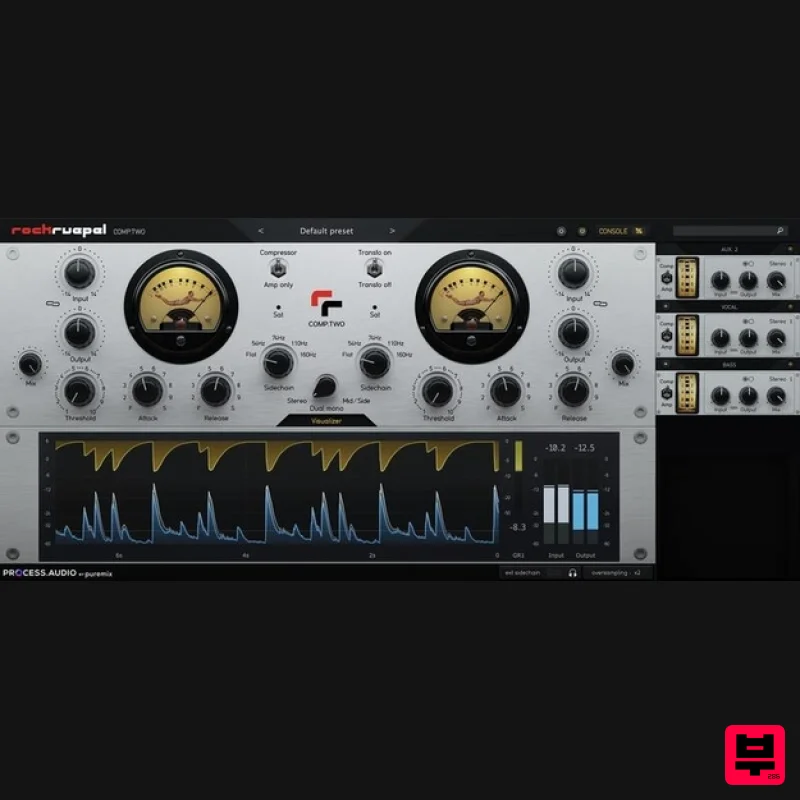
- .iframe-container{ position: relative; width: 100%; padding-bottom: 56.25%; height: 0; } .iframe-container iframe{ position: absolute; top:0; left: 0; width: 100%; height: 100%; } Modern Tube Compressor <iframe allow="accelerometer; autoplay; clipboard-write; encrypted-media; gyroscope; picture-in-picture; web-share" allowfullscreen="" frameborder="0" height="315" src="https://www.youtube.com/embed/wYuhSKeltyo?si=1MqczknBt5VCckk9" title="YouTube video player" width="560"></iframe> Vari-MU = Vari-Glue The COMP.TWO plugin is a faithful emulation of the German-built hardware compressor by Rockruepel (Rock-bully in English). It is an all-tube vari-mu design
- meaning there are no transistor stages in the circuit. Ideal for adding glue to your mix. The Rockruepel History Oliver Gregor
- soldering iron in hand
- has been building all sorts of machines since kindergarten. It is during his tenure as a tech at Skyline Studios in Düsseldorf that his love for music and electrical engineering merged into a relentless quest for creating the best audio equipment. Oliver's focus on tube circuitry led him to explore how to elevate vari-mu compressor designs to meet the needs of the modern workflow and 21st-century sonics. He quickly realized that to be the most useful
- a modern tube compressor had to be faster
- have higher headroom
- and have a more extensive feature set than what was available. The COMP.TWO is the logical evolution of COMP ONE and the culmination of 20 years of research
- development
- testing
- and incorporation of user feedback. Amp Only & Transformers The appeal of a compressor is as much the inherent sound of the unit as its ability to compress material. Using the same type of output tubes as the old Altec and RS124 compressors and with beautifully sounding Sowter transformers in the output stage
- the COMP.TWO is also a great vibe box
- with or without compression. When PROCESS AUDIO's owner
- Fab Dupont
- first tried the original COMP ONE hardware years ago
- he immediately requested to be able to use the compressor just as a tone box. Rockruepel added the AMP ONLY feature
- and it's there on the COMP.TWO. One+Time=Two A compressor is only as useful as its side chain is and flexible. Through years of refinement Oliver made sure that COMP.TWO has none of the limitations of traditional monolithic vari-mu circuits and can be as clean or as dirty as you need
- as fast as an 1176 or as slow as a Fairchild
- all with the texture and tone of a classic tube compressor. Modern Controls The team at PROCESS.AUDIO captured and recreated every nuance of the hardware and added its signature set of controls
- like the Console Remote which lets you control all instances of the COMP.TWO plugin from a central interface
- MS capabilities
- high-pass filter on a sidechain
- DRY/WET control
- and of course
- lots of presets designed by world-class producers and mixers. Visualisation Compression can be tricky to perceive
- so PROCESS.AUDIO created a visually pleasing and easily readable gain reduction visualizer to aid in precise gain matching and provide a true understanding of the impact of the settings on the program material. That's in addition to faithfully recreating the two gorgeous VU meters of the hardware units. 100+ Professional Presets Presets made for drums
- guitar
- synth
- bass
- and even full mixes. Get that perfect sound instantly. Features Hardware emulation: Vari-mu compression emulated from the original unit Amp only mode: Bypass the compression circuit and only hear the tubes and transformers vides Clean Amp: Bypass the hardware transformers and have a more clean signal Single or dual mono detection signal depending on the chosen mode Mid/Side processing Separated Dry/Wet knobs for both channels In/Out link to keep the feeling of a constant volume Remotre control: Remote console to see and control all your COMP.TWO instances Visualizer: Visualizer section to monitor levels and compression amount Presets: 80+ factory presets Oversampling: Oversampling option from None to x16 System Requirements Mac macOS 10.13 - macOS 12 Monterey (Apple Silicon Compatible) Apple Silicon or Intel Core i5 @ 1.7 – 2.2 GHz or better CPU speed AU
- VST and Standalone formats Decibel uses OpenGL GPU acceleration and requires a modern Nvidia or ATI Radeon graphics card - Older cards not optimized for OpenGL will overload your CPU iLok account for authorisation - iLok Cloud or Physical (iLok 2+) Windows Windows 8.1 - Windows 10 (64-bit only) Intel Core i5 @ 1.7 – 2.2 GHz or better CPU speed AAX
- and Standalone formats Decibel uses OpenGL GPU acceleration and requires a modern Nvidia or ATI Radeon graphics card - Older cards not optimized for OpenGL will overload your CPU iLok account for authorisation - iLok Cloud or Physical (iLok 2+) Please Note: Decibel used as an example. License Redemption 1. Copy your serial number link
- found within the serial number section of your Plugin Boutique User Account
- and paste it into your web browser or if you just have a serial number
- head to this LINK > Enter your details to create a new PROCESS.AUDIO account > Click 'REGISTER'. 2. Click 'GET YOUR PRODUCT(S)'. 3. This screen confirms which product you are attempting to redeem > Click 'GET YOUR PRODUCT(S)'. 4. This screen confirms that the code has been successfully redeemed to your account > Click 'REDEEM YOUR PLUG-IN LICENSE(S)'. 5. Locate the account activation email from your inbox > Click 'ACTIVATE YOUR ACCOUNT'. 6. Navigate back to your PROCESS.AUDIO My Licenses page. 7. Click 'REDEEM LICENSE'. 8. Enter your iLok Account ID > Click 'REDEEM LICENSE'. 9. This page confirms that you have successfully redeemed your license to your iLok account > Click 'CLOSE'. 10. Launch your iLok License Manager and log in > Navigate to the 'Available' tab > Locate your new license > Drag the license to your iLok Cloud Session (Or physical iLok2+) on the left-hand menu. 11. This screen confirms a successful activation of the license > Click 'OK'. 12. Navigate back to your PROCESS.AUDIO My Licenses page > Click 'DOWNLOAD PLUGIN'. 13. Select the appropriate format for your system to download the installer. Mac Installation 1. Launch the installer 'Decibel_X_X_X_macos.pkg'. 2. Click 'Continue'. 3. Click 'Continue'. 4. Click 'Agree'. 5. Click 'Continue'. 6. Confirm which plugin formats you wish to install > Click 'Continue'. 7. Click 'Install'. 8. Enter your system password > Click 'Install Software'. 9. Click 'Close'. 10. Launch your DAW > Insert Decibel on a new Audio Track. Your software is now installed and ready to use. Windows Installation 1. Launch the installer 'Decibel_X_X_X_win.exe'. 2. Click 'Next'. 3. Click 'I accept the agreement' > Click 'Next'. 4. Confirm which plugin formats you wish to install > Click 'Next'. 5. Click 'Next'. 6. Click 'Install'. 7. Click 'Finish'. 8. Launch your DAW > Insert Decibel on a new Audio Track. Your software is now installed and ready to use.
Additional Information
About the PROCESS.AUDIO COMP.TWO
The PROCESS.AUDIO COMP.TWO represents excellent craftsmanship in the Compressor category.
Why Choose the PROCESS.AUDIO COMP.TWO?
- •Authentic PROCESS.AUDIO craftsmanship and design
- •Versatile sound suitable for multiple musical genres
- •Professional build quality and reliable performance
- •Part of PROCESS.AUDIO's respected Compressor lineup
Compare & Explore
Browse our complete selection of PROCESS.AUDIO instruments or explore other Compressor options. Use our comparison tools to find the perfect match for your musical style and budget.
Similar Products

Soundspear Supertube
Compressor

DDMF Comprezzore
Compressor

Korneff Audio Pawn Shop Comp
Compressor

MeldaProduction MEssentialsFXBundle
Compressor

W. A. Production BIGGIFIER
Compressor

PSP Audioware PSP Vintage Warmer 2
Compressor

Initial Audio IA-LA1
Compressor

DDMF LinComp
Compressor

