
NUGEN Audio SigMod
Professional music gear - detailed information and where to buy
NUGEN Audio
SigMod
Product Info
* Prices may vary. Check retailer for current pricing and availability.
Product Description
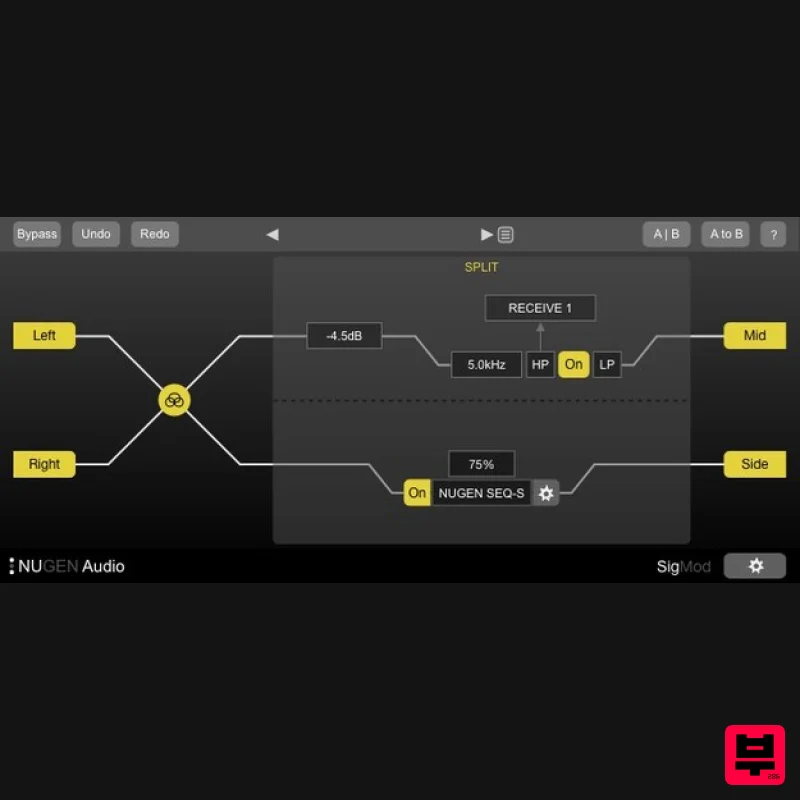
- Power Up Your Plugins Custom Signal Architecture Instantly enhance the functionality of your plug-ins and DAW with twelve different signal modification units. Explore new creative possibilities and quickly add missing features. Each module can easily be inserted
- swapped and moved around making new options to correct
- convert or tweak your audio. Full List of Modules Combine these twelve single-process modules in any order to design the precise routing you require. Auto-resizing keeps the signal flow and functionality clear at all times. Mid/side Protect Tap Crossover Insert Mute/solo Trim Switch DC offset Mono Phase Delay Use Stereo Plugins in Mid / Side Mode Add mid/side functionality to classic stereo compressor and EQ emulations
- or get creative with mid/side delays
- distortion and many other effects by inserting the mid/side encoder/decoder on either side of any left/right plugin instance. Protect Speakers
- Ears & Sanity Insert the Protect unit across your output bus and this safety module will automatically cut in to prevent bursts of noise or feedback howls due to system errors
- saving both your nerves and your speakers. Manual or auto-reset options give you the level of protection you need - a real gift when working with headphones! Tap and Crossover Want to try some parallel processing? Drop in the Tap module and you are good to go. Use the Crossover module to split the highs from the lows and apply different effects to different frequency ranges - great for avoiding muddying up the low frequencies or getting creative with automation and sweep effects. Host any VST2
- VST3 or AU Plugin Anywhere within your Signal Chain Enhance the functionality of your plug-ins and enable multiple new applications. A dual-mono option allows for independent processing of two parallel channels
- turbo-charging your existing plug-in collection with new creative possibilities. For your DAW Several of SigMod's modules offer easy access to functionality which is either missing from certain DAWs
- or at least awkward to access. Mute/solo or Trim the left and right sides of a stereo signal independently
- or easily flip the stereo image in one click with the Switch module. Quickly detect and correct DC offset to retain valuable headroom. How does your mix sound in mono? Think about how many listeners will be using a phone or a DAB radio with one speaker - the Mono module switches your signal from stereo to mono in one click. You can also check the Phase relationship between your left and right channels
- and use the simple Delay module to fix any syncing issues. Your Imagination is the Limit With SigMod's creative signal routing - particularly the Mid/side
- Crossover and Insert modules - the possibilities are virtually endless
- not to mention easy and tweakable. Ever wondered how your go-to tape emulator would sound in mid/side mode? Splitting your vocals into 6 different frequency bands and sending them each to a different compressor? Even just using your old plug-ins in a DAW which doesn't support VSTs or AUs? Expand your System Master & Channel Strip Features Signal Monitoring & Routing Options Mid / Side Conversion Output Level Protection Frequency Banded Splits 1000's of Possibilities... System Requirements Mac macOS 10.9 and later (64-bit only) 512 MB RAM AAX
- VST3
- AudioSuite Windows Windows XP and later (64-bit only) 512 MB RAM AAX
- VST3
- AudioSuite Awards NUGEN Audio Installation 1. Visit https: //www.nugenaudio.com/register.php and create a new account > enter your email address and License Code (found in your Plugin Boutique User Account). 2. Check your email > Click the link that reads ‘Complete license registration’. 3. Read the following information and click ‘My Account’. 4. Create a password > Click ‘Login’. 5. Once you have confirmed your account
- fill in the form which greets you. 6. Select your operating system. 7. Your licence can be viewed under the ‘My Licenses’ Tab. Note: If you wish to activate your Plugin using an iLok
- click ‘Convert To iLok’. 8. Click on the MY DOWNLOADS tab and download the full version of your plugin. 9. After the file has downloaded
- run the installer. 10. Read the software licence agreement and if happy
- click AGREE. 11. Select where you wish to install the plugin and click CONTINUE. 12. Select which component you wish to be installed and click CONTINUE. 13. Check you have enough space on your computer to install and if so
- click INSTALL. 14. Once the installation concludes
- open the plugin within your DAW. 15. Once the plugin is open within your DAW
- click USE LICENCE. 16. Click ON-LINE 17. Enter your licence code and click APPLY LICENCE. 18. Once your licence has been entered
- click YES to confirm you wish to licence to your machine. 19. You have now successfully licenced your plugin! PLEASE NOTE: If you wish to activate your licence onto your iLok dongle and not your machine
- please click CONVERT TO ILOK at stage 7.
Additional Information
About the NUGEN Audio SigMod
Experience the quality and tone that makes the NUGEN Audio SigMod a popular choice for musicians.
Why Choose the NUGEN Audio SigMod?
- •Authentic NUGEN Audio craftsmanship and design
- •Versatile sound suitable for multiple musical genres
- •Professional build quality and reliable performance
- •Part of NUGEN Audio's respected Utility lineup
Compare & Explore
Browse our complete selection of NUGEN Audio instruments or explore other Utility options. Use our comparison tools to find the perfect match for your musical style and budget.
Similar Products

Blue Cat Audio Blue Cat's Connector
Utility
$30
The Virtual Cable For Your Virtual Studio Blue Cat’s Connector is an audio & MIDI streaming plug-in that can be used...

Audible Genius Building Blocks 2
Utility
$30
Music Theory & Composition Training Software for DAW-Based Music Makers Drum Patterns, Basslines, Chord Progressions,...

Soundspear Luxor
Utility
$30
Luxor is the key if you want an instrument to stand out and spread in the mix. It will scoop your high frequencies to...

Tonalic Tonalic Arranger - 30 Day Subscription
Utility
$30
Real Musicians. Real Feel. Adaptive Performance Instrument for Your DAW Bring authentic, human musicianship into your...

Inphonik RX950
Utility
$30
Legendary Grit and Crunch Meet the RX950 Classic AD/DA Converter, Inphonik’s first effect plug-in, designed to...

DDMF TheStrip
Utility
$30
What is it? The Strip is the essential channel strip: the finest EQ, gate and compressor bundled in one beautifully...

Acoustica Spin It Again
Utility
$30
Spin It Again is the easiest way to convert your LPs and cassettes to CD and MP3. Remember all those ‘oldies but...

Audible Genius Building Blocks 1
Utility
$30
Music Theory & Composition Training Software for DAW-Based Music Makers Drum Patterns, Basslines, Chord Progressions,...
Frequently Asked Questions
The NUGEN Audio SigMod stands out for its exceptional NUGEN Audio craftsmanship and innovative design.
Yes! With its affordable price point and quality construction, it's perfect for learning utility.
Browse the similar products section to see how it stacks up against other utility.

