
Newfangled Audio Generate
Professional music gear - detailed information and where to buy
Newfangled Audio
Generate
Product Info
* Prices may vary. Check retailer for current pricing and availability.
Product Description
- Marquee Polysynth with Eight Chaotic Oscillators Unleash Chaos Take Chaos to the next level with Generate. Developed by Newfangled Audio
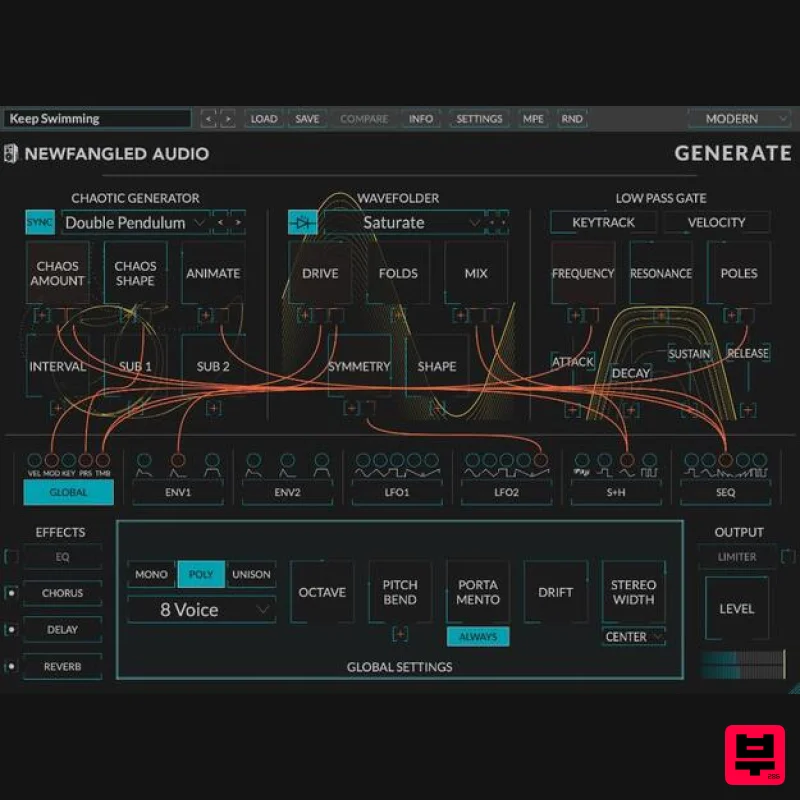
- Generate is a marquee polysynth combining five revolutionary chaotic oscillators with all the features you’d expect in a first-class synthesizer. Create beautifully complex pads
- warm moving keys
- jittery sequenced basses
- out-of-control leads
- and 'oh my God' textures. Features Wavefolder based on a bent model of the Buchla 259 Algorithm Modulatable effects allow the synth to modulate up to 13 effects parameters Step Sequencer with randomization and a pulse width output Novel chaotic oscillator has 8 types: Double Pendulum
- Vortex
- Pulsar
- Discharge
- Turbine
- Helix
- Crescent
- and Magma 5 Wavefolders based on the Buchla 259 Complex Waveform Generator
- Fractals
- a special Animated Equation
- and our own Saturate algorithm Low Pass Gate based on the Buchla 292 adds controls for POLES and RESONANCE Modulate all controls with MIDI/MPE
- two Looping Envelopes
- two LFOs
- Sample and Hold/Random
- and a Step Sequencer Innovative modulation UI allows modulation over almost every control from the main page
- allowing up to 1440 modulation routings in a single pane Innovative EQ
- Chorus
- Delay
- Reverb
- and Limiter effects to turn the sounds into magic MPE support allows amazing control from expressive controllers All mod sources have multiple outputs generated at once
- and they can modulate each other
- just like a modular synth Animations! The Double Pendulum
- Wavefolder
- and Low Pass Gate modules each have animations to show how each module responds to your input
- and to modulation Color Schemes! Don’t like the look of it
- change it Resizable UI Over 900 Presets
- including many from renowned artists Create the Chaos Generate is based on a set of chaotic generators. What initially looks like randomness contains underlying patterns
- interconnectedness
- constant feedback loops
- repetition
- self-similarity
- fractals
- and self-organization. Each of Generate’s 8 chaotic generators brings out these underlying patterns and creates an oscillator that can fade from a sine wave to total chaos
- with an expanse of territory to explore in between. The musical textures created include distortion
- harmonics
- grunge
- static
- and noise - All of which can be predictably or unpredictably modulated. Control the Chaos Generate's chaotic generators are routed through your choice of a Buchla wave folder
- or novel Animated or Fractal wave folders
- each adding unique overtones. Followed by a low pass gate inspired by the ideas of Don Buchla. These modules combine to create a versatile and musical voice with its own unique flavour. Modulate the Chaos Every parameter in Generate’s voice can be modulated by a combination of two Envelope Generators
- two LFOs
- a Sample and Hold/Random generator
- an 8 Step Sequencer
- and MIDI and MPE sources. The innovative modulation interface allows you to easily and quickly patch any combination of sources to any destination
- creating sounds that move
- and which move you. Effect the Chaos Generate's voice is followed by an unparalleled EQ
- Chorus
- Delay
- Reverb
- and Limiter
- all to launch your chaotic sounds into outer space or right into your listener's faces. Over 450 Presets Including Artists: Chris Tabron (Beyoncé
- The Strokes
- Die Antwoord) Count (Radiohead
- Tycho
- DJ Shadow
- Zoe Keating) Chris Carter (Throbbing Gristle
- Chris and Cosey) Matt Lange (deadmau5
- Mau5trap
- Ajunabeats) Adam Schatz (Landlady) Anthony Baldino (Interstellar
- Ex-Machina
- Avengers: Infinity War) Laurie Spiegel (Composer
- The Hunger Games
- has music in space!) Jacob Shea (Planet Earth
- Inception
- Battleship) Matthew Simms (Wire
- It Hugs Back) Sebastian Arocha Morton (ROCASound
- Iron Man 2) Jacob Bergson (Nerve
- Rubblebucket
- taut) Matthew Wang (Zooey’s Extraordinary Playlist
- Centigrade) So Wylie (Gimlet
- Mogul
- The Habitat) Kasson Crooker (Symbion Project
- FreQuency
- Amplitude) System Requirements Mac macOS 10.9 and later (64-bit only) (macOS 12 Monterey and M1 Apple Silicon supported) AAX
- VST2
- VST3 (64-bit) Please Note: AAX format is only compatible with Intel Macs (until Avid adds native M1 Apple Silicon support). Windows Windows 8 and later (64-bit only) (Windows 11 supported) AAX
- VST2
- VST3 (64-bit) Important Notes: Eventide tests their desktop plugins in Ableton Live
- Cubase
- FL Studio
- Logic Pro
- Pro Tools
- and Studio One (However
- their plugins should work with any compatible host.) No iLok dongle is required to run this software - only a FREE iLok account/Manager is required for authorisation. Justin Meldal-Johnsen "It's absolutely captivating. Well done. Wow." Theodore Shapiro "Generate has an animal quality that sets it apart from other synths. It's chaotic and alive
- surprising and beautiful." Blue Stahli "You had me at "chaotic". This is going to be a secret weapon for synth-based score composers" Please note: Blackhole is used as an example. Registration 1. Create an iLok account by following the steps from our help centre article - Getting Started with the iLok License Manager. If you already have an iLok account
- skip this step. 2. Go to https: //www.eventideaudio.com/login > Click 'Create Account' at the bottom of the page. 3. Enter your details (including your iLok Account User ID) > Click 'Register'. 4. You will now be redirected to your My Account page. 5. In the bottom right corner of the page
- enter the license key (format 1234-1234-1234) found in your Plugin Boutique account
- as well as your iLok Account User ID > Click 'Register'. Please note: a Serial Number is now not required Please note: Make sure there are no spaces at the beginning or after your license key. 6. Your software is now registered. 7. Launch the iLok License Manager application > Sign into your account. 8. Enter your iLok user ID and password > Click 'Sign in'. 9. Your license should now be listed within your iLok account. 10. Double-click on the license to bring up additional options > Click 'Activate' (located on the right of the screen). 11. Select where you wish the license to be activated > Click 'Activate'. 12. Click 'OK'. 13. Click 'OK'. Mac Installation 1. Download the Mac installer from https://www.eventideaudio.com/downloads/ > Run the installation > Click 'Next'. 2. Click to accept the license agreement > Click 'Next'. 3. Choose which plugin formats you'd like to install > Click 'Next'. Please note: If you're unsure
- leave all options selected or check out our help centre article Plugin Formats Explained for more information. 4. Select the destination folders (or leave them as the defaults) > Click 'Next'. 5. Click 'Next'. 6. Click 'Finish'. Your new software is now fully activated and ready to use within your DAW! Windows Installation 1. Download the Windows installer from https: //www.eventideaudio.com/downloads/ > Run the installation > Click 'Next'. 2. Read the License Agreement > Select 'I accept the agreement > Click 'Next'. 3. Choose which plugin formats you'd like to install > Click 'Next'. If you're unsure
- leave all options selected or check out our help centre article Plugin Formats Explained for more information. 4. Select the destination folders (or leave them as the defaults) > Click 'Next'. 5. Click 'Next'. 6. Click 'Finish'. Your new software is now fully activated and ready to use within your DAW!
Additional Information
About the Newfangled Audio Generate
Experience the quality and tone that makes the Newfangled Audio Generate a popular choice for musicians.
Why Choose the Newfangled Audio Generate?
- •Authentic Newfangled Audio craftsmanship and design
- •Versatile sound suitable for multiple musical genres
- •Professional build quality and reliable performance
- •Part of Newfangled Audio's respected Synth lineup
Compare & Explore
Browse our complete selection of Newfangled Audio instruments or explore other Synth options. Use our comparison tools to find the perfect match for your musical style and budget.
Similar Products

discoDSP Discovery
Synth
$30
Discovery is a virtual analog Nord Lead 2 inspired synthesizer featuring multi-layering, a morphing engine, high...

discoDSP Discovery Pro
Synth
$30
discoDSP’s Discovery was one of the company’s first and finest efforts. Heavily inspired by Clavia’s Nord Lead...

discoDSP OPL
Synth
$30
The OPL is a digital sound synthesis chip developed by Yamaha in the mid 1980s. Among other products, it was used in...

Thenatan Audio Poizen VST
Synth
$30
Thenatan and Global Audio Tools have teamed up again to bring music makers across the globe a jam packed powerful tool...

Reflekt Audio Xonex
Synth
$30
Xonex is a futuristic plugin that we have used time and time again to make a variety of beats. Xonex has offered me a...

ThaLoops Templetone
Synth
$30
The Ultimate Hip-Hop Production Plugin – Featuring a Vast Collection of Hip-Hop Sounds. Choose between wild drums,...

discoDSP OB-Xd
Synth
$30
OB-Xd is based on the Oberheim OB-X. It attempts to recreate its sound and behavior, but as the original was very...

AngelicVibes ELITE PIANIST
Synth
$30
Your next go-to virtual instrument. Real piano recordings with unique sound and effects 50 high-quality presets for...
Frequently Asked Questions
The Newfangled Audio Generate stands out for its exceptional Newfangled Audio craftsmanship and innovative design.
Yes! With its affordable price point and quality construction, it's perfect for learning synth.
Browse the similar products section to see how it stacks up against other synth.

