
Native Instruments Session Guitarist
Professional music gear - detailed information and where to buy
Native Instruments
Session Guitarist - Picked Nylon
Product Info
* Prices may vary. Check retailer for current pricing and availability.
Product Description
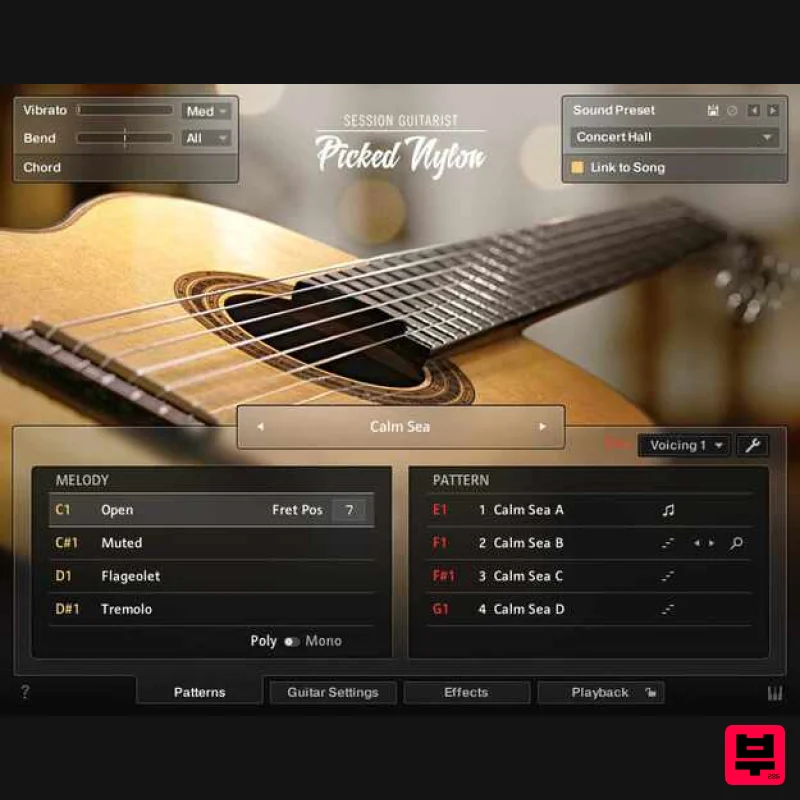
- A handcrafted original Picked Nylon captures a one-of-a-kind
- nylon-stringed guitar
- in an intuitively playable production tool. The instrument’s clean and mellow timbres are perfect for a range of genres
- from classical to electronica
- as well as distinctive styles like bossa nova and flamenco. Whether you’re producing film scores or pop tracks
- the powerful effects and performance controls give you everything you need for your perfect sound. Features Access the unique sound of a handcrafted nylon-stringed guitar
- captured in finest detail Create your own melodies
- or choose from 201 picked and strummed patterns
- recorded by a session pro Intuitive controls include multiple microphone positionings and pro-grade studio effects Now with MIDI drag and drop
- updated riff and phrase modes
- and next-gen NKS support Free KONTAKT PLAYER version 6.6 and higher
- or KONTAKT version 6.6 and higher required. Note: Massive is used as an example. Windows 1. Download the .zip installer file from your Plugin Boutique User Account. 2. Double-click the extracted .exe file to begin the installation process > click ‘Run’. 3. Read the welcome message > click 'Next'. 4. Click 'Next' to begin the installation. 5. Native Access has now been installed > Click 'Finish'. 6. Open Native Access > Create a new Native ID if you do not have one already. If you do
- skip ahead to step 8. 7. You will then receive an email with a confirmation link > Open the email and click 'CONFIRM EMAIL'. 8. Log in to Native Access with your Native ID. 9. Click 'Add a serial'. 10. Enter your Serial Number found in your Plugin Boutique User Account > Click 'ADD SERIAL'. 11. Once your serial has been registered
- click 'VIEW PRODUCTS NOT INSTALLED'. 12. Click the 'Not installed' tab > Locate Massive > Click 'INSTALL'. Your software is now activated and ready for use within your DAW. Mac 1. Download the .dmg installer file from your Plugin Boutique User Account. 2. Double-click the .dmg file to install Native Access. 3. Open Native Acces > Create a new Native ID if you do not have one already. If you do
- skip ahead to step 5. 4. You will then receive an email with a confirmation link > Open the email and click 'CONFIRM EMAIL'. 5. Log in to Native Access with your Native ID. 6. Click 'Add a serial' 7. Enter your Serial Number found in your Plugin Boutique User Account > Click 'ADD SERIAL'. 8. Click the 'Not installed' tab > Locate Massive > Click 'INSTALL'. Your software is now activated and ready for use within your DAW.
Additional Information
About the Native Instruments Session Guitarist - Picked Nylon
The Native Instruments Session Guitarist - Picked Nylon represents excellent craftsmanship in the Kontakt Instrument category.
Why Choose the Native Instruments Session Guitarist - Picked Nylon?
- •Authentic Native Instruments craftsmanship and design
- •Versatile sound suitable for multiple musical genres
- •Professional build quality and reliable performance
- •Part of Native Instruments's respected Kontakt Instrument lineup
Compare & Explore
Browse our complete selection of Native Instruments instruments or explore other Kontakt Instrument options. Use our comparison tools to find the perfect match for your musical style and budget.
Similar Products

Audiofier Aerkord
Kontakt Instrument

Rigid Audio Retrocade
Kontakt Instrument

DoubleBang Software Plugged
Kontakt Instrument

HD Instruments ZoneMatrix
Kontakt Instrument

Ecliptiq Audio Hexa Rhythm Designer
Kontakt Instrument

Aria Sounds Hybrichord
Kontakt Instrument

The Beat House LE HITS THE ESSENTIALS
Kontakt Instrument

Audiofier Sequi2r EX
Kontakt Instrument

