
Native Instruments Schema Light
Professional music gear - detailed information and where to buy
Native Instruments
Schema Light
Product Info
* Prices may vary. Check retailer for current pricing and availability.
Product Description
- Melodic Sequencer Plugin Lush
- Shapeable Layers Schema: Light gives you an endless source of new ideas
- packing a kaleidoscopic collection of soft
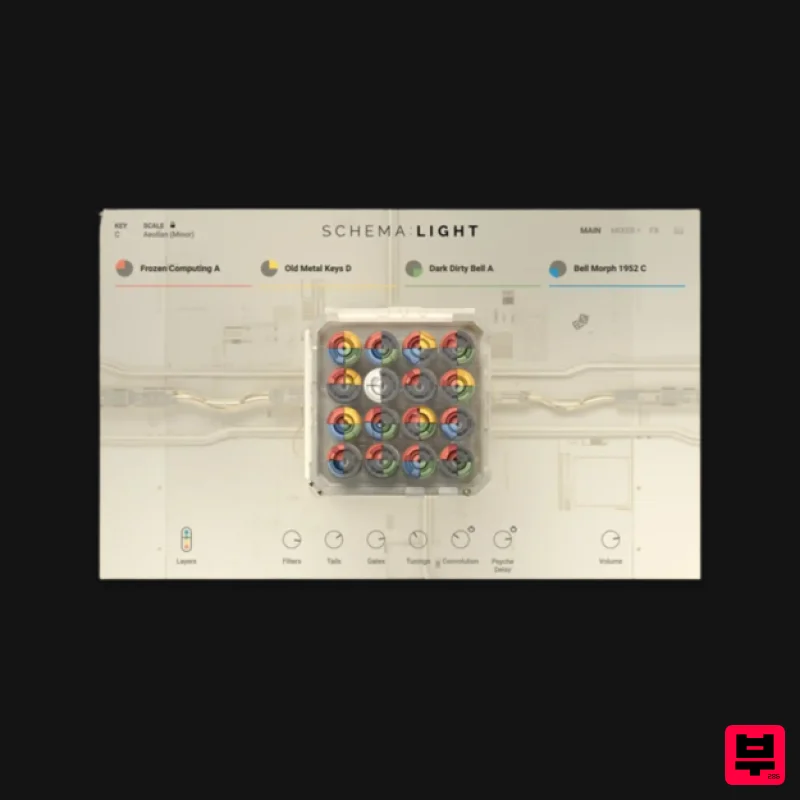
- layerable upper-range loops within an intuitive step sequencer plugin. Quickly generate evolving patterns and make them your own with a suite of effects and controls. Delve into delicate sounds that have been enriched and fine-tuned
- ideal for atmospheric film scores
- electronic soundscapes
- and hypnotic hip hop beats. The Schema Engine Schema: Light revolves around a unique 16-step sequencer. Begin with four tempo-synced loops
- each spanning two bars
- then toggle up to 16 steps for each layer to create distinctive melodic patterns. Add expression using the mod wheel and explore advanced scaling possibilities with the enhanced engine. Whether you’re seeking rapid results or hands-on sculpting
- Schema: Light offers an intuitive interface for any workflow. Instant Inspiration Discover a curated collection of 200 carefully designed presets
- each featuring four loops that can be shaped with various playback modes
- envelopes
- effects
- and more. From gentle plucks and bells to dreamy keys
- each of Schema: Light’s multi-sampled sound sources can be quickly swapped and previewed
- inviting happy accidents and seamless experimentation. Four Layers
- Endless Options Each sound source offers four different variations. Version A is the original
- flawlessly captured and enhanced with high-end outboard gear
- while versions B
- and D elevate the sounds further
- infusing an array of stompboxes
- modular systems
- tape machines
- advanced granular techniques
- and more. Freely mute and solo each layer
- or roll the dice to randomize loops
- the 16 individual slices
- or even the sequencer pattern itself. Shape Sounds Your Way Journey deep into sound design
- tailoring each of the 16 steps further by adjusting filters
- decay
- volume
- and pitch. Experiment with polyrhythms by altering the lengths of looping patterns
- and add character with a choice of six studio-grade effects assignable across two individual send slots. About The Creator Schema: Light was created in collaboration with pro sound and instrument designer Tobias Menguser. Since starting in the early 90s
- he has created sounds and instruments for many of the industry’s biggest names
- including providing sounds for an extensive catalog of almost 500 movie trailers. Features A unique sequencing engine for weaving captivating melodic patterns and textures Explore and sculpt creatively processed bells
- keys
- plucked strings
- xylophones
- and more Craft immersive sequences using the four-layer engine System Requirements FREE Kontakt 7 Player or Kontakt 7 Version 7.5 or higher is required to use this instrument Download size: 57 GB Note: Massive is used as an example. Windows 1. Download the .zip installer file from your Plugin Boutique User Account. 2. Double-click the extracted .exe file to begin the installation process > click ‘Run’. 3. Read the welcome message > click 'Next'. 4. Click 'Next' to begin the installation. 5. Native Access has now been installed > Click 'Finish'. 6. Open Native Access > Create a new Native ID if you do not have one already. If you do
- skip ahead to step 8. 7. You will then receive an email with a confirmation link > Open the email and click 'CONFIRM EMAIL'. 8. Log in to Native Access with your Native ID. 9. Click 'Add a serial'. 10. Enter your Serial Number found in your Plugin Boutique User Account > Click 'ADD SERIAL'. 11. Once your serial has been registered
- click 'VIEW PRODUCTS NOT INSTALLED'. 12. Click the 'Not installed' tab > Locate Massive > Click 'INSTALL'. Your software is now activated and ready for use within your DAW. Mac 1. Download the .dmg installer file from your Plugin Boutique User Account. 2. Double-click the .dmg file to install Native Access. 3. Open Native Acces > Create a new Native ID if you do not have one already. If you do
- skip ahead to step 5. 4. You will then receive an email with a confirmation link > Open the email and click 'CONFIRM EMAIL'. 5. Log in to Native Access with your Native ID. 6. Click 'Add a serial' 7. Enter your Serial Number found in your Plugin Boutique User Account > Click 'ADD SERIAL'. 8. Click the 'Not installed' tab > Locate Massive > Click 'INSTALL'. Your software is now activated and ready for use within your DAW.
Additional Information
About the Native Instruments Schema Light
Discover the distinctive sound and feel of the Native Instruments Schema Light, a standout choice among Kontakt Instrument.
Why Choose the Native Instruments Schema Light?
- •Authentic Native Instruments craftsmanship and design
- •Versatile sound suitable for multiple musical genres
- •Professional build quality and reliable performance
- •Part of Native Instruments's respected Kontakt Instrument lineup
Compare & Explore
Browse our complete selection of Native Instruments instruments or explore other Kontakt Instrument options. Use our comparison tools to find the perfect match for your musical style and budget.
Similar Products

Audiofier Aerkord
Kontakt Instrument

Audiofier Sequi2r EX
Kontakt Instrument

Aria Sounds Hybrichord
Kontakt Instrument

Ecliptiq Audio Hexa Rhythm Designer
Kontakt Instrument

The Beat House LE HITS THE ESSENTIALS
Kontakt Instrument

Rigid Audio Retrocade
Kontakt Instrument

DoubleBang Software Plugged
Kontakt Instrument

HD Instruments ZoneMatrix
Kontakt Instrument

