
Native Instruments Scene: Bloodplant
Professional music gear - detailed information and where to buy
Native Instruments
Scene: Bloodplant
Product Info
* Prices may vary. Check retailer for current pricing and availability.
Product Description
- Dystopian sci-fi textures A collection of distorted guitars
- futuristic synths
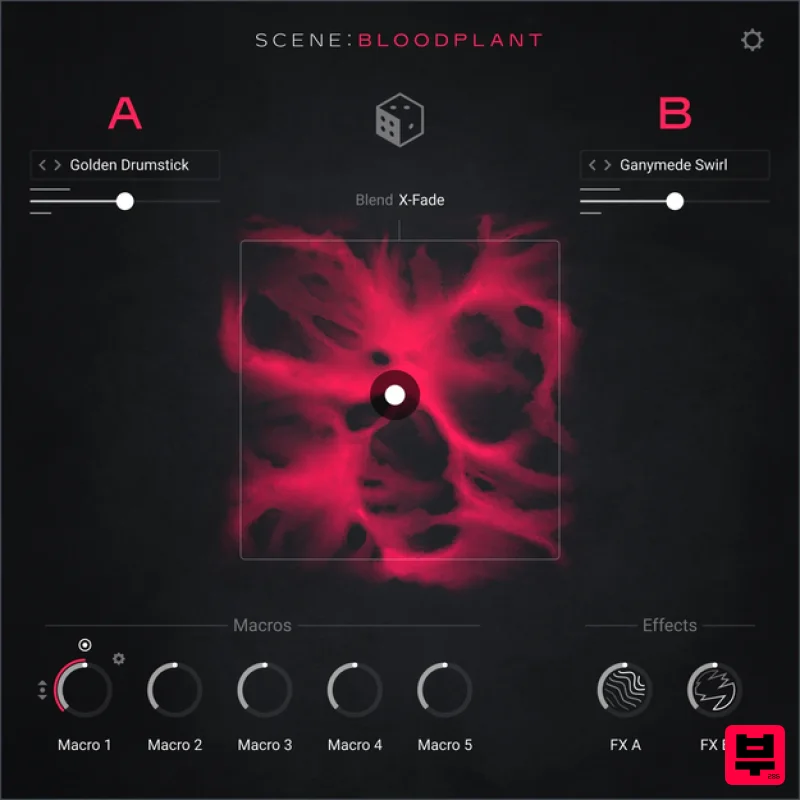
- and warped sounds Blend between 16 hybrid sound layers
- effects
- and controls Stay in key with an extensive selection of scales and modes Part of the Scene series – and streamlined instruments for premium
- cinematic sounds Post-apocalyptic soundscapes Enter a futuristic metropolis laid to waste. Scene: Bloodplant has all the ingredients you need to forge gritty
- industrial textures for dark
- dystopic science fiction soundtracks. Get started with 120 presets
- layer up sound sources
- and morph between textures and effects with the XY pad. Morph seamlessly between textures
- effects
- and sound layers with the XY pad. 16 Sounds Create expressive and evolving soundscapes by blending and layering 16 sound sources. FX Shape sounds with creative effects presets including reverbs
- delays
- and modulation. Aftertouch Experience hands-on control of parameters like volume
- tuning
- and motion with polyphonic aftertouch compatibility. About the Scene series Designed with media composers in mind
- the Scene series offers premium cinematic sounds in a simple and easy-to-use interface. Centered around an XY pad
- each instrument comes loaded with carefully-designed presets and streamlined controls
- enabling you to quickly blend
- layer
- and shape the perfect sound for on-screen moments. Free Kontakt Player version 8.7.1 and higher
- or Kontakt version 8.7.1 and higher. Mac macOS 13
- 14 or 15 (latest update) Intel Core i5/equivalent CPU or Apple Silicon 4 GB RAM (6 GB recommended) Supports Core Audio Graphics hardware support for Direct 3D 11.1 (Feature Level 11_0) or higher Windows Windows 10 or 11 (64-bit
- latest Service Pack) or Windows 11 (latest Service Pack) Intel Core i5 or equivalent CPU 4 GB RAM (6 GB recommended) Supports ASIO and WASAPI Graphics hardware support for Direct 3D 11.1 (Feature Level 11_0) or higher Note: Massive is used as an example. Windows 1. Download the .zip installer file from your Plugin Boutique User Account. 2. Double-click the extracted .exe file to begin the installation process > click ‘Run’. 3. Read the welcome message > click 'Next'. 4. Click 'Next' to begin the installation. 5. Native Access has now been installed > Click 'Finish'. 6. Open Native Access > Create a new Native ID if you do not have one already. If you do
- skip ahead to step 8. 7. You will then receive an email with a confirmation link > Open the email and click 'CONFIRM EMAIL'. 8. Log in to Native Access with your Native ID. 9. Click 'Add a serial'. 10. Enter your Serial Number found in your Plugin Boutique User Account > Click 'ADD SERIAL'. 11. Once your serial has been registered
- click 'VIEW PRODUCTS NOT INSTALLED'. 12. Click the 'Not installed' tab > Locate Massive > Click 'INSTALL'. For Super 8 installation
- please download and install the free Reaktor 6 Player available from this link - https: //www.native-instruments.com/en/products/komplete/synths/reaktor-6-player/free-download/ - once installed
- open Reaktor within your DAW and locate Super 8. Your software is now activated and ready for use within your DAW. Mac 1. Download the .dmg installer file from your Plugin Boutique User Account. 2. Double-click the .dmg file to install Native Access. 3. Open Native Acces > Create a new Native ID if you do not have one already. If you do
- skip ahead to step 5. 4. You will then receive an email with a confirmation link > Open the email and click 'CONFIRM EMAIL'. 5. Log in to Native Access with your Native ID. 6. Click 'Add a serial' 7. Enter your Serial Number found in your Plugin Boutique User Account > Click 'ADD SERIAL'. 8. Click the 'Not installed' tab > Locate Massive > Click 'INSTALL'. For Super 8 installation
- please download and install the free Reaktor 6 Player available from this link - https: //www.native-instruments.com/en/products/komplete/synths/reaktor-6-player/free-download/ - once installed
- open Reaktor within your DAW and locate Super 8. Your software is now activated and ready for use within your DAW.
Additional Information
About the Native Instruments Scene: Bloodplant
The Native Instruments Scene: Bloodplant combines traditional design with modern performance for Kontakt Instrument enthusiasts.
Why Choose the Native Instruments Scene: Bloodplant?
- •Authentic Native Instruments craftsmanship and design
- •Versatile sound suitable for multiple musical genres
- •Professional build quality and reliable performance
- •Part of Native Instruments's respected Kontakt Instrument lineup
Compare & Explore
Browse our complete selection of Native Instruments instruments or explore other Kontakt Instrument options. Use our comparison tools to find the perfect match for your musical style and budget.
Similar Products

Audiofier Aerkord
Kontakt Instrument

Rigid Audio Retrocade
Kontakt Instrument

Aria Sounds Hybrichord
Kontakt Instrument

HD Instruments ZoneMatrix
Kontakt Instrument

Ecliptiq Audio Hexa Rhythm Designer
Kontakt Instrument

DoubleBang Software Plugged
Kontakt Instrument

The Beat House LE HITS THE ESSENTIALS
Kontakt Instrument

Audiofier Sequi2r EX
Kontakt Instrument

