
Native Instruments Razor
Professional music gear - detailed information and where to buy
Native Instruments
Razor
Product Info
* Prices may vary. Check retailer for current pricing and availability.
Product Description
- The Cutting Edge Detailed
- dynamic additive synthesis – sharp as a RAZOR Extreme sonic flexibility and morphability for boundless sound design Easy-to-use subtractive controls and unique visual feedback Ultra-Sharp Synthesizer The groundbreaking additive synthesis powerhouse
- RAZOR delivers powerful sound and cutting edge sonic control. Innovative
- Additive At the vanguard of additive synthesis
- RAZOR delivers character like no other. Discover cutting edge sound design with unparalleled dynamics and a precise sound identity suited to tense basses
- bristling leads and shifting
- sci-fi soundscapes. Created by maverick Berlin producer Errorsmith in partnership with Native Instruments
- RAZOR’s approach to additive synthesis is pragmatic and musical – providing detailed control without sacrificing usability. So shake off the virtual analog dust – go additive and sharpen your studio cuts with RAZOR. RAZOR runs in the free REAKTOR PLAYER and REAKTOR. The Sound of Additive Synthesis In additive synthesis
- the sound is constructed from partials – single sine waves firing in parallel
- changing amplitude and even frequency over time. The resulting sound remains clear and precise at all times
- even when heavily modulated. RAZOR's additive engine consists of up to 320 partials. Everything you hear - the filters
- the stereo imaging
- even the reverbs and delays are created by manipulating these individual sine waves. This gives RAZOR an up-front
- high-resolution sound
- unmistakably different to other software synthesizers. Razor’s Edge Apart from outstanding sound quality
- the level of control in additive synthesis provides a host of new possibilities for shaping sound. Here are some examples of what’s possible in RAZOR: Creative filters – variable slopes and boosts Dissonance – from modulating single partials to compressing the whole sound Reverb per-partial – the reverb tail follows pitch Partial panning – pan parts of the frequency spectrum separately Complex formants - as filters and oscillators Echo steps – create evolving echoes Vocoder – an exceptional 34-band vocoder Designed for Musicians RAZOR’s interface draws on familiar concepts from ‘traditional’ synthesizers. You'll recognize the oscillators
- filter section
- and many other parameters
- but the options are new – the formant or the waterbed settings
- for example. This combination of new and familiar makes creating sounds surprisingly simple. RAZOR has been designed for musicians
- not scientists. The entire interface is compact and focused
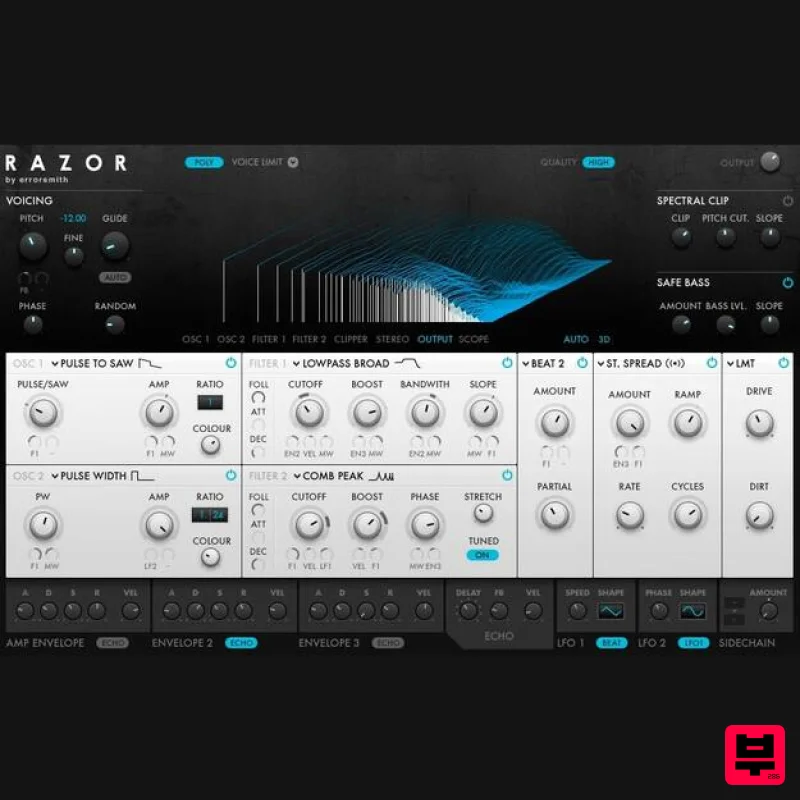
- with a straightforward internal modulation framework and a large graphical display. When you’re creating sounds
- this display provides helpful visual feedback and some beautiful 3D graphics. Macros for Performance A performance view provides eight macro controls
- pre-mapped to filters
- oscillators
- modulation
- and effects in each preset. Just map the macros in RAZOR to eight knobs on your controller. And when using RAZOR in MASCHINE
- these macros map automatically to the eight knobs on the controller – instant
- effortless hardware control. System Requirements Windows (64-bit only) Intel Core i5 or equivalent CPU
- 4 GB RAM Stand-alone
- AAX Windows 10 or 11 macOS (64-bit only) i5
- 4 GB RAM Stand-alone
- AAX macOS 11+ Important Note: The Free Reaktor 6 Player is required to use this product. An Internet connection and a graphics card that supports OpenGL 2.1 or higher are required to download and activate this product. Once installed and activated
- the product can be used offline. Note: Form is used as an example. Windows 1. Download the .zip installer file from your Plugin Boutique User Account. 2. Double-click the extracted .exe file to begin the installation process > click ‘Run’. 3. Read the welcome message > click 'Next'. 4. Click 'Next' to begin the installation. 5. Native Access has now been installed > Click 'Finish'. 6. Open Native Access > Create a new Native ID if you do not have one already. If you do
- skip ahead to step 8. 7. You will then receive an email with a confirmation link > Open the email and click 'CONFIRM EMAIL'. 8. Log in to Native Access with your Native ID. 9. Click 'Add a serial'. 10. Enter your Serial Number found in your Plugin Boutique User Account > Click 'ADD SERIAL'. 11. Click the 'Not installed' tab > Locate Form > Click 'INSTALL'. 12. From the 'Not Installed' tab
- locate Reaktor 6 Player and click 'Install'. Your software is now activated and ready for use within your DAW. Mac 1. Download the .dmg installer file from your Plugin Boutique User Account. 2. Double-click the .dmg file to install Native Access. 3. Create a new Native ID if you do not have one already. If you do
- skip ahead to step 5. 4. You will then receive an email with a confirmation link > Open the email and click 'CONFIRM EMAIL'. 5. Log in with your Native ID. 6. Click 'Add a serial'. 7. Enter your Serial Number found in your Plugin Boutique User Account > Click 'ADD SERIAL'. 8. Click the 'Not installed' tab > Locate Form > Click 'INSTALL'. 9. From the 'Not Installed' tab
- locate Reaktor 6 Player and click 'Install'. Your software is now activated and ready for use within your DAW.
Additional Information
About the Native Instruments Razor
Discover the distinctive sound and feel of the Native Instruments Razor, a standout choice among Synth.
Why Choose the Native Instruments Razor?
- •Authentic Native Instruments craftsmanship and design
- •Versatile sound suitable for multiple musical genres
- •Professional build quality and reliable performance
- •Part of Native Instruments's respected Synth lineup
Compare & Explore
Browse our complete selection of Native Instruments instruments or explore other Synth options. Use our comparison tools to find the perfect match for your musical style and budget.
Similar Products

Thenatan Audio Poizen VST
Synth
$30
Thenatan and Global Audio Tools have teamed up again to bring music makers across the globe a jam packed powerful tool...

discoDSP Discovery Pro
Synth
$30
discoDSP’s Discovery was one of the company’s first and finest efforts. Heavily inspired by Clavia’s Nord Lead...

AngelicVibes ELITE PIANIST
Synth
$30
Your next go-to virtual instrument. Real piano recordings with unique sound and effects 50 high-quality presets for...

ThaLoops Templetone
Synth
$30
The Ultimate Hip-Hop Production Plugin – Featuring a Vast Collection of Hip-Hop Sounds. Choose between wild drums,...

discoDSP OPL
Synth
$30
The OPL is a digital sound synthesis chip developed by Yamaha in the mid 1980s. Among other products, it was used in...

discoDSP Discovery
Synth
$30
Discovery is a virtual analog Nord Lead 2 inspired synthesizer featuring multi-layering, a morphing engine, high...

Reflekt Audio Xonex
Synth
$30
Xonex is a futuristic plugin that we have used time and time again to make a variety of beats. Xonex has offered me a...

discoDSP OB-Xd
Synth
$30
OB-Xd is based on the Oberheim OB-X. It attempts to recreate its sound and behavior, but as the original was very...
Frequently Asked Questions
The Native Instruments Razor stands out for its exceptional Native Instruments craftsmanship and innovative design.
Yes! With its affordable price point and quality construction, it's perfect for learning synth.
Browse the similar products section to see how it stacks up against other synth.

