
Native Instruments Noire
Professional music gear - detailed information and where to buy
Native Instruments
Noire
Product Info
* Prices may vary. Check retailer for current pricing and availability.
Product Description
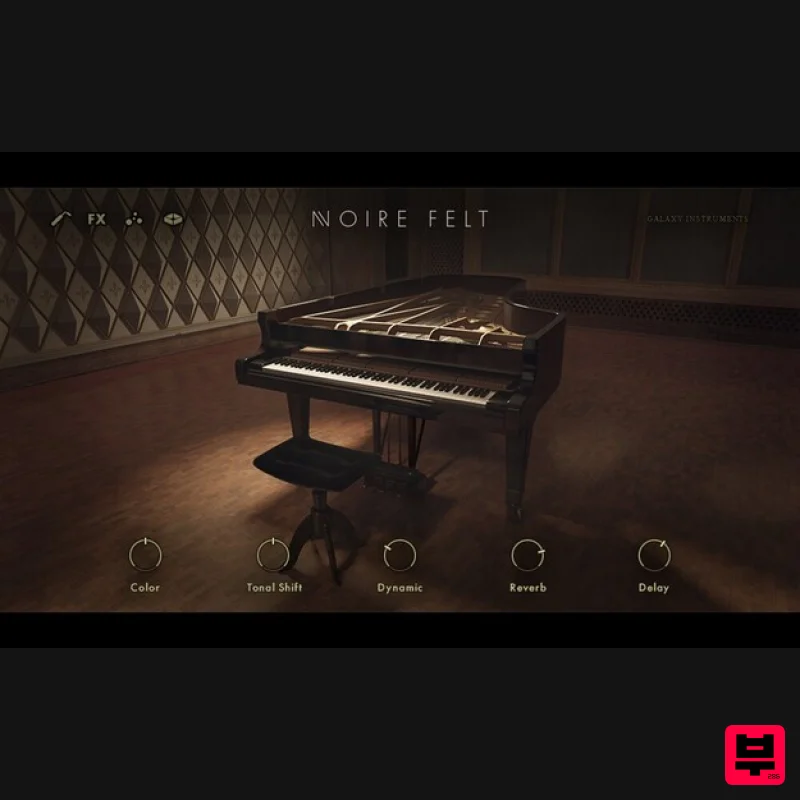
- Evocative Concert Grand Signature Sound Experience firsthand the signature grand piano sound of composer and pianist Nils Frahm. This is the sound of a unique concert grand – handpicked by the artist
- custom intonated
- and augmented with a felt damper. We’ve captured the piano in its native habitat – the ambient environment of Saal 3 in Berlin’s renowned
- Bauhaus-designed Funkhaus recording complex. The result is a unique
- intense
- and evocative instrument
- with an atmosphere all of its own. Pure and Felt What sound do you need for your next piece? You have two here to choose from. The pure version delivers a clear
- unadulterated grand piano tone. The felt version is completely distinct sample – the same grand piano
- but with a felt moderator between hammers and strings
- which creates a gentle tone with reduced attack. You can sculpt the sound of both by adjusting the attack
- release
- resonance
- overtones
- velocity curve
- temperament
- and more. What Is the Particles Engine? Looking to spark new ideas? Use the innovative particles engine to automatically generate clouds of pulsating
- swirling harmonic elements based on what you play. The particles engine instantly adds motion to your playing and pushes you to explore new possibilities. Creative Customization NOIRE isn’t about imitating a certain sound – it gives you inspiring raw material
- and plenty of creative options for making the sound your own. Integrate noises for realism
- choose from a range of sound design options
- dial in some sub bass
- and try your hand at creative tone shifting. Then fine-tune the piano’s place in the mix by applying EQ
- compression
- reverb
- and delay. Made for Komplete Kontrol NOIRE is designed for seamless integration with the KOMPLETE KONTROL keyboards. For the ultimate NOIRE experience
- try it out on the KOMPLETE KONTROL S88
- which offers fully weighted hammer-action keys. Created in Collaboration With Galaxy Instruments This handpicked
- custom-intonated Yamaha CFX 9’ grand piano was methodically (and lovingly) sampled by Uli Baronowsky and Galaxy Instruments. Using vintage microphones and preamps
- the team spent several weeks capturing the full dynamic and tonal range of this distinctive instrument in Saal 3 of the legendary Funkhaus Nalepastrasse
- Berlin – once the home of East German state radio. Features Nils Frahm’s concert grand
- meticulously sampled in a legendary space Pure
- felt-dampened
- and sound design versions
- with extensive customization options Innovative particles engine sparks ideas for solo compositions
- scoring
- and more System Requirements FREE Kontakt Player or Kontakt Version 6.0.4 or higher is required to use this instrument Download size: 16 GB Note: Massive is used as an example. Windows 1. Download the .zip installer file from your Plugin Boutique User Account. 2. Double-click the extracted .exe file to begin the installation process > click ‘Run’. 3. Read the welcome message > click 'Next'. 4. Click 'Next' to begin the installation. 5. Native Access has now been installed > Click 'Finish'. 6. Open Native Access > Create a new Native ID if you do not have one already. If you do
- skip ahead to step 8. 7. You will then receive an email with a confirmation link > Open the email and click 'CONFIRM EMAIL'. 8. Log in to Native Access with your Native ID. 9. Click 'Add a serial'. 10. Enter your Serial Number found in your Plugin Boutique User Account > Click 'ADD SERIAL'. 11. Once your serial has been registered
- click 'VIEW PRODUCTS NOT INSTALLED'. 12. Click the 'Not installed' tab > Locate Massive > Click 'INSTALL'. Your software is now activated and ready for use within your DAW. Mac 1. Download the .dmg installer file from your Plugin Boutique User Account. 2. Double-click the .dmg file to install Native Access. 3. Open Native Acces > Create a new Native ID if you do not have one already. If you do
- skip ahead to step 5. 4. You will then receive an email with a confirmation link > Open the email and click 'CONFIRM EMAIL'. 5. Log in to Native Access with your Native ID. 6. Click 'Add a serial' 7. Enter your Serial Number found in your Plugin Boutique User Account > Click 'ADD SERIAL'. 8. Click the 'Not installed' tab > Locate Massive > Click 'INSTALL'. Your software is now activated and ready for use within your DAW.
Additional Information
About the Native Instruments Noire
The Native Instruments Noire represents excellent craftsmanship in the Kontakt Instrument category.
Why Choose the Native Instruments Noire?
- •Authentic Native Instruments craftsmanship and design
- •Versatile sound suitable for multiple musical genres
- •Professional build quality and reliable performance
- •Part of Native Instruments's respected Kontakt Instrument lineup
Compare & Explore
Browse our complete selection of Native Instruments instruments or explore other Kontakt Instrument options. Use our comparison tools to find the perfect match for your musical style and budget.
Similar Products

Rigid Audio Retrocade
Kontakt Instrument

Audiofier Sequi2r EX
Kontakt Instrument

Audiofier Aerkord
Kontakt Instrument

DoubleBang Software Plugged
Kontakt Instrument

HD Instruments ZoneMatrix
Kontakt Instrument

Aria Sounds Hybrichord
Kontakt Instrument

The Beat House LE HITS THE ESSENTIALS
Kontakt Instrument

Ecliptiq Audio Hexa Rhythm Designer
Kontakt Instrument

