
Native Instruments Lores
Professional music gear - detailed information and where to buy
Native Instruments
Lores
Product Info
* Prices may vary. Check retailer for current pricing and availability.
Product Description
- Evolving Tones and Textures The Art of Sonic Storytelling Music is a story
- LORES is your narrator
- inviting listeners on a sonic trip around the world to hear your own unique tale. From traditional strings to eclectic instruments
- such as the hurdy-gurdy and shakuhachi
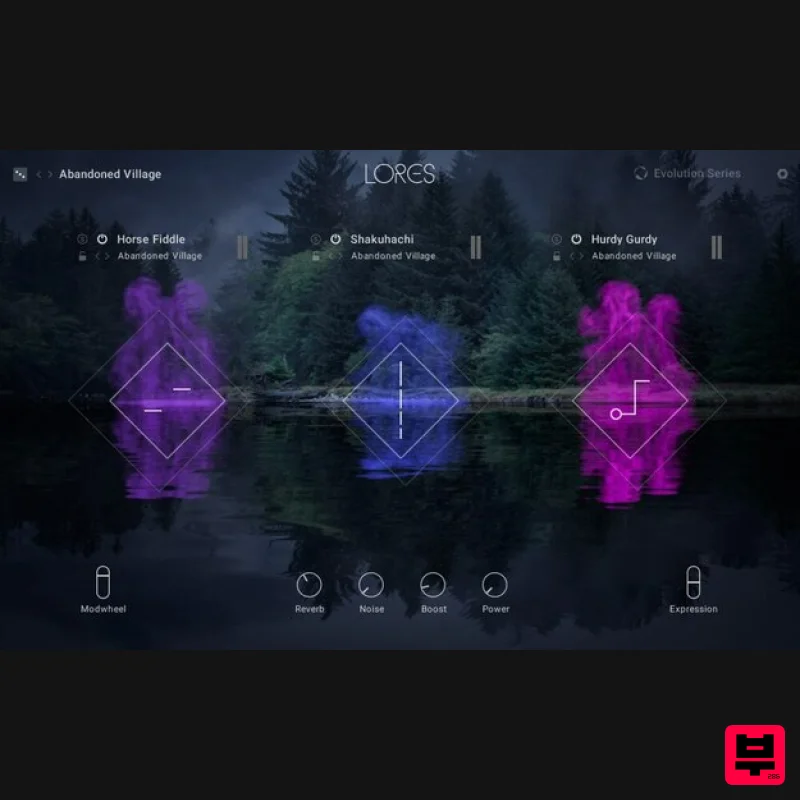
- this innovative library makes it easy to add magic to your scenes. Play yourself into the narrative with an intuitive interface that lets you create extraordinary
- evolving soundscapes. Immersive
- Inventive
- Inspiring Meticulously curated and refined
- LORES dissolves the boundaries of traditional instrumentation
- allowing you to seamlessly blend eclectic tones. Enter a space where the timbre of a Mongolian horse fiddle dances together with a woodwind ensemble
- or hear what medieval pipes sound like accompanied by violin with a Middle Eastern flair. Choose from 16 instruments and hundreds of articulations to mix and match — the possibilities for fantastical blends are boundless. Play with Human Feel Stories told through song are universal to the human experience
- and that’s why LORES continues this age-old legacy with personable touches. Musicians were sampled playing with organic variations – random swells
- unexpected tremolos
- and stray harmonics create natural movement at the performance level. Using multi-mic recording
- instruments can be physically staged within multi-dimensional plumes
- adding dynamic realism to your productions. Clinton Shorter’s Dreamwork Clinton Shorter is a Canadian film and television composer best known for scoring District 9. A true aural raconteur
- he weaves his musical narratives through texture and timbre. Learn about Shorter’s writing process and the quest Evolution Series undertook to build his ideal instrument – a space for creative experimentation modeled after his core workflow. Compose It With Komplete Kontrol Immerse yourself in the magic and mystery of LORES with KOMPLETE KONTROL. Use its fully-integrated interface to intuitively create dynamic instrument blends
- which can be fine-tuned with subtle compositional tools. Add another layer of playability and physical expression to your performances with NKS integration. About Evolution Series This dedicated team of globe-trotting developers is inspired by sounds from all over the planet. They capture only the most expressive performances from talented players to deliver completely authentic libraries. With a focus on the raw quality of traditional instruments and voices
- Evolution Series continues to set the bar for high-quality sounds and intuitive engines
- suitable for all types of composing. Features An eclectic collection of organic instruments
- purpose-built for creating musical stories Add dynamic realism and movement to your productions with this playful
- multi-dimensional library 16 instruments expressed through over 300 hand-played articulations – classic woodwinds
- rare chordophones
- and compelling vocals System Requirements FREE Kontakt 6 Player or Kontakt 6 Version 6.7 or higher is required to use this instrument Download size: 72.3 GB Note: Massive is used as an example. Windows 1. Download the .zip installer file from your Plugin Boutique User Account. 2. Double-click the extracted .exe file to begin the installation process > click ‘Run’. 3. Read the welcome message > click 'Next'. 4. Click 'Next' to begin the installation. 5. Native Access has now been installed > Click 'Finish'. 6. Open Native Access > Create a new Native ID if you do not have one already. If you do
- skip ahead to step 8. 7. You will then receive an email with a confirmation link > Open the email and click 'CONFIRM EMAIL'. 8. Log in to Native Access with your Native ID. 9. Click 'Add a serial'. 10. Enter your Serial Number found in your Plugin Boutique User Account > Click 'ADD SERIAL'. 11. Once your serial has been registered
- click 'VIEW PRODUCTS NOT INSTALLED'. 12. Click the 'Not installed' tab > Locate Massive > Click 'INSTALL'. Your software is now activated and ready for use within your DAW. Mac 1. Download the .dmg installer file from your Plugin Boutique User Account. 2. Double-click the .dmg file to install Native Access. 3. Open Native Acces > Create a new Native ID if you do not have one already. If you do
- skip ahead to step 5. 4. You will then receive an email with a confirmation link > Open the email and click 'CONFIRM EMAIL'. 5. Log in to Native Access with your Native ID. 6. Click 'Add a serial' 7. Enter your Serial Number found in your Plugin Boutique User Account > Click 'ADD SERIAL'. 8. Click the 'Not installed' tab > Locate Massive > Click 'INSTALL'. Your software is now activated and ready for use within your DAW.
Additional Information
About the Native Instruments Lores
Experience the quality and tone that makes the Native Instruments Lores a popular choice for musicians.
Why Choose the Native Instruments Lores?
- •Authentic Native Instruments craftsmanship and design
- •Versatile sound suitable for multiple musical genres
- •Professional build quality and reliable performance
- •Part of Native Instruments's respected Kontakt Instrument lineup
Compare & Explore
Browse our complete selection of Native Instruments instruments or explore other Kontakt Instrument options. Use our comparison tools to find the perfect match for your musical style and budget.
Similar Products

The Beat House LE HITS THE ESSENTIALS
Kontakt Instrument

DoubleBang Software Plugged
Kontakt Instrument

Ecliptiq Audio Hexa Rhythm Designer
Kontakt Instrument

Aria Sounds Hybrichord
Kontakt Instrument

HD Instruments ZoneMatrix
Kontakt Instrument

Audiofier Aerkord
Kontakt Instrument

Rigid Audio Retrocade
Kontakt Instrument

Audiofier Sequi2r EX
Kontakt Instrument

