
Native Instruments Fables
Professional music gear - detailed information and where to buy
Native Instruments
Fables
Product Info
* Prices may vary. Check retailer for current pricing and availability.
Product Description
- Evocative Orchestral Library Weave Stories Through Sound Set the scene with Fables
- a cinematic library of evolving ensemble textures. Building on the legacy of Lores
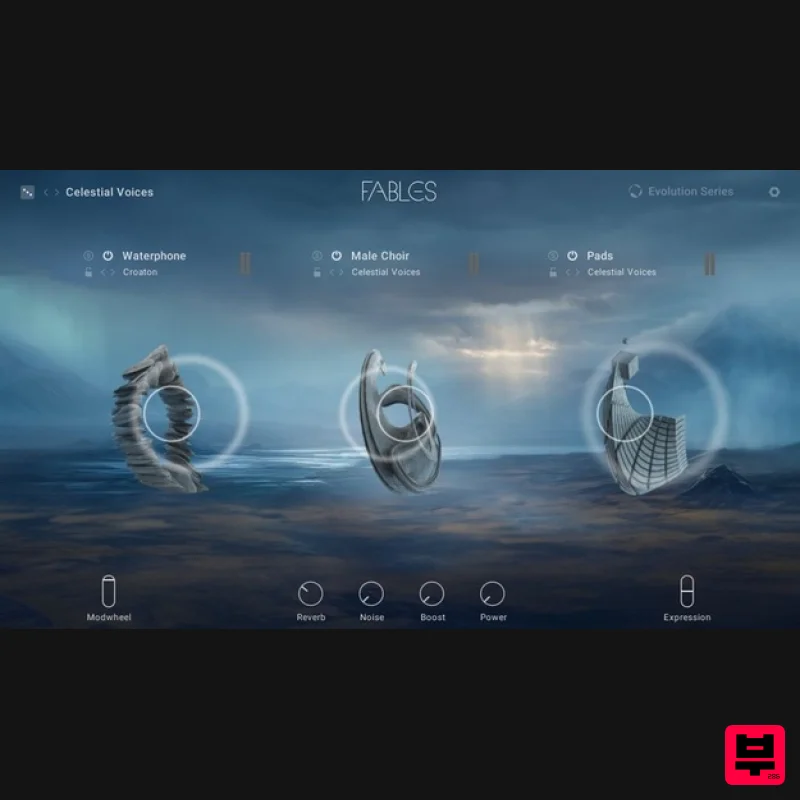
- Fables lets you seamlessly blend and layer a collection of lush acoustic instruments across a three-layer engine to shape your own multi-dimensional soundscapes. Whether you’re crafting your next cinematic score or adding motion to electronic productions
- Fables has all you need to bring movement
- magic
- and mysticism to your music. Hybrid Cinematic Textures Discover the alchemy between organic and synthetic tones with a collection of blendable string sections
- female and male choirs
- woodwind
- tuned percussion
- pads
- low brass
- French horn ensembles
- and even waterphone. Each sampled instrument was performed by virtuosic musicians
- offering a stunning array of articulations and effect options. Expressive Performance Fables is powered by polyphonic aftertouch
- allowing each note to become its own canvas for expression. Infuse your music with subtle nuances and breathtaking dynamics by effortlessly controlling MIDI with your touch. Subtly affect the volume
- panning
- filters
- pitch
- and modulation of each voice independently
- adding a whole new dimension of depth and emotion to your compositions and performances. Behind The Scenes Recorded at the iconic Studios 301 in Sydney
- the sounds of Fables are enriched with unique acoustics and top-of-the-line equipment. Finding beauty in imperfection
- every swell
- tremolo
- and stray harmonic is meticulously captured to embrace human character. Blend between two microphone positions for true control. About Evolution Series This dedicated team of globe-trotting developers is inspired by sounds from all over the planet. They capture only the most expressive performances from talented players to deliver completely authentic libraries. With a focus on the raw quality of traditional instruments and voices
- Evolution Series continues to set the bar for high-quality sounds and intuitive engines
- suitable for all types of composing. Features Blend and layer a collection of organic and synthetic timbres to craft immersive soundscapes Perform expressively with polyphonic aftertouch 16 hand-played instruments expressed through over 400 articulations – waterphone
- strings
- choirs
- and more System Requirements FREE Kontakt 7 Player or Kontakt 7 Version 7.5 or higher is required to use this instrument Download size: 57 GB Note: Massive is used as an example. Windows 1. Download the .zip installer file from your Plugin Boutique User Account. 2. Double-click the extracted .exe file to begin the installation process > click ‘Run’. 3. Read the welcome message > click 'Next'. 4. Click 'Next' to begin the installation. 5. Native Access has now been installed > Click 'Finish'. 6. Open Native Access > Create a new Native ID if you do not have one already. If you do
- skip ahead to step 8. 7. You will then receive an email with a confirmation link > Open the email and click 'CONFIRM EMAIL'. 8. Log in to Native Access with your Native ID. 9. Click 'Add a serial'. 10. Enter your Serial Number found in your Plugin Boutique User Account > Click 'ADD SERIAL'. 11. Once your serial has been registered
- click 'VIEW PRODUCTS NOT INSTALLED'. 12. Click the 'Not installed' tab > Locate Massive > Click 'INSTALL'. Your software is now activated and ready for use within your DAW. Mac 1. Download the .dmg installer file from your Plugin Boutique User Account. 2. Double-click the .dmg file to install Native Access. 3. Open Native Acces > Create a new Native ID if you do not have one already. If you do
- skip ahead to step 5. 4. You will then receive an email with a confirmation link > Open the email and click 'CONFIRM EMAIL'. 5. Log in to Native Access with your Native ID. 6. Click 'Add a serial' 7. Enter your Serial Number found in your Plugin Boutique User Account > Click 'ADD SERIAL'. 8. Click the 'Not installed' tab > Locate Massive > Click 'INSTALL'. Your software is now activated and ready for use within your DAW.
Additional Information
About the Native Instruments Fables
The Native Instruments Fables combines traditional design with modern performance for Kontakt Instrument enthusiasts.
Why Choose the Native Instruments Fables?
- •Authentic Native Instruments craftsmanship and design
- •Versatile sound suitable for multiple musical genres
- •Professional build quality and reliable performance
- •Part of Native Instruments's respected Kontakt Instrument lineup
Compare & Explore
Browse our complete selection of Native Instruments instruments or explore other Kontakt Instrument options. Use our comparison tools to find the perfect match for your musical style and budget.
Similar Products

The Beat House LE HITS THE ESSENTIALS
Kontakt Instrument

Rigid Audio Retrocade
Kontakt Instrument

DoubleBang Software Plugged
Kontakt Instrument

HD Instruments ZoneMatrix
Kontakt Instrument

Audiofier Sequi2r EX
Kontakt Instrument

Aria Sounds Hybrichord
Kontakt Instrument

Audiofier Aerkord
Kontakt Instrument

Ecliptiq Audio Hexa Rhythm Designer
Kontakt Instrument

