
Native Instruments Dopamine
Professional music gear - detailed information and where to buy
Native Instruments
Dopamine
Product Info
* Prices may vary. Check retailer for current pricing and availability.
Product Description
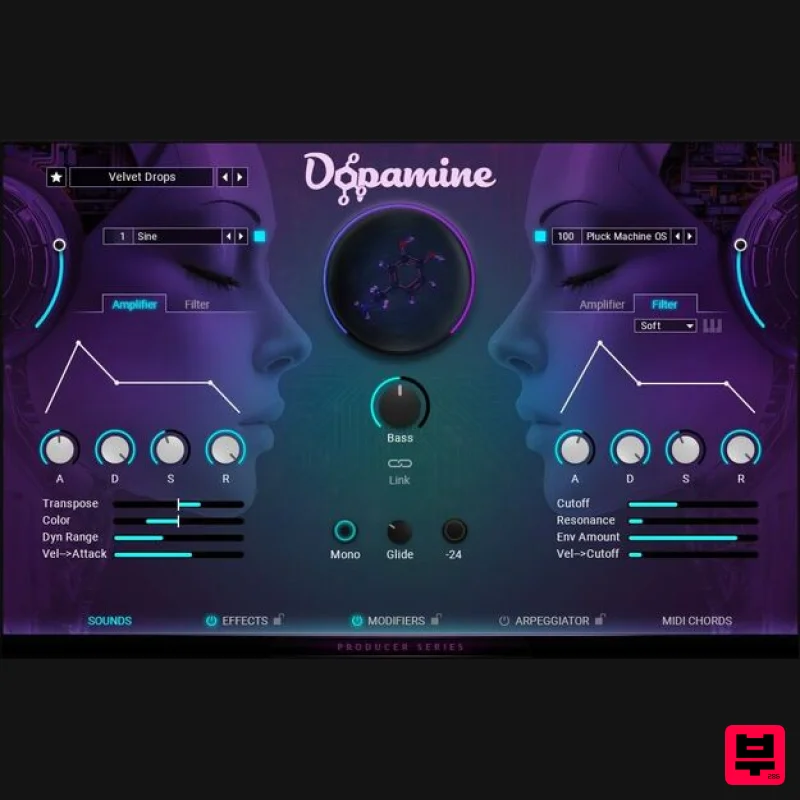
- Pop and EDM synth instrument Created by Big Wave Audio exclusively for Native Instruments Your fast lane to chart-ready tracks Made exclusively for Native Instruments by Big Wave Audio
- Dopamine lets you trigger real-time effects like side-chain
- lo-fi
- and tape stop right from your keyboard. Get over 200 presets for pop
- trap
- and beyond. Use filter tags to find sounds like pads
- leads
- plucks
- and basses. And instantly create diverse sonic and rhythmic sequences with the built-in step sequencer and arpeggiator. Features Get big drops without the effort with this synth designed for beatmakers and producers Animate your sounds in real time with built-in modifier keys and step sequencer Expressive master effects and drag-and-drop MIDI chord progressions Note: Free Kontakt Player or Kontakt (version 8.7.1 or higher). Please also see the Kontakt Player system requirements and the Kontakt Player FAQ. Free Kontakt Player or Kontakt (version 8.7.1 or higher). Please also see the Kontakt Player system requirements and the Kontakt Player FAQ. macOS 13
- and 15 (latest update) Windows 10 or 11 (latest Service Pack) Intel Core i5 or equivalent CPU
- or Apple Silicon
- 4 GB RAM (6 GB recommended) Graphics hardware support for Direct 3D 11.1 (Feature Level 11_0) or higher 2 GB free disk space Supports ASIO
- Core Audio
- and WASAPI Native Instruments Installation Instructions Note: Massive is used as an example. Windows 1. Download the .zip installer file from this Help Centre Area. 2. Double-click the extracted .exe file to begin the installation process > click ‘Run’. 3. Read the welcome message > click 'Next'. 4. Click 'Next' to begin the installation. 5. Native Access has now been installed > Click 'Finish'. 6. Open Native Access > Create a new Native ID if you do not have one already. If you do
- skip ahead to step 8. 7. You will then receive an email with a confirmation link > Open the email and click 'CONFIRM EMAIL'. 8. Log in to Native Access with your Native ID. 9. Click 'Add a serial'. 10. Enter your Serial Number found in your Plugin Boutique User Account > Click 'ADD SERIAL'. 11. Once your serial has been registered
- click 'VIEW PRODUCTS NOT INSTALLED'. 12. Click the 'Not installed' tab > Locate Massive > Click 'INSTALL'. Your software is now activated and ready for use within your DAW. Mac 1. Download the .dmg installer file from this Help Centre Area. 2. Double-click the .dmg file to install Native Access. 3. Open Native Access > Create a new Native ID if you do not have one already. If you do
- skip ahead to step 5. 4. You will then receive an email with a confirmation link > Open the email and click 'CONFIRM EMAIL'. 5. Log in to Native Access with your Native ID. 6. Click 'Add a serial' 7. Enter your Serial Number found in your Plugin Boutique User Account > Click 'ADD SERIAL'. 8. Click the 'Not installed' tab > Locate Massive > Click 'INSTALL'. Your software is now activated and ready for use within your DAW. Beatport Streaming Advanced Registration Instructions 1. Head to Beatport.com > enter your details > click 'CREATE ACCOUNT' (if you already have an account simply Log in). 2. Click 'SUBSCRIBE'. 3. Under the 'Advanced' plan > click 'TRY FREE FOR 30 DAYS'. 4. Enter your '3-Months Beatport Streaming Advanced' code (found in your Plugin Boutique account) > enter your payment details > Enter your billing details > click 'APPLY'. Please note: No payment will be taken when you complete this step. Your payment date will be three months after you redeem your free 3 months of Beatport Streaming Advanced. 5. Click 'UNDEFINED 3-MONTH' to begin your free 3-Months Beatport Advanced Streaming membership. 6. Click 'Get Started' to get started with your subscription for Beatport Streaming Advanced. Beatsource Pro+ Registration Instructions 1. Head to Beatsource > enter your details > click 'Create Account' (if you already have an account simply Log in). 2. Click 'Try Beatsource Free'. 3. Under the 'Beatsource Pro+' plan > click 'Try 30 Days Free'. 4. Enter your '3-Months Beatsource Pro+' code (found in your Plugin Boutique account) > enter your payment details > Enter your billing details > click 'APPLY'. Please note: No payment will be taken when you complete this step. Your payment date will be three months after you redeem your free 3 months of Beatsource Pro+. 5. Click 'START YOUR 3 MONTH FREE TRIAL' to begin your free 3-Months Beatsource Pro+ membership. Your subscription is now activated.
Additional Information
About the Native Instruments Dopamine
Discover the distinctive sound and feel of the Native Instruments Dopamine, a standout choice among Kontakt Instrument.
Why Choose the Native Instruments Dopamine?
- •Authentic Native Instruments craftsmanship and design
- •Versatile sound suitable for multiple musical genres
- •Professional build quality and reliable performance
- •Part of Native Instruments's respected Kontakt Instrument lineup
Compare & Explore
Browse our complete selection of Native Instruments instruments or explore other Kontakt Instrument options. Use our comparison tools to find the perfect match for your musical style and budget.
Similar Products

Ecliptiq Audio Hexa Rhythm Designer
Kontakt Instrument

The Beat House LE HITS THE ESSENTIALS
Kontakt Instrument

DoubleBang Software Plugged
Kontakt Instrument

HD Instruments ZoneMatrix
Kontakt Instrument

Audiofier Aerkord
Kontakt Instrument

Rigid Audio Retrocade
Kontakt Instrument

Aria Sounds Hybrichord
Kontakt Instrument

Audiofier Sequi2r EX
Kontakt Instrument

