
Native Instruments Choir Essentials - Omnia
Professional music gear - detailed information and where to buy
Native Instruments
Choir Essentials - Omnia
Product Info
* Prices may vary. Check retailer for current pricing and availability.
Product Description
- Streamlined Symphonic Choir CHOIR SOUNDS ON TAP Capturing 40 vocalists in stunning detail
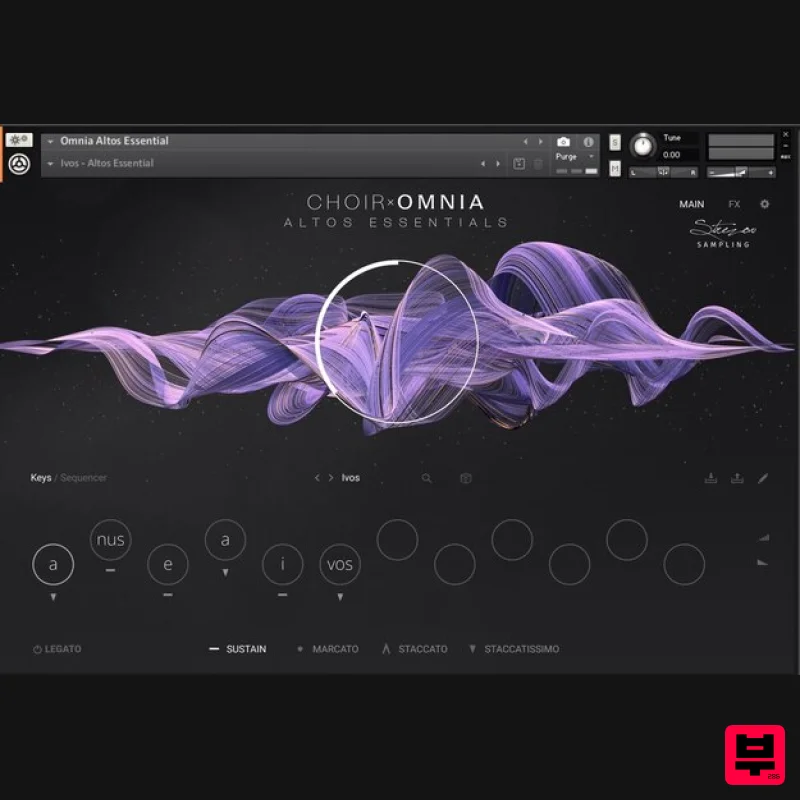
- Choir: Omnia Essentials simplifies the creation of breathtaking choral arrangements. This streamlined version of the full Omnia library offers deep control over four independent sections: soprano
- alto
- tenor
- and bass. From gentle hums to expressive shouts
- it’s perfect for enriching cinematic scores
- electronic productions
- and everything in between. ULTRA-REALISTIC VOCALS Strezov Sampling's Polyphonic True Legato script automatically tracks your melodies and harmonies
- ensuring seamless transitions between notes. Enjoy natural-sounding progressions with effortless voice- and shape performances with a choice of sustain
- marcato
- staccato
- and staccatissimo expressions. SYLLABUILDER ENGINE Perform using individual syllables or quickly build complex phrases with the Syllabuilder engine
- which merges phonemes to create unique vocal expressions. With two transform modes and multiple round-robins per syllable
- crafting authentic choir lines is easier than ever. Or
- use the randomize buttons to generate new syllable sequences for endless inspiration. MORE EXPRESSIVE WITH KONTROL KEYBOARDS Choir: Omnia Essentials offers full integration with Kontrol keyboards. Take advantage of the Light Guide to display key ranges
- use keyswitches to change syllables on the fly
- and fine tune your sound with the mod wheel and pitch bend. CREATED WITH STREZOV SAMPLING Founded in 2012 by a group of full-time composers
- Strezov Sampling create products that achieve realistic results with ease. Sourcing a comprehensive range of locally-recorded samples from all corners of the globe
- their virtual choirs and orchestral libraries make never-sampled-before sounds accessible to all. Their libraries have been used in soundtracks for numerous films and AAA productions by renowned composers and music producers. Features An intuitive 40-piece choir with four independent soprano
- alto
- tenor
- and bass sections Quickly dial in detailed choir arrangements featuring a wide range of vowels using Polyphonic True Legato A lightweight version of the full Choir: Omnia library
- featuring a single mic position and dedicated instruments for individual vowels System Requirements macOS: Intel Macs (i5 or higher): macOS 12
- or 14 (latest update) Apple Silicon Macs (via Rosetta 2 and natively on ARM in standalone or in hosts that support it): macOS 12
- or 14 (latest update) Supported interfaces: macOS (64-bit only): standalone
- VST3
- AAX Windows: Windows 10 or 11 (latest Service Pack)
- Intel Core i5 or equivalent CPU 4 GB RAM (6 GB is recommended for large Kontakt instruments) Supported interfaces: Windows (64-bit only): standalone
- VST3
- AAX Supported Interfaces macOS (64-bit only): Stand-alone
- VST3
- AAX Windows (64-bit only): Stand-alone
- VST3
- AAX Important Note: FREE Kontakt 7.1.05 Player or Kontakt 7.1.05 or higher is required to use this instrument. Note: Massive is used as an example. Windows 1. Download the .zip installer file from your Plugin Boutique User Account. 2. Double-click the extracted .exe file to begin the installation process > click ‘Run’. 3. Read the welcome message > click 'Next'. 4. Click 'Next' to begin the installation. 5. Native Access has now been installed > Click 'Finish'. 6. Open Native Access > Create a new Native ID if you do not have one already. If you do
- skip ahead to step 8. 7. You will then receive an email with a confirmation link > Open the email and click 'CONFIRM EMAIL'. 8. Log in to Native Access with your Native ID. 9. Click 'Add a serial'. 10. Enter your Serial Number found in your Plugin Boutique User Account > Click 'ADD SERIAL'. 11. Once your serial has been registered
- click 'VIEW PRODUCTS NOT INSTALLED'. 12. Click the 'Not installed' tab > Locate Massive > Click 'INSTALL'. Your software is now activated and ready for use within your DAW. Mac 1. Download the .dmg installer file from your Plugin Boutique User Account. 2. Double-click the .dmg file to install Native Access. 3. Open Native Acces > Create a new Native ID if you do not have one already. If you do
- skip ahead to step 5. 4. You will then receive an email with a confirmation link > Open the email and click 'CONFIRM EMAIL'. 5. Log in to Native Access with your Native ID. 6. Click 'Add a serial' 7. Enter your Serial Number found in your Plugin Boutique User Account > Click 'ADD SERIAL'. 8. Click the 'Not installed' tab > Locate Massive > Click 'INSTALL'. Your software is now activated and ready for use within your DAW.
Additional Information
About the Native Instruments Choir Essentials - Omnia
The Native Instruments Choir Essentials - Omnia combines traditional design with modern performance for Kontakt Instrument enthusiasts.
Why Choose the Native Instruments Choir Essentials - Omnia?
- •Authentic Native Instruments craftsmanship and design
- •Versatile sound suitable for multiple musical genres
- •Professional build quality and reliable performance
- •Part of Native Instruments's respected Kontakt Instrument lineup
Compare & Explore
Browse our complete selection of Native Instruments instruments or explore other Kontakt Instrument options. Use our comparison tools to find the perfect match for your musical style and budget.
Similar Products

HD Instruments ZoneMatrix
Kontakt Instrument

Rigid Audio Retrocade
Kontakt Instrument

Ecliptiq Audio Hexa Rhythm Designer
Kontakt Instrument

DoubleBang Software Plugged
Kontakt Instrument

The Beat House LE HITS THE ESSENTIALS
Kontakt Instrument

Audiofier Aerkord
Kontakt Instrument

Aria Sounds Hybrichord
Kontakt Instrument

Audiofier Sequi2r EX
Kontakt Instrument

