
Native Instruments Blocks Primes
Professional music gear - detailed information and where to buy
Native Instruments
Blocks Primes
Product Info
* Prices may vary. Check retailer for current pricing and availability.
Product Description
- 23 expressive Blocks modules for synthesis
- sequencing
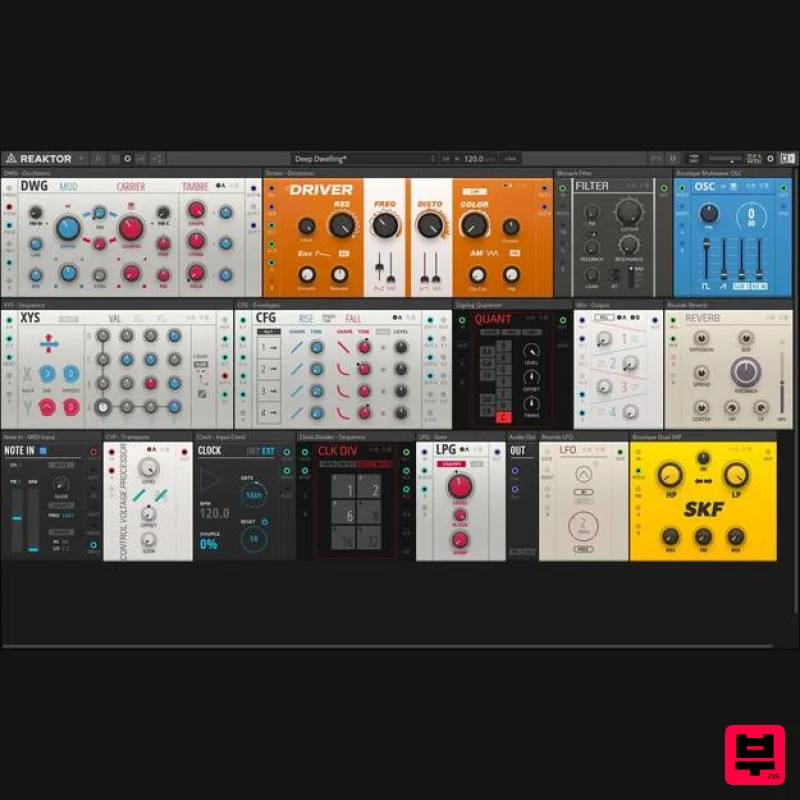
- and FX Over 50 preset Racks – each one a powerful synthesizer in its own right For use with REAKTOR PLAYER and BLOCKS BASE Master Modular Melody BLOCKS PRIMES is a collection of 23 advanced Blocks that deliver character
- depth
- and exceptional sound. Sound generators
- sequencers
- effects – everything runs in REAKTOR or the free REAKTOR PLAYER
- and extends the basic framework provided by BLOCKS BASE. Whether you just discovered the magic of modular synthesis
- or you’ve got a dozen racks at home
- BLOCKS PRIMES adds life to your setup – hardware or otherwise. Spectrum of Synthesis BLOCKS PRIMES offers a wide array of synthesis and modulation methods. The Kodiak family includes two sequencers
- an oscillator
- a morphing filter
- and an experimental noise generator. The four West Coast elements are inspired by synth pioneer Don Buchla and his playful approach to synthesis. Some of Native’s most acclaimed synth technology is represented
- with elements from DRIVER and MONARK converted to Blocks format and optimized for modular experimentation. Understanding Racks What do you get when you patch multiple modules together to create a synth? You get a Rack. There are 50+ expertly crafted and fully patchable Racks included in BLOCKS PRIMES
- each one a playable synthesizer. Feedback drones
- sequenced distortion modules
- percussive and even soundscape patches are ready to go. You can use these as they are
- or experiment with them to create something entirely new. Expandable Inside and Out BLOCKS PRIMES runs in REAKTOR and REAKTOR PLAYER
- and is fully compatible with the entire Blocks ecosystem. From the fundamental modules found in BLOCKS BASE to 200+ eclectic modules from acclaimed third party developers – just drag
- drop
- and patch to expand your modular rig. You can even take Blocks outside the box with the CV connectivity module for full hardware integration. Komplete Kontrol Integration When using BLOCKS PRIMES with KOMPLETE KONTROL software or keyboards
- each rack loads with 8 macros automatically mapped to sonically interesting controls for that specific rack. This makes it easy to harness the power of complex racks
- and personalize sounds for inspiring results. System Requirements Windows (64-bit only) Intel Core i5 or equivalent CPU
- 4 GB RAM Stand-alone
- AAX Windows 10 or 11 macOS (64-bit only) i5
- 4 GB RAM Stand-alone
- AAX macOS 11+ Important Note: The Free Reaktor 6 Player is required to use this product. An Internet connection and a graphics card that supports OpenGL 2.1 or higher are required to download and activate this product. Once installed and activated
- the product can be used offline. Note: Form is used as an example. Windows 1. Download the .zip installer file from your Plugin Boutique User Account. 2. Double-click the extracted .exe file to begin the installation process > click ‘Run’. 3. Read the welcome message > click 'Next'. 4. Click 'Next' to begin the installation. 5. Native Access has now been installed > Click 'Finish'. 6. Open Native Access > Create a new Native ID if you do not have one already. If you do
- skip ahead to step 8. 7. You will then receive an email with a confirmation link > Open the email and click 'CONFIRM EMAIL'. 8. Log in to Native Access with your Native ID. 9. Click 'Add a serial'. 10. Enter your Serial Number found in your Plugin Boutique User Account > Click 'ADD SERIAL'. 11. Click the 'Not installed' tab > Locate Form > Click 'INSTALL'. 12. From the 'Not Installed' tab
- locate Reaktor 6 Player and click 'Install'. Your software is now activated and ready for use within your DAW. Mac 1. Download the .dmg installer file from your Plugin Boutique User Account. 2. Double-click the .dmg file to install Native Access. 3. Create a new Native ID if you do not have one already. If you do
- skip ahead to step 5. 4. You will then receive an email with a confirmation link > Open the email and click 'CONFIRM EMAIL'. 5. Log in with your Native ID. 6. Click 'Add a serial'. 7. Enter your Serial Number found in your Plugin Boutique User Account > Click 'ADD SERIAL'. 8. Click the 'Not installed' tab > Locate Form > Click 'INSTALL'. 9. From the 'Not Installed' tab
- locate Reaktor 6 Player and click 'Install'. Your software is now activated and ready for use within your DAW.
Additional Information
About the Native Instruments Blocks Primes
The Native Instruments Blocks Primes combines traditional design with modern performance for Synth enthusiasts.
Why Choose the Native Instruments Blocks Primes?
- •Authentic Native Instruments craftsmanship and design
- •Versatile sound suitable for multiple musical genres
- •Professional build quality and reliable performance
- •Part of Native Instruments's respected Synth lineup
Compare & Explore
Browse our complete selection of Native Instruments instruments or explore other Synth options. Use our comparison tools to find the perfect match for your musical style and budget.
Similar Products

Reflekt Audio Xonex
Synth

discoDSP OB-Xd
Synth

ThaLoops Templetone
Synth

Thenatan Audio Poizen VST
Synth

discoDSP OPL
Synth

discoDSP Discovery Pro
Synth

AngelicVibes ELITE PIANIST
Synth

discoDSP Discovery
Synth

