
Native Instruments Absynth 6 Update
Professional music gear - detailed information and where to buy
Native Instruments
Absynth 6 Update
Product Info
* Prices may vary. Check retailer for current pricing and availability.
Product Description
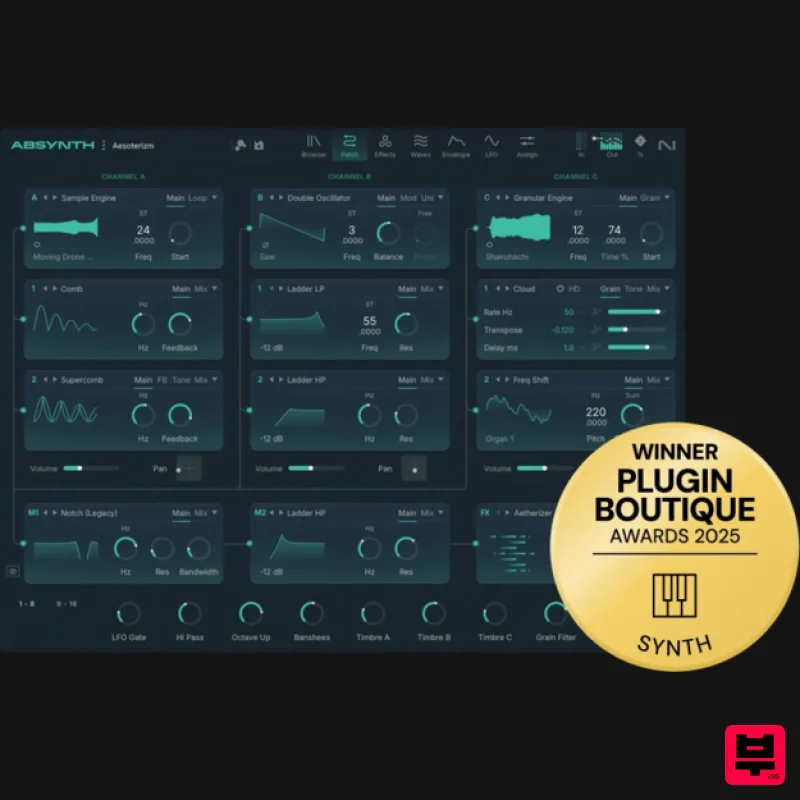
- Important note: This is an update for owners of Absynth 5. The full version of Absynth 6 is also available. Creative hybrid synthesizer Absynth 6 marks the rebirth of a classic Native Instruments synth
- known for its otherworldly sonic character and hybrid nature. Its semi-modular three-channel oscillator engine combines subtractive
- wavetable
- and granular methods to create unconventional
- evolving textures. A refined interface
- new waveform editor
- and visual browser make sound design faster and more intuitive
- while tools like the Mutator inspire instant creativity with intelligent preset generation. Over 2000 presets
- including 350 brand-new sounds
- provide a rich starting point. With polyphonic aftertouch and MPE support
- advanced envelopes
- signature creative effects like Aetherizer
- and full surround sound capability
- Absynth 6 is an expressive powerhouse for modern sound exploration. Main features Hybrid semi-modular engine with subtractive
- wavetable
- and granular synthesis Three-channel oscillator architecture with deep modulation Redesigned interface for streamlined workflows Fully backward compatible with previous Absynth versions Over 2000 factory presets
- including 350+ new sounds Creative tools Mutator: morph modules with depth and randomness controls
- mutation history Multi-stage 68-point envelopes with looping
- breakpoint curves
- and sustain stages Sample jump envelopes with randomized LFO movement Unique creative effects including Aetherizer and Cloud Filter Waveform editor for precise sound sculpting Polyphonic aftertouch and full MPE support True multichannel surround spatialization Design & connectivity Visual browser for fast
- intuitive preset exploration Hardware integration with Kontrol keyboards and Maschine MTS-ESP support for global microtuning and new harmonic systems Features Oscillators and synthesis Three-channel semi-modular oscillator system Subtractive
- wavetable
- and granular synthesis modes Advanced modulation system with macros
- velocity
- and modwheel assignments Modulation and envelopes Multi-stage 68-point envelopes with looping and breakpoint curves Sample jump envelopes for randomized playback movement Dedicated modulation LFOs Effects Signature Absynth creative effects including Aetherizer and Cloud Filter Per-effect surround sound spatialization Interface Redesigned for a streamlined workflow Visual preset browser Waveform editor with precision control Compatibility and integration Seamless hardware integration with Kontrol keyboards and Maschine MTS-ESP support for real-time microtuning and alternate tunings Supports ASIO
- Core Audio
- and WASAPI Windows 10 or 11 (latest Service Pack) macOS 14
- 26 (latest update) Intel Core i5 or equivalent CPU
- or Apple Silicon 4 GB RAM (6 GB recommended) Runs in 64-bit VST3
- and AAX hosts Internet connection required for installation and activation (offline use possible afterwards) Note: Massive is used as an example. Windows 1. Download the .zip installer file from your Plugin Boutique User Account. 2. Double-click the extracted .exe file to begin the installation process > click ‘Run’. 3. Read the welcome message > click 'Next'. 4. Click 'Next' to begin the installation. 5. Native Access has now been installed > Click 'Finish'. 6. Open Native Access > Create a new Native ID if you do not have one already. If you do
- skip ahead to step 8. 7. You will then receive an email with a confirmation link > Open the email and click 'CONFIRM EMAIL'. 8. Log in to Native Access with your Native ID. 9. Click 'Add a serial'. 10. Enter your Serial Number found in your Plugin Boutique User Account > Click 'ADD SERIAL'. 11. Once your serial has been registered
- click 'VIEW PRODUCTS NOT INSTALLED'. 12. Click the 'Not installed' tab > Locate Massive > Click 'INSTALL'. For Super 8 installation
- please download and install the free Reaktor 6 Player available from this link - https: //www.native-instruments.com/en/products/komplete/synths/reaktor-6-player/free-download/ - once installed
- open Reaktor within your DAW and locate Super 8. Your software is now activated and ready for use within your DAW. Mac 1. Download the .dmg installer file from your Plugin Boutique User Account. 2. Double-click the .dmg file to install Native Access. 3. Open Native Acces > Create a new Native ID if you do not have one already. If you do
- skip ahead to step 5. 4. You will then receive an email with a confirmation link > Open the email and click 'CONFIRM EMAIL'. 5. Log in to Native Access with your Native ID. 6. Click 'Add a serial' 7. Enter your Serial Number found in your Plugin Boutique User Account > Click 'ADD SERIAL'. 8. Click the 'Not installed' tab > Locate Massive > Click 'INSTALL'. For Super 8 installation
- please download and install the free Reaktor 6 Player available from this link - https: //www.native-instruments.com/en/products/komplete/synths/reaktor-6-player/free-download/ - once installed
- open Reaktor within your DAW and locate Super 8. Your software is now activated and ready for use within your DAW.
Additional Information
About the Native Instruments Absynth 6 Update
The Native Instruments Absynth 6 Update represents excellent craftsmanship in the Synth category.
Why Choose the Native Instruments Absynth 6 Update?
- •Authentic Native Instruments craftsmanship and design
- •Versatile sound suitable for multiple musical genres
- •Professional build quality and reliable performance
- •Part of Native Instruments's respected Synth lineup
Compare & Explore
Browse our complete selection of Native Instruments instruments or explore other Synth options. Use our comparison tools to find the perfect match for your musical style and budget.
Similar Products

AngelicVibes ELITE PIANIST
Synth
$30
Your next go-to virtual instrument. Real piano recordings with unique sound and effects 50 high-quality presets for...

Reflekt Audio Xonex
Synth
$30
Xonex is a futuristic plugin that we have used time and time again to make a variety of beats. Xonex has offered me a...

Thenatan Audio Poizen VST
Synth
$30
Thenatan and Global Audio Tools have teamed up again to bring music makers across the globe a jam packed powerful tool...

discoDSP OPL
Synth
$30
The OPL is a digital sound synthesis chip developed by Yamaha in the mid 1980s. Among other products, it was used in...

discoDSP Discovery
Synth
$30
Discovery is a virtual analog Nord Lead 2 inspired synthesizer featuring multi-layering, a morphing engine, high...

ThaLoops Templetone
Synth
$30
The Ultimate Hip-Hop Production Plugin – Featuring a Vast Collection of Hip-Hop Sounds. Choose between wild drums,...

discoDSP Discovery Pro
Synth
$30
discoDSP’s Discovery was one of the company’s first and finest efforts. Heavily inspired by Clavia’s Nord Lead...

discoDSP OB-Xd
Synth
$30
OB-Xd is based on the Oberheim OB-X. It attempts to recreate its sound and behavior, but as the original was very...
Frequently Asked Questions
The Native Instruments Absynth 6 Update stands out for its exceptional Native Instruments craftsmanship and innovative design.
Yes! With its affordable price point and quality construction, it's perfect for learning synth.
Browse the similar products section to see how it stacks up against other synth.

