
Muze Mirage
Professional music gear - detailed information and where to buy
Muze
Mirage
Product Info
* Prices may vary. Check retailer for current pricing and availability.
Product Description
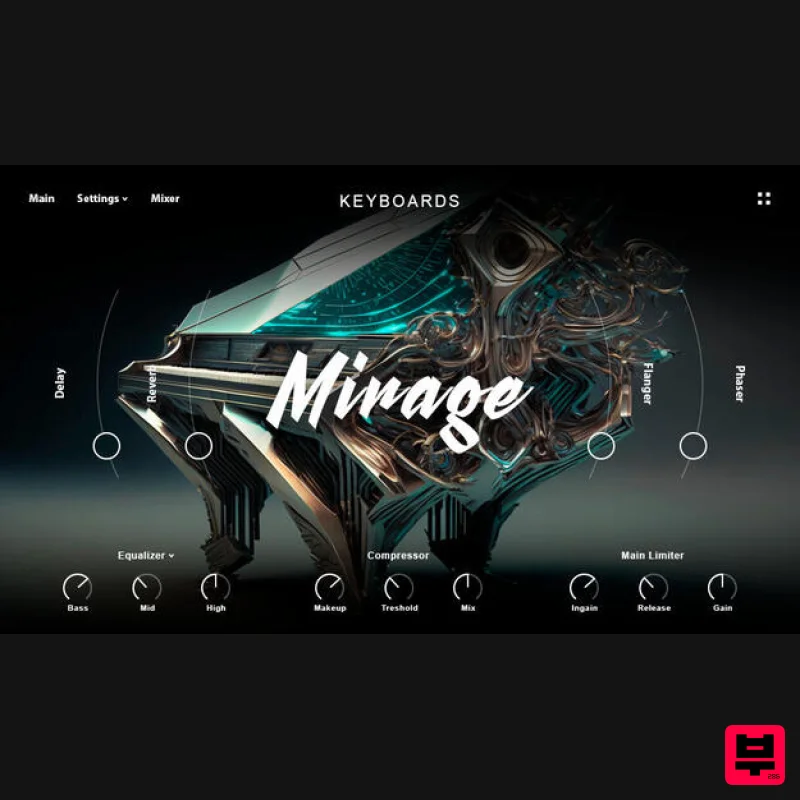
- One of the most beloved concert grand pianos from Yamaha with an army of fans around the world. Top musicians and composers have for decades preferred this grand piano for their work both in the studio and in performance. Muze tried to record this masterpiece piano as realistically as possible so that you can not only hear it
- but also feel its style and character. Experience such a refreshed classic C7. Interface Fully customizable
- discover the instrument and make it yours
- thanks to the easy-to-use UI and to the big amount of settings. Features 9.43 GB (Lossless compression) library size 11288 Yamaha C7 samples 12 velocity layers 10 Mic Positions 50 Hybrid Sources: Textures and Pads 14 Built-in Effects: Compressor
- Delays
- Reverb
- Limiter
- Cabinet
- Gainer
- Rotator
- Stereo Panner
- Chorus
- Phaser
- Flanger
- 3 and 5-Band EQ & more Powerful Layering Engine with XY Pad Modulation Sampled with Analog & Digital equipment. System Requirements Mac Kontakt Retail Version: v.5.8 or newer Minimum – 8GB RAM / Mac OS X 10.7 or later / 7200 RPM or faster HDD. Recommended – 16GB RAM or more / Mac OS X 10.7 or later / SSD (Solid State Drive). PC Kontakt Retail Version: v.5.8 or newer Minimum – 8GB RAM / Windows 7 or later / Sound card with ASIO drivers / 7200 RPM or faster HDD. Recommended – 16GB RAM / Windows 7 or later / Sound card with ASIO drivers / SSD (Solid State Drive). Please Note: This product requires the FULL version of Kontakt and is NOT compatible with the free Kontakt Player. Please Note: Muze - Aquamarine is used as an example. Important Note: This software requires the Full Version of Native Instruments Kontakt to be installed on your system. Mac Installation 1. Click the blue 'Download' within your Plugin Boutique User Account > Click 'Download' on all of the folders from the Muze download page. 2. Once the downloads are complete
- unzip all of the folders. 3. Move the 'Muze Aquamarine' folder (located within 'Muze_Aqua_Install') to where you store your Kontakt Instrument files. 4. Move the unzipped instrument folders (located within all 'MA_xxxx' folders) to 'Muze Aquamarine/Samples'. 5. Unzip the 'Snapshots.zip' (located within 'Muze_Aqua_Install') file and move to
- 'Users/*your username*/Documents/Native Instruments/Kontakt/'. 6. Open Kontakt
- either as a standalone application or as a plugin within your DAW. 7. Click the 'Files' tab at the top of Kontakt > Navigate to the location of 'Muze Aquamarine' folder from step 2 of the installation instructions > Click 'Muze Aquamarine'
- followed by 'Instruments'. 8. Click and drag any .nki file from the left-hand window of Kontakt into the main window of Kontakt to load up a patch. Your software is now installed and ready to use. Windows Installation 1. Click the blue 'Download' within your Plugin Boutique User Account > Click 'Download' on all of the folders from the Muze download page. 2. Once the downloads are complete
- unzip all of the folders. 3. Move the 'Muze Aquamarine' folder (located within 'Muze_Aqua_Install') to where you store your Kontakt Instrument files. 4. Move the unzipped instrument folders (located within all 'MA_xxxx' folders) to 'Muze Aquamarine/Samples'. 5. Unzip the 'Snapshots.zip' (located within 'Muze_Aqua_Install') file and move to
- 'C: \Users\*your username*\Documents\Native Instruments\Kontakt'. 6. Open Kontakt
- either as a standalone application or as a plugin within your DAW. 7. Click the 'Files' tab at the top of Kontakt > Navigate to the location of 'Muze Aquamarine' folder from step 2 of the installation instructions > Click 'Muze Aquamarine'
- followed by 'Instruments'. 8. Click and drag any .nki file from the left-hand window of Kontakt into the main window of Kontakt to load up a patch. Your software is now installed and ready to use.
Additional Information
About the Muze Mirage
Discover the distinctive sound and feel of the Muze Mirage, a standout choice among Kontakt Instrument.
Why Choose the Muze Mirage?
- •Authentic Muze craftsmanship and design
- •Versatile sound suitable for multiple musical genres
- •Professional build quality and reliable performance
- •Part of Muze's respected Kontakt Instrument lineup
Compare & Explore
Browse our complete selection of Muze instruments or explore other Kontakt Instrument options. Use our comparison tools to find the perfect match for your musical style and budget.
Similar Products

Aria Sounds Hybrichord
Kontakt Instrument

Ecliptiq Audio Hexa Rhythm Designer
Kontakt Instrument

HD Instruments ZoneMatrix
Kontakt Instrument

Audiofier Sequi2r EX
Kontakt Instrument

Audiofier Aerkord
Kontakt Instrument

Rigid Audio Retrocade
Kontakt Instrument

DoubleBang Software Plugged
Kontakt Instrument

The Beat House LE HITS THE ESSENTIALS
Kontakt Instrument

