
Mucoder Tonespace
Professional music gear - detailed information and where to buy
Product Description
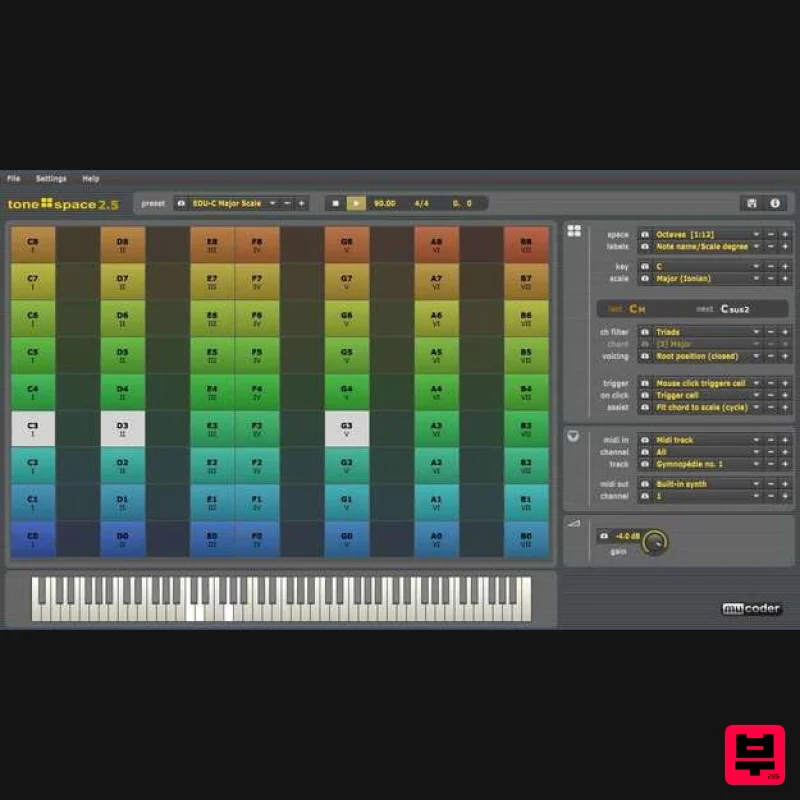
- Mucoder: Tonespace Chord Generator and Visualizer What is Tonespace? A chord generator and visualizer Displays chords and scales on a grid
- making it easy to understand their structure Displays chords on a piano keyboard
- making it easy to play them Supports 39 chord types
- 25 chord voicings/inversions
- 21 scales
- 18 keys
- and 50 different grids Accepts easy
- single-note MIDI input for triggering or viewing chords Can output chords over MIDI to your favorite synth Acts either as a VST or Audio Unit plugin for your DAW
- or as a standalone application How Do I Use It? Audition and play chords while you move the mouse around in a grid-like space - or use a traditional MIDI keyboard instead Learn how musical scales and keys work
- and how chords relate to these
- using the simple octave-based spaces Discover how chords map onto surprisingly simple geometric shapes in the more advanced spaces Use chord-generation algorithms to fit chords to scales and keys automatically Trigger chords from monophonic midi input and record the played chords using midi output System Requirements Available as VST
- AU or standalone app For Windows
- Mac and Linux Now with 64-bit support Installing on Windows First extract the windows .zip archive to a directory on your file system. On Windows you can use either the: Standalone 32-bit version (tonespace.exe) or 64-bit (tonespace_64.exe). This needs no installation
- just run it and you are set. VST plugin 32-bit version 32-bit (tonespace.dll) or 64-bit (tonespace_64.dll). Copy this dll into your VST directory of your DAW host and run your VST host. Please Note: if you plan on using the older 1.0 VST version of tonespace side-by-side with tonespace 2
- it is recommended to rename the VST dll of one of these versions. This is only an issue for Windows users
- as tonespace 1.0 was Windows-only. How? Rename the v1.0 tonespace.dll to tonespace1.dll if you have no old projects that depend on that plugin version Or (less preferred) rename the v2.0 tonespace.dll to tonespace2.dll if you have old projects that depend on tonespace 1.0 Installing on Mac OS X First mount the OS X .dmg archive on your mac by double clicking it On OS X you can use either the: Standalone version (tonespace.app). This needs no installation
- just run it and you are set. This is a universal binary containing both 32 and 64-bit versions. Audio Unit and VST plugin version (tonespace.component). This is a universal binary containing both AU and VST versions
- in both 32 and 64-bit versions. Setting up the AU version: Copy the tonespace.component file into your AU directory (/Users/yourname/Library/Audio/Plug-ins/Components) and run your AU host. Setting up the VST version: Copy the tonespace.component file into your VST directory (/Users/yourname/Library/Audio/Plug-ins/VST) and rename it to tonespace.vst. Then run your VST host. Installing on Linux First extract the Linux .zip archive to a directory on your file system. On Linux you can use either the: Standalone version (tonespace). You first need to set the executable bit on this binary using the command 'chmod +x tonespace'. Then just run it and you are set. VST plugin version (tonespace.so). Copy this file into your VST directory of your DAW host and run your VST host. All binaries for Linux are currently 64-bit only.
Additional Information
About the Mucoder Tonespace
The Mucoder Tonespace represents excellent craftsmanship in the Utility category.
Why Choose the Mucoder Tonespace?
- •Authentic Mucoder craftsmanship and design
- •Versatile sound suitable for multiple musical genres
- •Professional build quality and reliable performance
- •Part of Mucoder's respected Utility lineup
Compare & Explore
Browse our complete selection of Mucoder instruments or explore other Utility options. Use our comparison tools to find the perfect match for your musical style and budget.
Similar Products

Soundspear Luxor
Utility
$30
Luxor is the key if you want an instrument to stand out and spread in the mix. It will scoop your high frequencies to...

Tonalic Tonalic Arranger - 30 Day Subscription
Utility
$30
Real Musicians. Real Feel. Adaptive Performance Instrument for Your DAW Bring authentic, human musicianship into your...

Audible Genius Building Blocks 1
Utility
$30
Music Theory & Composition Training Software for DAW-Based Music Makers Drum Patterns, Basslines, Chord Progressions,...

DDMF TheStrip
Utility
$30
What is it? The Strip is the essential channel strip: the finest EQ, gate and compressor bundled in one beautifully...

Audible Genius Building Blocks 2
Utility
$30
Music Theory & Composition Training Software for DAW-Based Music Makers Drum Patterns, Basslines, Chord Progressions,...

Blue Cat Audio Blue Cat's Connector
Utility
$30
The Virtual Cable For Your Virtual Studio Blue Cat’s Connector is an audio & MIDI streaming plug-in that can be used...

Inphonik RX950
Utility
$30
Legendary Grit and Crunch Meet the RX950 Classic AD/DA Converter, Inphonik’s first effect plug-in, designed to...

Acoustica Spin It Again
Utility
$30
Spin It Again is the easiest way to convert your LPs and cassettes to CD and MP3. Remember all those ‘oldies but...
Frequently Asked Questions
The Mucoder Tonespace stands out for its exceptional Mucoder craftsmanship and innovative design.
It's designed for intermediate to advanced players who appreciate professional-quality utility.
Browse the similar products section to see how it stacks up against other utility.

