
Moog Moogerfooger MF-109S Saturator
Professional music gear - detailed information and where to buy
Moog
Moogerfooger MF-109S Saturator
Product Info
* Prices may vary. Check retailer for current pricing and availability.
Product Description
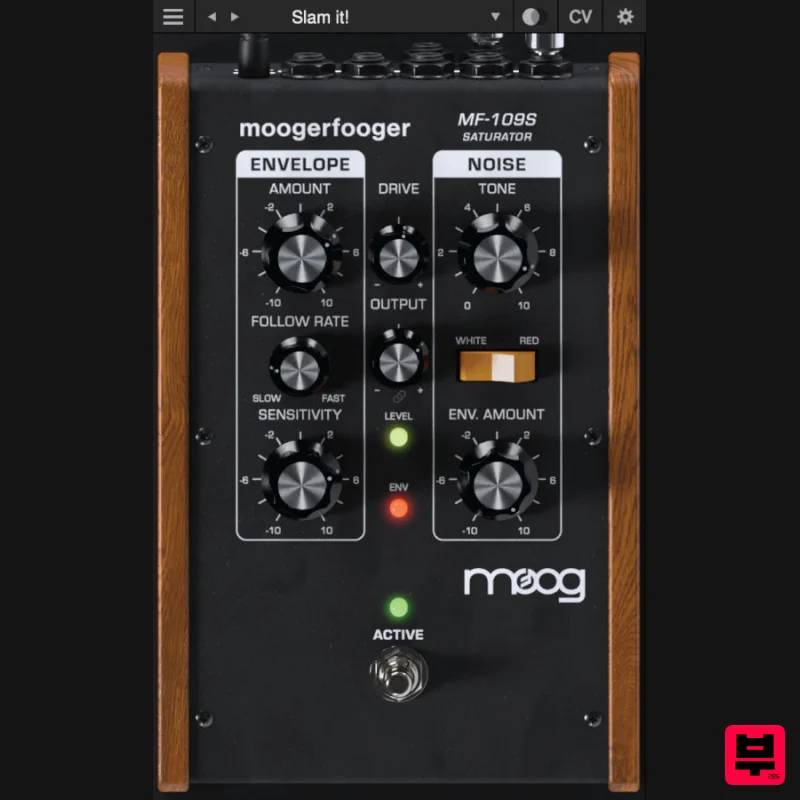
- Moogerfooger MF-109S Saturator The MF-109S Saturator is a new software-only effect which emerged out of the development of the Moogerfooger Effects Plug-ins. A major component of each Moogerfooger is its input drive stage
- which is able to add warmth
- distortion
- and crunch to a sound. During beta testing
- it became clear that users wanted dynamic control over the drive circuit of the Moogerfoogers
- so the MF-109S was born. The MF-109S Saturator is able to move from tight
- dynamic overdrive and analog saturation to compression and expansion by pairing a wide-range envelope follower with bipolar control over the unique drive circuit of the Moogerfooger Effects Plug-ins. Further
- it models the noise generator circuit of the Minimoog Model D and allows for control of both noise generator level and noise tone with switchable filter type. The MF-109S Saturator's envelope follower and noise CV outputs and multiple CV inputs allow it to speak with all of the other Moogerfooger Effects Plug-ins. About the Moogerfooger Effects Plug-ins Moogerfooger Effects Plug-ins are a re-invention of Moog’s classic analogue effects pedals
- bringing the legendary tone
- musicality
- and interconnectivity of the original hardware effects to your digital music production environment. Designed by Bob Moog and his engineering team in the late '90s and '00s
- Moogerfooger effects pedals were direct descendants of the original Moog modular synthesisers
- adapted to process
- modulate
- and play with inputs ranging from guitar
- voice
- and synthesiser to any imaginable audio source. From the MF-104's lush
- warm analogue delay circuit to the swirling phaser effects of the MF-103 and legendary resonant ladder lowpass filter in the MF-101
- Moogerfoogers have become renowned for their sound and modularity
- adopted by studios and performers around the world. Each Moogerfooger plugin has been meticulously recreated with reverence for the lush
- distinctive tones of the original analogue circuits—now ready to be integrated into your digital audio workstation. With stereo functionality and an extended feature set
- these plug-ins further tailor the classic Moogerfooger functionality to the modern digital creator. With all parameters ready to be automated as well as the ability to save and manage presets
- Moogerfooger Effects Plug-ins mutate and re-shape themselves around your audio tracks. The original collection of Moogerfoogers were more than the sum of their parts due to their powerful and flexible control voltage inputs and outputs—able to play amongst themselves and combine into dynamic inter-related effects. The Moogerfooger Effects Plug-ins recreate that CV interconnectivity
- allowing each instance of a Moogerfooger to modulate the parameters of any other across your project in any DAW as an AUv2
- VST3
- or AAX plug-in. Each effect springs to life and captures nuances in your signal with digital attenuverters added to every CV input and side-chain capabilities
- providing innovative sound design possibilities and deep control over every aspect of your sound. Looking for the Moogerfooger plugin collection? The full bundle is available HERE. System Requirements MacOS 11.7 or newer
- Intel or Apple Silicon Windows 10 or newer
- 64-bit Intel systems or newer VST3/AU/AAX formats supported Registration 1. Go to https: //software.moogmusic.com/register or click 'Download' in your user account. 2. Click 'Create an account' > If you already have a moog account
- skip to step 5. 3. Enter the requested details > Click 'CREATE'. 4. Open your email and locate the conformation email sent from moog > Click 'Confirm Your Email'. 5. Log in to your moog account. 6. Click 'REGISTER SOFTWARE' > Enter the serial number found in your Plugin Boutique User Account > Click 'REGISTER'. 7. Download the relevant installer for your operating system. PC Installation 1. Double-click the .exe file to begin installation. 2. Click 'Next' 3. Click 'I accept the agreement' > Click 'Next'. 4. Click 'Next' 5. Click 'Next' 6. Click 'Next' 7. Click 'Finish'. 8. Open your DAW > Locate and open Mariana. 9. Click 'SIGN IN'. 10. Log into your moog account. 11. Return to your DAW > Click 'ACTIVATE'. Your Software is Now Installed and Ready to be Used Within Your DAW! Mac Installation 1. Extract the downloaded .zip file's contents
- and launch the installer. 2. Click 'Continue'. 3. Read the agreement
- then click 'Continue'. 4. Click 'Agree'. 5. Click 'Install'. 6. Click 'Close'. 7. Open your DAW > Locate and open Mariana. 8. Click 'SIGN IN'. 9. Log into your moog account. 10. Return to your DAW > Click 'ACTIVATE'. Your Software is Now Installed and Ready to be Used Within Your DAW!
Additional Information
About the Moog Moogerfooger MF-109S Saturator
The Moog Moogerfooger MF-109S Saturator combines traditional design with modern performance for Saturation enthusiasts.
Why Choose the Moog Moogerfooger MF-109S Saturator?
- •Authentic Moog craftsmanship and design
- •Versatile sound suitable for multiple musical genres
- •Professional build quality and reliable performance
- •Part of Moog's respected Saturation lineup
Compare & Explore
Browse our complete selection of Moog instruments or explore other Saturation options. Use our comparison tools to find the perfect match for your musical style and budget.
Similar Products
Audified MultiDrive PRO
Saturation
Gooey Audio Sizzle
Saturation

Antares Warm
Saturation
Soundspear Aloha
Saturation
TBProAudio GSat+
Saturation
Platone Studio Swiss Saturator
Saturation
UnplugRed Red Bass
Saturation
SIMPLE Plugins SIMPLE Saturator
Saturation

