
MNTRA Instruments Sur
Professional music gear - detailed information and where to buy
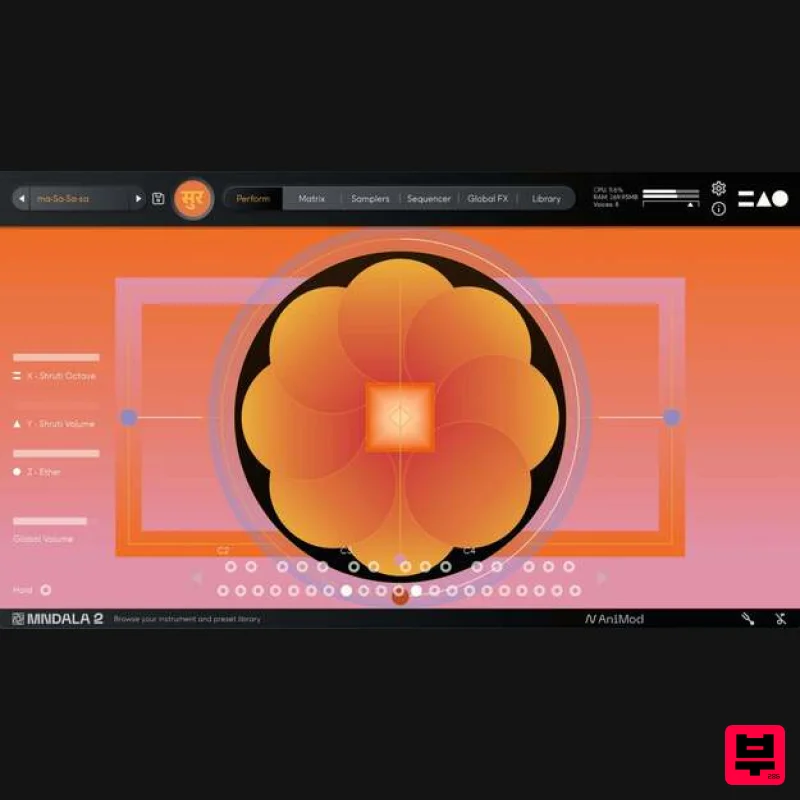
MNTRA Instruments
Sur
Product Info
* Prices may vary. Check retailer for current pricing and availability.
Product Description
- The Essence of Drone Sur is the free taster of the full portal instrument
- Naada. Introducing Sur - meticulously crafted to reproduce the essence of the drone in Indian classical music. Featuring exquisitely recorded Tanpuras and Shruti Box
- Sur offers a sonic foundation for spiritual expression and aesthetic beauty
- serving as a versatile instrument for musical exploration and meditation. Powered by the advanced MNDALA 2 engine
- Sur features a deep micro-tuning system and creatively processed samples
- inviting musicians to further explore the intricate nuances of popular Ragas with precision and authenticity. <iframe allow="autoplay" frameborder="no" height="300" src="https: //w.soundcloud.com/player/?url=https%3A//api.soundcloud.com/playlists/1784493465&color=%23ff5500&auto_play=false&hide_related=false&show_comments=true&show_user=true&show_reposts=false&show_teaser=true&visual=true" width="100%"></iframe> MNTRA Instruments · Sur (Demo Tracks) In essence
- Sur is a taste of the sacred beauty and boundless potential of the drone within Indian classical music and beyond
- beckoning musicians and sound healing practitioners on a journey of sonic discovery and resonance. Features 6 Presets 16 Raga Presets 8 Instrument Sound Sources System Requirements Engine/parent product: MNDALA 2 macOS 10.11+ Windows 10+ AAX
- VST3 and AU formats available to be used in most DAWs *Mixcraft Pro 9 not supported Please note: Huracan is used as an example. You will need to install the MNDALA 2 engine to use Mirage. Mac 1. Download the MNDALA 2 Engine installer from your Plugin Boutique User Account > Extract the .zip archive > Launch the .pkg installer. 2. Click 'Continue'. 3. Click 'Continue'. 4. Click 'Agree'. 5. Click 'Continue'. 6. Click 'Install'. 7. Click 'Install Software'. 8. Click 'Close'. 9. Launch your DAW > Insert MNDALA 2 on a new instrument track > Click 'Create New Account' (If you have an existing MNTRA Instruments log in and skip to step 15). 10. Enter your email address and click 'Register'. 11. A MNTRA account has now been created > Click 'edit your password and account details' to create a password for your MNTRA account. 12. Enter your chosen password into the 'New password' box > Enter your password again into the 'Confirm new password' box > Click 'Save changes'. 13. Enter your MNTRA account details > Click 'Login'. 14. You are now logged into the MNDALA 2 Engine > Click 'Library' to continue to activate Huracan. 15. Click 'Add From Serial'. 16. Enter your serial number found within your Plugin Boutique User Account > Click 'Enter'. 17. Click 'OK'. 18. Click 'Install'. 19. Click 'OK' > Choose a location to store the instruments samples. 20. Huracan is now downloading (this may take a few minutes). 21. Click 'OK'. 22. Click 'OK' > Close and relaunch your DAW. 23. Insert MNDALA 2 on a new instrument track > Click 'Open Preset Browser'. 24. Select 'Huracan' then choose a preset. Huracan is now installed
- activated
- and ready to use. Windows 1. Download the MNDALA 2 Engine installer from your Plugin Boutique User Account > Extract the .zip archive > Launch the .exe installer. 2. Click 'More info'. 3. Click 'Run anyway'. 4. Accept the license agreement > Click 'Next'. 5. Click 'Next'. 6. Click 'Next'. 7. Click 'Next'. 8. Click 'Install'. 9. Click 'Finish'. 10. Launch your DAW > Insert MNDALA 2 on a new instrument track > Click 'Create New Account' (If you have an existing MNTRA Instruments log in and skip to step 15). 11. Enter your email address and click 'Register'. 12. A MNTRA account has now been created > Click 'edit your password and account details' to create a password for your MNTRA account. 13. Enter your chosen password into the 'New password' box > Enter your password again into the 'Confirm new password' box > Click 'Save changes'. 14. Enter your MNTRA account details > Click 'Login'. 15. You are now logged into the MNDALA 2 Engine > Click 'Library' to continue to activate Huracan. 16. Click 'Add From Serial'. 17. Enter your serial number found within your Plugin Boutique User Account > Click 'Enter'. 18. Click 'OK'. 19. Click 'Install'. 20. Click 'OK' > Choose a location to store the instruments samples. 21. Huracan is now downloading (this may take a few minutes). 22. Click 'OK'. 23. Click 'OK' > Close and relaunch your DAW. 24. Insert MNDALA 2 on a new instrument track > Click 'Open Preset Browser'. 25. Select 'Huracan' then choose a preset. Your software is now ready to use!
Additional Information
About the MNTRA Instruments Sur
Experience the quality and tone that makes the MNTRA Instruments Sur a popular choice for musicians.
Why Choose the MNTRA Instruments Sur?
- •Authentic MNTRA Instruments craftsmanship and design
- •Versatile sound suitable for multiple musical genres
- •Professional build quality and reliable performance
- •Part of MNTRA Instruments's respected Synth Presets lineup
Compare & Explore
Browse our complete selection of MNTRA Instruments instruments or explore other Synth Presets options. Use our comparison tools to find the perfect match for your musical style and budget.
Similar Products
W. A. Production Progressive Trance for InstaComposer 3
Synth Presets
Resonance Sound FILTH Vol. 1 for Serum 2
Synth Presets
Resonance Sound UK Speed Garage Vol. 1 for Serum 2
Synth Presets

Resonance Sound Stranger Serum Synths Vol. 1 for Serum 2
Synth Presets

W. A. Production Cinematic Synths for Babylon 2
Synth Presets

Resonance Sound Main Stage Techno Vol. 1 for Serum 2
Synth Presets
W. A. Production Progressive House for Babylon 2
Synth Presets
W. A. Production Melodic Techno for InstaComposer 3
Synth Presets

