
MNTRA Instruments Pripyat
Professional music gear - detailed information and where to buy
MNTRA Instruments
Pripyat
Product Info
* Prices may vary. Check retailer for current pricing and availability.
Product Description
- Irradiated Synth Textures Pripyat is MNTRA's first foray into the world of synthetic textures
- funnelled through our idiosyncratic approach to sampling and sound design. With a focus on the cold and industrial character of some of their favourite synth heavy scores
- they derived the main source material from electromagnetic interference recorded at an electrical substation and unstable vintage analog synths processed by custom-made guitar pedals and eurorack modular. These radioactive soundscapes are sure to add a new dimension to your palette — inspiring you and breathing new life into your music. At the core of Pripyat is MNTRA's desire to present a collection of electronic textures with a unique aesthetic and take full advantage of the cutting-edge sound design engine MNDALA. This library features brutal electromagnetic interference
- normally inaudible to the human ear - both in its pure form and re-amped through various acoustic resonators
- warbling vintage analog synthesizers processed through various guitar pedals and Eurorack modular effects
- and clamorous ultrasonic recordings of dry ice on a rare Marimbaphone and a Bombo drum
- as well as additional percussion sounds. Within the proprietary MNDALA engine
- the source material is vastly expanded
- allowing you to create deeply textured soundscapes
- as well as go-to synth basses
- pads
- leads
- and FX. MNTRA's team of experienced sound designers have created a collection of 60 presets to get you started right out of the box
- so whether you’re looking for quick inspiration or a complex sound design environment
- there's something for you. To intuitively control the complex array of back-end parameters in real-time
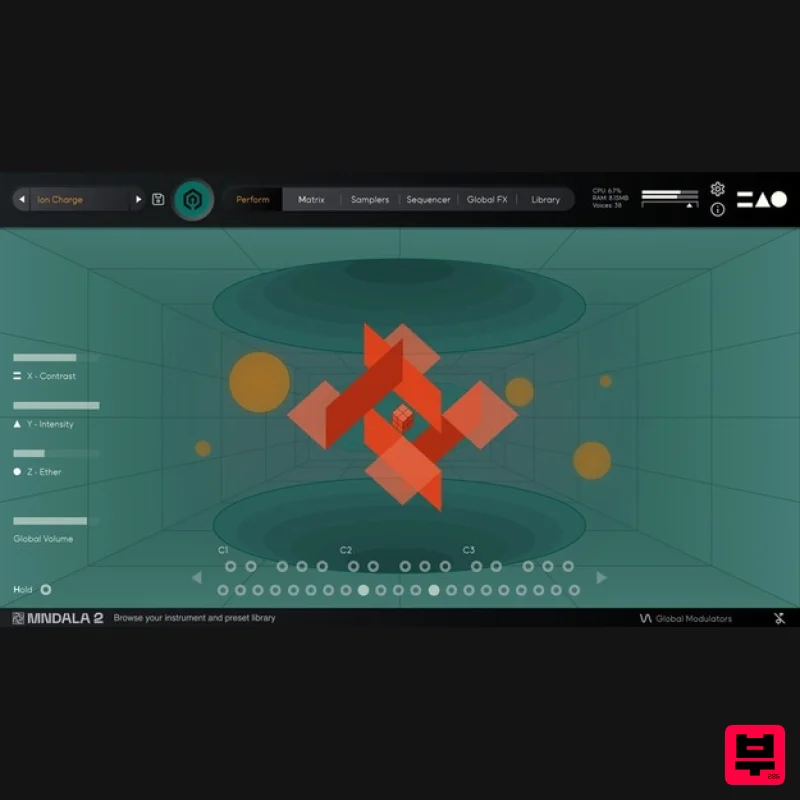
- MNTRA created an interactive animated scene inspired by retro soviet poster art
- allowing you to intuitively ‘play’ Pripyat like a physical instrument. Instruments Included Electromagnetic Transistor Buzz Pad Synth Cinematic Drone Dark Drone Shimmer Pad Chaos Pad Percussion Sonar Drum Radiated Drum FX Frozen Marimbaphone Industrial Scream Features Recorded at 32-bit 96 kHz and 384 kHz resolution. CPU-friendly in-DAW playback at industry- 24-bit 96kHz resolution. Plugin app and samples watermarked to you. Easy downloads and updates via Pulse Downloader. 10 Sample Maps Up to 18 Round Robins System Requirements 1.48 GB installed (4 GB recommended for setup) VST / AU / AAX plugin for Windows & Mac OS (10.11+) (including M1 Chip support) Minimum 8GB of RAM and an i5 or better CPU required (SSD drive recommended) Supported by all VST / AU / AAX compatible DAWs. Note: Huracan is used as an example. Mac 1. Download the MNDALA 2 Engine installer from your Plugin Boutique User Account > Extract the .zip archive > Launch the .pkg installer. 2. Click 'Continue'. 3. Click 'Continue'. 4. Click 'Agree'. 5. Click 'Continue'. 6. Click 'Install'. 7. Click 'Install Software'. 8. Click 'Close'. 9. Launch your DAW > Insert MNDALA 2 on a new instrument track > Click 'Create New Account' (If you have an existing MNTRA Instruments log in and skip to step 15). 10. Enter your email address and click 'Register'. 11. A MNTRA account has now been created > Click 'edit your password and account details' to create a password for your MNTRA account. 12. Enter your chosen password into the 'New password' box > Enter your password again into the 'Confirm new password' box > Click 'Save changes'. 13. Enter your MNTRA account details > Click 'Login'. 14. You are now logged into the MNDALA 2 Engine > Click 'Library' to continue to activate Huracan. 15. Click 'Add From Serial'. 16. Enter your serial number found within your Plugin Boutique User Account > Click 'Enter'. 17. Click 'OK'. 18. Click 'Install'. 19. Click 'OK' > Choose a location to store the instruments samples. 20. Huracan is now downloading (this may take a few minutes). 21. Click 'OK'. 22. Click 'OK' > Close and relaunch your DAW. 23. Insert MNDALA 2 on a new instrument track > Click 'Open Preset Browser'. 24. Select 'Huracan' then choose a preset. Huracan is now installed
- activated
- and ready to use. Windows 1. Download the MNDALA 2 Engine installer from your Plugin Boutique User Account > Extract the .zip archive > Launch the .exe installer. 2. Click 'More info'. 3. Click 'Run anyway'. 4. Accept the license agreement > Click 'Next'. 5. Click 'Next'. 6. Click 'Next'. 7. Click 'Next'. 8. Click 'Install'. 9. Click 'Finish'. 10. Launch your DAW > Insert MNDALA 2 on a new instrument track > Click 'Create New Account' (If you have an existing MNTRA Instruments log in and skip to step 15). 11. Enter your email address and click 'Register'. 12. A MNTRA account has now been created > Click 'edit your password and account details' to create a password for your MNTRA account. 13. Enter your chosen password into the 'New password' box > Enter your password again into the 'Confirm new password' box > Click 'Save changes'. 14. Enter your MNTRA account details > Click 'Login'. 15. You are now logged into the MNDALA 2 Engine > Click 'Library' to continue to activate Huracan. 16. Click 'Add From Serial'. 17. Enter your serial number found within your Plugin Boutique User Account > Click 'Enter'. 18. Click 'OK'. 19. Click 'Install'. 20. Click 'OK' > Choose a location to store the instruments samples. 21. Huracan is now downloading (this may take a few minutes). 22. Click 'OK'. 23. Click 'OK' > Close and relaunch your DAW. 24. Insert MNDALA 2 on a new instrument track > Click 'Open Preset Browser'. 25. Select 'Huracan' then choose a preset. Huracan is now installed
- activated
- and ready to use.
Additional Information
About the MNTRA Instruments Pripyat
Experience the quality and tone that makes the MNTRA Instruments Pripyat a popular choice for musicians.
Why Choose the MNTRA Instruments Pripyat?
- •Authentic MNTRA Instruments craftsmanship and design
- •Versatile sound suitable for multiple musical genres
- •Professional build quality and reliable performance
- •Part of MNTRA Instruments's respected Virtual Instruments lineup
Compare & Explore
Browse our complete selection of MNTRA Instruments instruments or explore other Virtual Instruments options. Use our comparison tools to find the perfect match for your musical style and budget.
Similar Products

Boom SWAMPS - 3D Surround
Virtual Instruments

Audiomodern Opacity 2: Soundbox Instrument
Virtual Instruments

MeldaProduction Electric Keys - Tines
Virtual Instruments

UJAM BEAUTYFLUTE Pro
Virtual Instruments

MNTRA Instruments Nagual
Virtual Instruments

ZAK Sound Asteroid
Virtual Instruments

Safari Audio Cubby
Virtual Instruments

ZAK Sound Lyra
Virtual Instruments

