
MNTRA Instruments Orakle X
Professional music gear - detailed information and where to buy
MNTRA Instruments
Orakle X
Product Info
* Prices may vary. Check retailer for current pricing and availability.
Product Description
- Dark Sounds Suite Expanded Orakle X offers everything you need to make modern cinematic music inspired by ancient sounds. Informed by our passion for international instruments and techniques
- Orakle X transcends place and time. It includes experimental string articulations
- thunderous horns
- flute clusters
- overtone singing
- a massive array of unique percussion
- and so much more. Orakle X is MNTRA's largest Sound Sculpture Instrument yet
- offering everything you need to make modern cinematic music inspired by ancient sounds. Informed by their passion for international instruments and techniques
- Orakle X transcends place and time. Orakle X includes experimental string articulations
- thunderous horns
- flute clusters
- overtone singing
- a massive array of unique percussion
- and so much more. Orakle X expands on MNTRA's original Orakle Sound Sculpture Instrument. For an affordable
- condensed collection of the Orakle X sounds
- check out the original
- Orakle! At the heart of Orakle X is MNTRA's founder Brian D’Oliveira’s (The Witcher NOTW
- Shadow Of The Tomb Raider
- Resident Evil 7 + 8) vast collection of one-of-a-kind instruments
- assembled during his many travels across the globe. His dedication to studying the ancient performance techniques of these unique instruments
- combined with MNTRA's ultrasonic sampling workflow
- allows them to be heard in an entirely new way. From aleatoric flute swarms and bombastic drums to bowed metal textures and extended Baroque cello harmonics
- Orakle X gives you all the components needed to create visionary sound worlds. Recorded with state-of-the-art equipment in MNTRA's legendary RCA Victor studio in Montreal
- and meticulously sampled to capture the nuanced resonances of these rare instruments
- Orakle X has vast compositional and sound design applications. This isn’t your off-the-shelf orchestral library. These sounds are dripping with personality. MNTRA's performances focused on alternative extended techniques that amplify the distinctive characteristics of the instruments. Simply hold down one note and hear the sound evolve under your finger. Recorded with sonic mangling and manipulation in mind
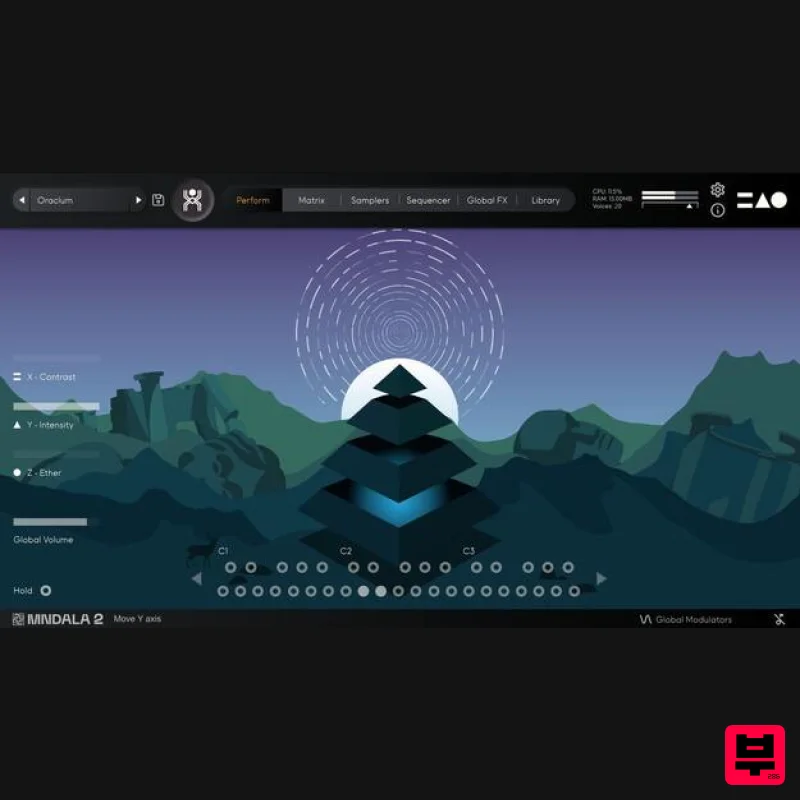
- MNTRA's powerful MNDALA Sound Design Engine allows you to shape these instruments into anything you can imagine. Transform a beautiful quena flute into a speaker-rattling industrial drone. Warp the harmonically rich treble gamba strings into an otherworldly ambient pad. This is your sonic playground. To get you started
- MNTRA's team of sound designers has created a bank of over 40 expertly crafted presets. Utilizing the full power of their 3-axis RTPCs (Real-Time Parameter Controls)
- the interactive animated Perform View interface allows you to easily explore these complex presets. Simply map your favourite MIDI controller to the XYZ performance macros and follow this inspiring collection of dynamic sounds wherever they take you. Instrument Sample Maps Wind Tin Whistle Flutter Tin Whistle Harmonic Motion Quena Flutter Mini Quena Harmonic Motion Rajasthani Tin Flute Stereo Motion Rajasthani Tin Flute Short Shawm Vibrato Low Tibetan Horn Long Low Tibetan Horn Short High Tibetan Horn Short Voice Voice Long F Voice Long MF Voice Long P Voice Short F Voice Short MF Voice Short P Strings Baroque Cello Harmonics 1 Baroque Cello Harmonics 2 Baroque Cello Short F Baroque Cello Short MF Kabak Long Kabak Flick Treble Gamba Long Left Treble Gamba Long Right Treble Gamba Pizz Percussion Reco Reco Strike Bass Drum Strike F Bass Drum Strike MF Bass Drum Roll Repinique Drum Hit Repinique Drum Stick Strike Frame Drum Mallet Strike F Frame Drum Mallet Strike MF Frame Drum Mallet Strike P Clapping Sticks 1 Clapping Sticks 2 Pandeiro Hit Bata Top Hit Bata Bottom Hit Bombo Close Hit Bombo Far Hit Djembe Center Hit Djembe Rim Hit Amazonian Drum Hit Ocean Drum Hit Yamador Hit Effects Spring Bell Bowed Cymbal Bowed F Cymbal Bowed MF Cymbal Bowed P Reco Reco Bowed Features 51 Sample Maps Up To 59 Round Robbins Recorded at industry- 32-bit/384kHz resolution Extreme resolution CPU efficient in-DAW playback & blazingly fast preset loading Plugin app and samples watermarked to you Easy downloads and updates via Pulse Downloader 15.2 GB installed System Requirements 20GB hard drive space required for setup VST / AU / AAX plugin for Windows & Mac OS (10.11+) Including M1 Chip Minimum 8GB of RAM and an i5 or better CPU required Supported by all VST/AU/AAX compatible DAW’s* Panic Girl “If you need some fresh and unusual sounds for your compositions or want to work with an easy yet powerful user interface
- then you should definitely check it out.” Chris Dudley “I own every MNTRA instrument and I can honestly say they’re all pushing a limit and filling a niche I didn’t even know was there.” Nemanja Rancic “I find all the MNTRA instruments to be organic
- yet perfectly capable of blending with synths. They feel timeless to me
- because I can use them in any project I work on.” Note: Huracan is used as an example. Mac 1. Download the MNDALA 2 Engine installer from your Plugin Boutique User Account > Extract the .zip archive > Launch the .pkg installer. 2. Click 'Continue'. 3. Click 'Continue'. 4. Click 'Agree'. 5. Click 'Continue'. 6. Click 'Install'. 7. Click 'Install Software'. 8. Click 'Close'. 9. Launch your DAW > Insert MNDALA 2 on a new instrument track > Click 'Create New Account' (If you have an existing MNTRA Instruments log in and skip to step 15). 10. Enter your email address and click 'Register'. 11. A MNTRA account has now been created > Click 'edit your password and account details' to create a password for your MNTRA account. 12. Enter your chosen password into the 'New password' box > Enter your password again into the 'Confirm new password' box > Click 'Save changes'. 13. Enter your MNTRA account details > Click 'Login'. 14. You are now logged into the MNDALA 2 Engine > Click 'Library' to continue to activate Huracan. 15. Click 'Add From Serial'. 16. Enter your serial number found within your Plugin Boutique User Account > Click 'Enter'. 17. Click 'OK'. 18. Click 'Install'. 19. Click 'OK' > Choose a location to store the instruments samples. 20. Huracan is now downloading (this may take a few minutes). 21. Click 'OK'. 22. Click 'OK' > Close and relaunch your DAW. 23. Insert MNDALA 2 on a new instrument track > Click 'Open Preset Browser'. 24. Select 'Huracan' then choose a preset. Huracan is now installed
- activated
- and ready to use. Windows 1. Download the MNDALA 2 Engine installer from your Plugin Boutique User Account > Extract the .zip archive > Launch the .exe installer. 2. Click 'More info'. 3. Click 'Run anyway'. 4. Accept the license agreement > Click 'Next'. 5. Click 'Next'. 6. Click 'Next'. 7. Click 'Next'. 8. Click 'Install'. 9. Click 'Finish'. 10. Launch your DAW > Insert MNDALA 2 on a new instrument track > Click 'Create New Account' (If you have an existing MNTRA Instruments log in and skip to step 15). 11. Enter your email address and click 'Register'. 12. A MNTRA account has now been created > Click 'edit your password and account details' to create a password for your MNTRA account. 13. Enter your chosen password into the 'New password' box > Enter your password again into the 'Confirm new password' box > Click 'Save changes'. 14. Enter your MNTRA account details > Click 'Login'. 15. You are now logged into the MNDALA 2 Engine > Click 'Library' to continue to activate Huracan. 16. Click 'Add From Serial'. 17. Enter your serial number found within your Plugin Boutique User Account > Click 'Enter'. 18. Click 'OK'. 19. Click 'Install'. 20. Click 'OK' > Choose a location to store the instruments samples. 21. Huracan is now downloading (this may take a few minutes). 22. Click 'OK'. 23. Click 'OK' > Close and relaunch your DAW. 24. Insert MNDALA 2 on a new instrument track > Click 'Open Preset Browser'. 25. Select 'Huracan' then choose a preset. Huracan is now installed
- activated
- and ready to use.
Additional Information
About the MNTRA Instruments Orakle X
The MNTRA Instruments Orakle X combines traditional design with modern performance for Virtual Instruments enthusiasts.
Why Choose the MNTRA Instruments Orakle X?
- •Authentic MNTRA Instruments craftsmanship and design
- •Versatile sound suitable for multiple musical genres
- •Professional build quality and reliable performance
- •Part of MNTRA Instruments's respected Virtual Instruments lineup
Compare & Explore
Browse our complete selection of MNTRA Instruments instruments or explore other Virtual Instruments options. Use our comparison tools to find the perfect match for your musical style and budget.
Similar Products

MeldaProduction Electric Keys - Tines
Virtual Instruments

Boom SWAMPS - 3D Surround
Virtual Instruments

ZAK Sound Asteroid
Virtual Instruments

ZAK Sound Lyra
Virtual Instruments

Audiomodern Opacity 2: Soundbox Instrument
Virtual Instruments

Safari Audio Cubby
Virtual Instruments

MNTRA Instruments Nagual
Virtual Instruments

UJAM BEAUTYFLUTE Pro
Virtual Instruments

