
MNTRA Instruments Orakle
Professional music gear - detailed information and where to buy
MNTRA Instruments
Orakle
Product Info
* Prices may vary. Check retailer for current pricing and availability.
Product Description
- Multidimensional Dark Sounds Suite Orakle is inspired by desolate landscapes and ancient aesthetics
- by combining arcane instruments and techniques from medieval
- nordic
- and pan-Asian musical cultures. Our curated suite of strings
- percussion
- voices
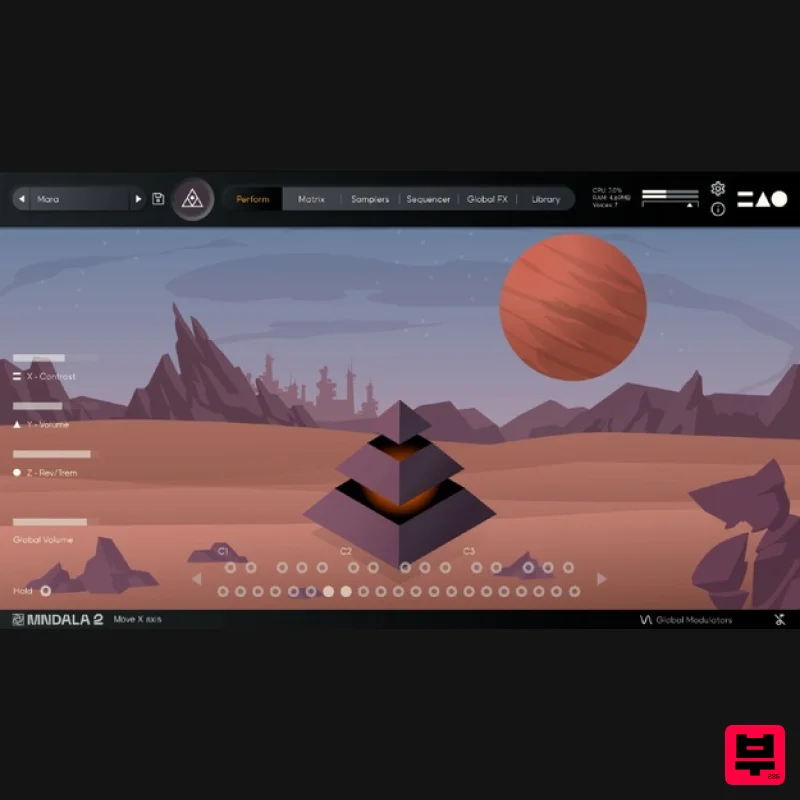
- and more blend together to forge a vast unique cinematic soundscape - enhanced by our multidimensional Sound Sculpture audio engine MNDALA 2. Performed by award-winning multi-instrumentalist composer Brian D'Oliveira
- and drawing from decades of experience gained during our award-winning film and video-game productions
- Orakle features Medieval & Eastern-inspired performance methods as well as unconventional extended techniques. Each note is a unique performance brought to life within Orakle
- ready for you to sculpt. Ranging from our powerful Tibetan Horns and Giant Concert Bass Drum to the grating wails of the Turkish Kabak Kemane and Treble Viola Da Gambas
- Orakle creates a distinctly dark atmosphere. Our sampling approach comes from our desire to share something unconventionally interesting. Enhanced and transformed within our MNDALA Engine
- allows you to explore countless sonic pathways of dynamic sound design with these rare instruments. List Of Instruments Low Tibetan Horn Long Low Tibetan Horn Short High Tibetan Horn Short Cymbal Bowed F Cymbal Bowed MF Cymbal Bowed P Bass Drum Strike F Bass Drum Strike MF Bass Drum Roll Repinique Drum Hit 1 Repinique Drum Hit 2 Frame Drum Mallet Strike F Frame Drum Mallet Strike MF Frame Drum Mallet Strike P Clapping Sticks 1 Clapping Sticks 2 Voice Long F Voice Long MF Voice Long P Voice Short F Voice Short MF Voice Short P Baroque Cello Harmonics Long 1 Baroque Cello Harmonics Long 2 Baroque Cello Harmonic Short 1 Baroque Cello Harmonics Short 2 Kabak Long Kabak Flick Treble Gamba Long Left Treble Gamba Long Right Treble Gamba Pizz Features 31 Sample Maps 46 Presets Up to 59 Round Robins Recorded at 32-bit 384khz resolution CPU-friendly playback at 24-bit 96khz resolution System Requirements VST/AU/AAX plugin for Windows & Mac OS (10.11+) including Apple Silicon support Plugin app and samples watermarked to you Easy downloads and updates via Pulse Downloader 11 GB installed
- 16 GB required for setup Minimum 8GB of RAM and an i5 or better CPU required Supported by all VST/AU/AAX compatible DAWs Chris Dudley “I own every MNTRA instrument and I can honestly say they’re all pushing a limit and filling a niche I didn’t even know was there.” Ryan Elder “In a sea of virtual instruments and sound libraries MNTRA's Instruments really stand out as creative and inspirational tools.” Nemanja Rancic “I find all the MNTRA instruments to be organic
- yet perfectly capable of blending with synths. They feel timeless to me
- because I can use them in any project I work on.” Mac 1. Download the MNDALA 2 Engine installer from your Plugin Boutique User Account > Extract the .zip archive > Launch the .pkg installer. 2. Click 'Continue'. 3. Click 'Continue'. 4. Click 'Agree'. 5. Click 'Continue'. 6. Click 'Install'. 7. Click 'Install Software'. 8. Click 'Close'. 9. Launch your DAW > Insert MNDALA 2 on a new instrument track > Click 'Create New Account' (If you have an existing MNTRA Instruments log in and skip to step 15). 10. Enter your email address and click 'Register'. 11. A MNTRA account has now been created > Click 'edit your password and account details' to create a password for your MNTRA account. 12. Enter your chosen password into the 'New password' box > Enter your password again into the 'Confirm new password' box > Click 'Save changes'. 13. Enter your MNTRA account details > Click 'Login'. 14. You are now logged into the MNDALA 2 Engine > Click 'Library' to continue to activate Huracan. 15. Click 'Add From Serial'. 16. Enter your serial number found within your Plugin Boutique User Account > Click 'Enter'. 17. Click 'OK'. 18. Click 'Install'. 19. Click 'OK' > Choose a location to store the instruments samples. 20. Huracan is now downloading (this may take a few minutes). 21. Click 'OK'. 22. Click 'OK' > Close and relaunch your DAW. 23. Insert MNDALA 2 on a new instrument track > Click 'Open Preset Browser'. 24. Select 'Huracan' then choose a preset. Huracan is now installed
- activated
- and ready to use. Windows 1. Download the MNDALA 2 Engine installer from your Plugin Boutique User Account > Extract the .zip archive > Launch the .exe installer. 2. Click 'More info'. 3. Click 'Run anyway'. 4. Accept the license agreement > Click 'Next'. 5. Click 'Next'. 6. Click 'Next'. 7. Click 'Next'. 8. Click 'Install'. 9. Click 'Finish'. 10. Launch your DAW > Insert MNDALA 2 on a new instrument track > Click 'Create New Account' (If you have an existing MNTRA Instruments log in and skip to step 15). 11. Enter your email address and click 'Register'. 12. A MNTRA account has now been created > Click 'edit your password and account details' to create a password for your MNTRA account. 13. Enter your chosen password into the 'New password' box > Enter your password again into the 'Confirm new password' box > Click 'Save changes'. 14. Enter your MNTRA account details > Click 'Login'. 15. You are now logged into the MNDALA 2 Engine > Click 'Library' to continue to activate Huracan. 16. Click 'Add From Serial'. 17. Enter your serial number found within your Plugin Boutique User Account > Click 'Enter'. 18. Click 'OK'. 19. Click 'Install'. 20. Click 'OK' > Choose a location to store the instruments samples. 21. Huracan is now downloading (this may take a few minutes). 22. Click 'OK'. 23. Click 'OK' > Close and relaunch your DAW. 24. Insert MNDALA 2 on a new instrument track > Click 'Open Preset Browser'. 25. Select 'Huracan' then choose a preset. Huracan is now installed
- activated
- and ready to use.
Additional Information
About the MNTRA Instruments Orakle
The MNTRA Instruments Orakle represents excellent craftsmanship in the Virtual Instruments category.
Why Choose the MNTRA Instruments Orakle?
- •Authentic MNTRA Instruments craftsmanship and design
- •Versatile sound suitable for multiple musical genres
- •Professional build quality and reliable performance
- •Part of MNTRA Instruments's respected Virtual Instruments lineup
Compare & Explore
Browse our complete selection of MNTRA Instruments instruments or explore other Virtual Instruments options. Use our comparison tools to find the perfect match for your musical style and budget.
Similar Products

Safari Audio Cubby
Virtual Instruments

MNTRA Instruments Nagual
Virtual Instruments

UJAM BEAUTYFLUTE Pro
Virtual Instruments

ZAK Sound Asteroid
Virtual Instruments

MeldaProduction Electric Keys - Tines
Virtual Instruments

ZAK Sound Lyra
Virtual Instruments

Boom SWAMPS - 3D Surround
Virtual Instruments

Audiomodern Opacity 2: Soundbox Instrument
Virtual Instruments

