
MNTRA Instruments Kymera
Professional music gear - detailed information and where to buy
MNTRA Instruments
Kymera
Product Info
* Prices may vary. Check retailer for current pricing and availability.
Product Description
- Dark Sound Effects Redefined Kymera is a macabre collection of haunted sounds for the next generation of horror. Building on years of R&D in creating custom instruments for award-winning horror video games and films
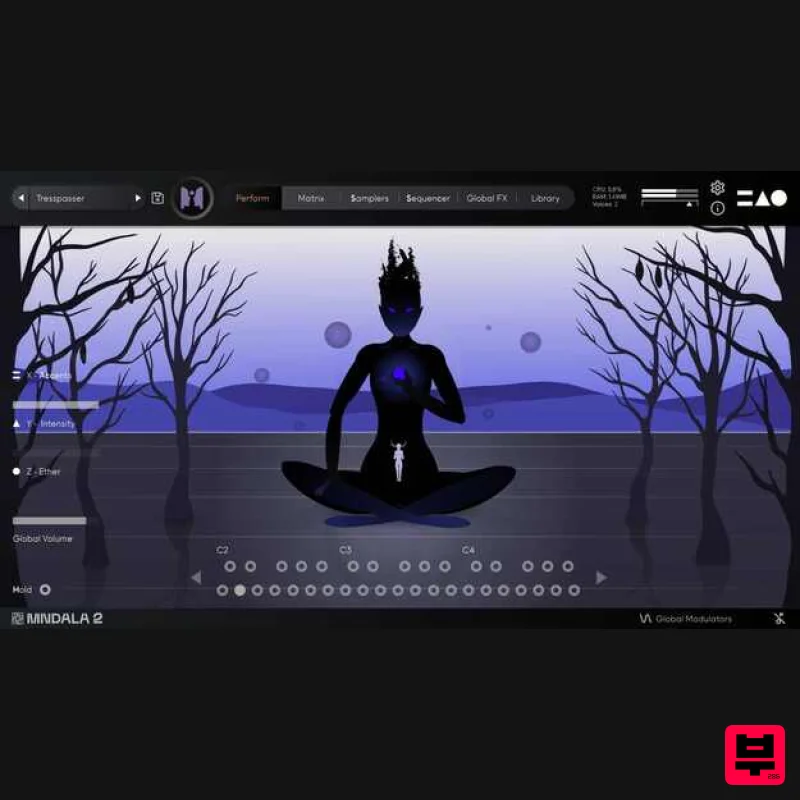
- the MNTRA team spent weeks in the studio experimenting with unconventional sound objects and techniques to bring you a horror toolkit unlike any other. Proprietary Engine - VST/AU Plugin included. No additional software required. 3-Axis Universal Controls - Simply map your favorite controller once for all plugin instances. Intuitive Performance GUI - Custom animation-driven performance interface & mouse interactions. Industry Audio Quality - 384khz/32-bit extended ultrasonic range sample sources Enter a World of Evil Kymera is the first entry in MNTRA Instruments' new series of instruments based on the principles of Musique concrète developed by French composer Pierre Schaeffer in the 1940s and now taken into the future. Inside you will find a vast collection of idiosyncratic sounds recorded in extreme ultrasonic quality
- allowing you to pitch and manipulate the original recordings beyond recognition without losing their clarity and definition. As laid out in the tape experiments conducted by Schaeffer and his contemporaries in the mid-20th century
- Kymera allows you to burn all relations between the sampled material and its sonic origin
- creating brand new sound objects out of the ashes. Inspired by classic horror sound effects
- this instrument is not for the faint of heart. Spanning the screeching tones of dry ice on metal
- whining hurdy-gurdy drones
- blood-curdling screams
- the voice of MNTRA's studio mascot Penny the French bulldog
- and countless others; these sounds are a testament to their love for all things dark. Within the collection of 60 presets that MNTRA has designed to kickstart your journey into this dark new world
- you will find sound effects including dynamic monster vocalizations
- environmental sounds
- and foley; as well as tonal elements such as rhythmic sequences
- drones
- and pads made from surprising and unlikely sources. Whether you're a sound designer searching for the creature sounds of the future
- an experimental musician looking to add organic depth to your productions
- or a film/video game composer in need of instant inspiration
- there is something waiting for you in Kymera. Inside Kymera (30 Sample Maps and Up to 14 Round Robbins) Monsters Monster Snarl Long Monster Snarl Short Monster Breathy Growl Monster Guttural Creature Inhale Croak Creature Tongue Creature Snarl Bloodcurdling Scream Canine Intimidation Canine Grumble Canine Saliva Mouth Tear Mouth Ingestion Mouth Devour Liquid Gulping Haunted House Haunted House Door Creak Long Haunted House Door Creak Short Haunted House Wail Haunted House Trapdoor Haunted House Drag Old Coffin Creak Spectres Lochness Groan Long Lochness Groan Short Industrial Rattle Short Industrial Rattle Long Tectonic Quake Long Tectonic Quake Short Features 30 Sample Maps Up to 14 Round Robbins Recorded at 32-bit 384 kHz resolution Extreme resolution CPU efficient in-DAW playback & blazingly fast preset loading Plugin app and samples watermarked to you System Requirements 872 MB installed (2 GB recommended for setup) VST / AU / AAX plugin for Windows & Mac OS (10.11+) (including M1 Chip support) Minimum 8 GB of RAM and an i5 or better CPU required (SSD drive recommended) Supported by all VST / AU / AAX compatible DAWs Note: Huracan is used as an example. Mac 1. Download the MNDALA 2 Engine installer from your Plugin Boutique User Account > Extract the .zip archive > Launch the .pkg installer. 2. Click 'Continue'. 3. Click 'Continue'. 4. Click 'Agree'. 5. Click 'Continue'. 6. Click 'Install'. 7. Click 'Install Software'. 8. Click 'Close'. 9. Launch your DAW > Insert MNDALA 2 on a new instrument track > Click 'Create New Account' (If you have an existing MNTRA Instruments log in and skip to step 15). 10. Enter your email address and click 'Register'. 11. A MNTRA account has now been created > Click 'edit your password and account details' to create a password for your MNTRA account. 12. Enter your chosen password into the 'New password' box > Enter your password again into the 'Confirm new password' box > Click 'Save changes'. 13. Enter your MNTRA account details > Click 'Login'. 14. You are now logged into the MNDALA 2 Engine > Click 'Library' to continue to activate Huracan. 15. Click 'Add From Serial'. 16. Enter your serial number found within your Plugin Boutique User Account > Click 'Enter'. 17. Click 'OK'. 18. Click 'Install'. 19. Click 'OK' > Choose a location to store the instruments samples. 20. Huracan is now downloading (this may take a few minutes). 21. Click 'OK'. 22. Click 'OK' > Close and relaunch your DAW. 23. Insert MNDALA 2 on a new instrument track > Click 'Open Preset Browser'. 24. Select 'Huracan' then choose a preset. Huracan is now installed
- activated
- and ready to use. Windows 1. Download the MNDALA 2 Engine installer from your Plugin Boutique User Account > Extract the .zip archive > Launch the .exe installer. 2. Click 'More info'. 3. Click 'Run anyway'. 4. Accept the license agreement > Click 'Next'. 5. Click 'Next'. 6. Click 'Next'. 7. Click 'Next'. 8. Click 'Install'. 9. Click 'Finish'. 10. Launch your DAW > Insert MNDALA 2 on a new instrument track > Click 'Create New Account' (If you have an existing MNTRA Instruments log in and skip to step 15). 11. Enter your email address and click 'Register'. 12. A MNTRA account has now been created > Click 'edit your password and account details' to create a password for your MNTRA account. 13. Enter your chosen password into the 'New password' box > Enter your password again into the 'Confirm new password' box > Click 'Save changes'. 14. Enter your MNTRA account details > Click 'Login'. 15. You are now logged into the MNDALA 2 Engine > Click 'Library' to continue to activate Huracan. 16. Click 'Add From Serial'. 17. Enter your serial number found within your Plugin Boutique User Account > Click 'Enter'. 18. Click 'OK'. 19. Click 'Install'. 20. Click 'OK' > Choose a location to store the instruments samples. 21. Huracan is now downloading (this may take a few minutes). 22. Click 'OK'. 23. Click 'OK' > Close and relaunch your DAW. 24. Insert MNDALA 2 on a new instrument track > Click 'Open Preset Browser'. 25. Select 'Huracan' then choose a preset. Huracan is now installed
- activated
- and ready to use.
Additional Information
About the MNTRA Instruments Kymera
The MNTRA Instruments Kymera combines traditional design with modern performance for Virtual Instruments enthusiasts.
Why Choose the MNTRA Instruments Kymera?
- •Authentic MNTRA Instruments craftsmanship and design
- •Versatile sound suitable for multiple musical genres
- •Professional build quality and reliable performance
- •Part of MNTRA Instruments's respected Virtual Instruments lineup
Compare & Explore
Browse our complete selection of MNTRA Instruments instruments or explore other Virtual Instruments options. Use our comparison tools to find the perfect match for your musical style and budget.
Similar Products

Audiomodern Opacity 2: Soundbox Instrument
Virtual Instruments

Boom SWAMPS - 3D Surround
Virtual Instruments

ZAK Sound Asteroid
Virtual Instruments

MNTRA Instruments Nagual
Virtual Instruments

MeldaProduction Electric Keys - Tines
Virtual Instruments

UJAM BEAUTYFLUTE Pro
Virtual Instruments

Safari Audio Cubby
Virtual Instruments

ZAK Sound Lyra
Virtual Instruments

