
MNTRA Instruments Huracan
Professional music gear - detailed information and where to buy
MNTRA Instruments
Huracan
Product Info
* Prices may vary. Check retailer for current pricing and availability.
Product Description
- Wild Winds Awaken Introducing Huracan
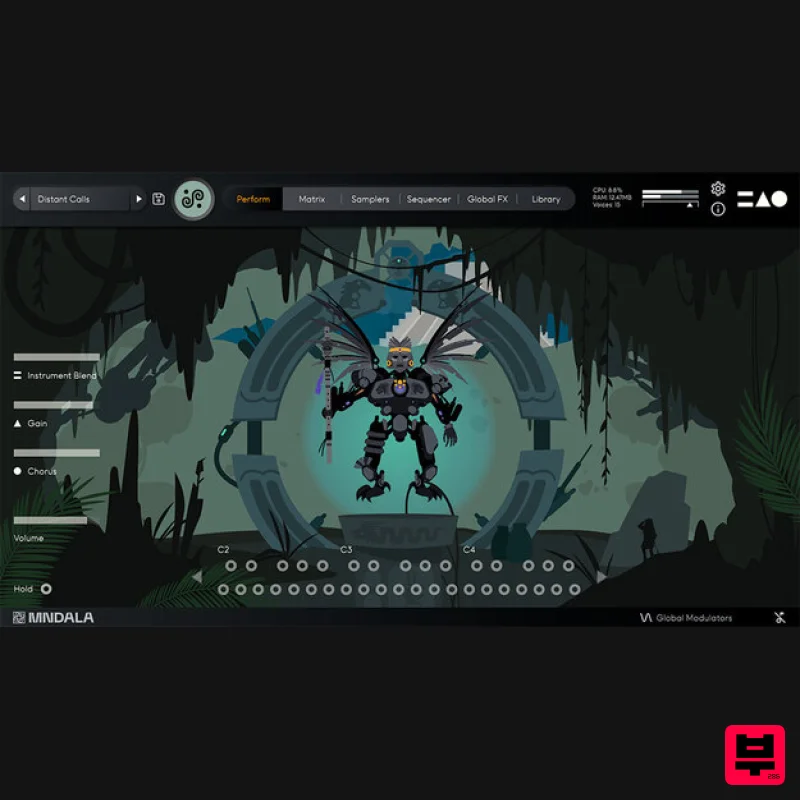
- a gateway into a new world of winds and percussion inspired by Meosoamerican and Andean cultures. 11 rare and unique wind instruments are accompanied by 5 textural percussion sounds
- giving you a complete
- curated palette
- ready to create breathtaking music. Huracan (A.K.A; U Kʼux Kaj
- Heart of Sky) is a Kʼicheʼ Maya god of wind
- storm
- and fire. Here MNTRA imagined a hidden cenote deep in the jungle where a lone traveller stumbles upon the ancient deity
- incidentally awakening it from a deep slumber and activating a portal into an alternate timeline where pre-hispanic cultures continued to thrive unaffected by colonisation. Over time they developed their own distinctive version of synthesisers and electronic instruments. Central to Huracan is MNTRA's founder Brian D’Oliveira’s (Composer of Shadow of the Tomb Raider
- The Witcher: Nightmare of the Wolf ) deep connection with South and Central American cultures and their unique instruments. Originally raised in the Venezuelan Andes mountains
- he began a lifelong pursuit of learning and researching ancient musical cultures
- starting with these unique instruments. Here
- MNTRA have deeply sampled a curated collection of sources from his personal arsenal
- allowing you to harness their unique potential in your own compositions. Within MNTRA's bespoke Animistic Sampler Engine
- MNDALA
- these sounds can be shaped into entirely new forms with an intuitive 3-axis global control system. Built on years of development in capturing and efficiently reproducing extreme definition audio
- MNDALA allows you to discover and manipulate the ultrasonic textures hidden within these ancient winds and percussion
- never before accessible in a playable form. Additionally
- the extensive custom-made FX system gives you the tools to transform the source material into an endless range of otherworldly synths and textures
- their natural air and pitch fluctuations imbuing your sound with unparalleled life and variation. Instruments Wind Mihuioti Whistle (Straight
- Flutter) - Prehispanic bird whistle made of earthenware from Minerales de Pozos in Central Mexico Quena (Short
- Long
- Flutter) - Peruvian quena with bone mouthpiece Double Chamber Flute (Short
- Straight
- Flutter) - Double-chambered flute from Peru Skull Ocarina - Earthenware Prehispanic calavera (skull) ocarina Palo De Canto (Short
- Long) - Rare Amazonian whistling double aerophones (singing sticks) Percussion Guadua Hit - Large percussive bamboo Aerophone hit with hands Prehispanic Ceremonial Shakers - Prehispanic ceremonial shakers sourced from Minerales de Pozos in central Mexico Güiro Selvático - Cylindrical güiro made from Amazonian black wood Gourd Hom-Pax Hit - Percussive hit on a gourd variant of a Mayan trumpet Metal Hom-Pax Hit - Percussive hit on a metal variant of a Mayan trumpet Features 40+ Presets 16 Instrument Sample Maps Up to 20 Round Robins Up to 3 Dynamic Layers 3 Microphone channels (Close
- Vintage) Recorded at extreme definition 32-bit 384kHz ultrasonic resolution CPU-efficient in-engine playback at industry- 24-bit 96kHz resolution No fuss copy protection - simply install and the instrument is uniquely encrypted to be used within your system Seamless download
- updates
- and installation within MNDALA with a registered MNTRA account System Requirements 2 GB installed (5 GB recommended for setup) 64-bit VST3 / AU / AAX plugin for Windows & macOS (10.11+) (including M1 Chip support) Minimum 8 GB of RAM and an i5 or better CPU required (SSD drive recommended) Supported by all VST3 / AU / AAX compatible DAWs Mac 1. Download the MNDALA 2 Engine installer from your Plugin Boutique User Account > Extract the .zip archive > Launch the .pkg installer. 2. Click 'Continue'. 3. Click 'Continue'. 4. Click 'Agree'. 5. Click 'Continue'. 6. Click 'Install'. 7. Click 'Install Software'. 8. Click 'Close'. 9. Launch your DAW > Insert MNDALA 2 on a new instrument track > Click 'Create New Account' (If you have an existing MNTRA Instruments log in and skip to step 15). 10. Enter your email address and click 'Register'. 11. A MNTRA account has now been created > Click 'edit your password and account details' to create a password for your MNTRA account. 12. Enter your chosen password into the 'New password' box > Enter your password again into the 'Confirm new password' box > Click 'Save changes'. 13. Enter your MNTRA account details > Click 'Login'. 14. You are now logged into the MNDALA 2 Engine > Click 'Library' to continue to activate Huracan. 15. Click 'Add From Serial'. 16. Enter your serial number found within your Plugin Boutique User Account > Click 'Enter'. 17. Click 'OK'. 18. Click 'Install'. 19. Click 'OK' > Choose a location to store the instruments samples. 20. Huracan is now downloading (this may take a few minutes). 21. Click 'OK'. 22. Click 'OK' > Close and relaunch your DAW. 23. Insert MNDALA 2 on a new instrument track > Click 'Open Preset Browser'. 24. Select 'Huracan' then choose a preset. Huracan is now installed
- activated
- and ready to use. Windows 1. Download the MNDALA 2 Engine installer from your Plugin Boutique User Account > Extract the .zip archive > Launch the .exe installer. 2. Click 'More info'. 3. Click 'Run anyway'. 4. Accept the license agreement > Click 'Next'. 5. Click 'Next'. 6. Click 'Next'. 7. Click 'Next'. 8. Click 'Install'. 9. Click 'Finish'. 10. Launch your DAW > Insert MNDALA 2 on a new instrument track > Click 'Create New Account' (If you have an existing MNTRA Instruments log in and skip to step 15). 11. Enter your email address and click 'Register'. 12. A MNTRA account has now been created > Click 'edit your password and account details' to create a password for your MNTRA account. 13. Enter your chosen password into the 'New password' box > Enter your password again into the 'Confirm new password' box > Click 'Save changes'. 14. Enter your MNTRA account details > Click 'Login'. 15. You are now logged into the MNDALA 2 Engine > Click 'Library' to continue to activate Huracan. 16. Click 'Add From Serial'. 17. Enter your serial number found within your Plugin Boutique User Account > Click 'Enter'. 18. Click 'OK'. 19. Click 'Install'. 20. Click 'OK' > Choose a location to store the instruments samples. 21. Huracan is now downloading (this may take a few minutes). 22. Click 'OK'. 23. Click 'OK' > Close and relaunch your DAW. 24. Insert MNDALA 2 on a new instrument track > Click 'Open Preset Browser'. 25. Select 'Huracan' then choose a preset. Huracan is now installed
- activated
- and ready to use.
Additional Information
About the MNTRA Instruments Huracan
The MNTRA Instruments Huracan combines traditional design with modern performance for Virtual Instruments enthusiasts.
Why Choose the MNTRA Instruments Huracan?
- •Authentic MNTRA Instruments craftsmanship and design
- •Versatile sound suitable for multiple musical genres
- •Professional build quality and reliable performance
- •Part of MNTRA Instruments's respected Virtual Instruments lineup
Compare & Explore
Browse our complete selection of MNTRA Instruments instruments or explore other Virtual Instruments options. Use our comparison tools to find the perfect match for your musical style and budget.
Similar Products

MNTRA Instruments Nagual
Virtual Instruments

Safari Audio Cubby
Virtual Instruments

Boom SWAMPS - 3D Surround
Virtual Instruments

ZAK Sound Lyra
Virtual Instruments

Audiomodern Opacity 2: Soundbox Instrument
Virtual Instruments

MeldaProduction Electric Keys - Tines
Virtual Instruments

ZAK Sound Asteroid
Virtual Instruments

UJAM BEAUTYFLUTE Pro
Virtual Instruments

