
MeldaProduction MAutoStereoFix
Professional music gear - detailed information and where to buy
MeldaProduction
MAutoStereoFix
Product Info
* Prices may vary. Check retailer for current pricing and availability.
Product Description
- MAutoStereoFix is a magical tool
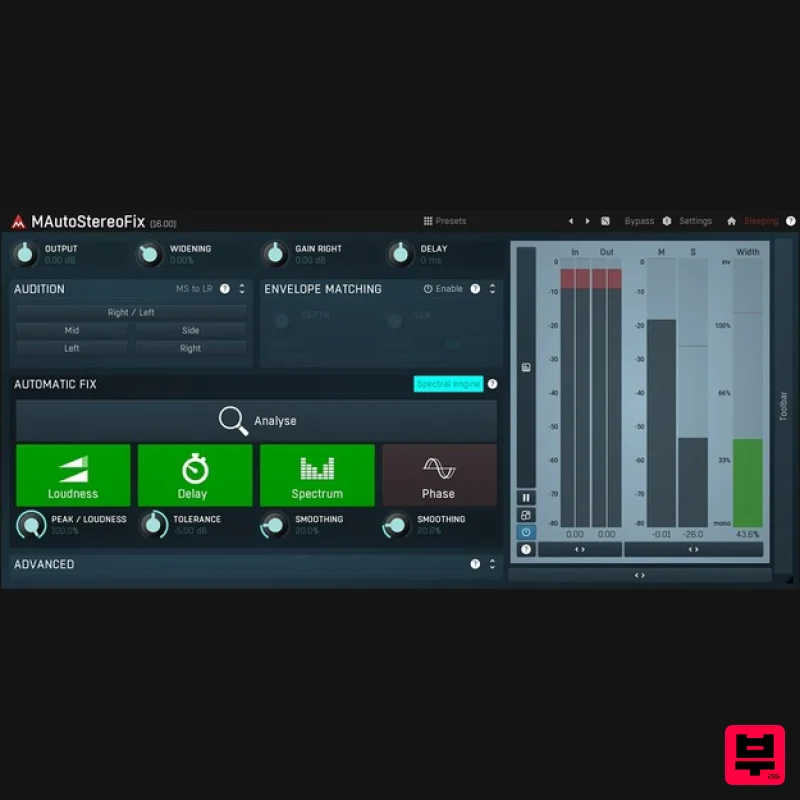
- that fixes problems in stereo recordings even if you didn't even know there are any! It has been designed for stereo microphone recordings such as overheads and rooms
- but can be used on master tracks as well. Extremely easy to use MAutoStereoFix analyzes your audio material and automatically matches the volume
- time
- spectrum and phase of the right channel to the left channel. And if you like it can even match the volume envelope. Just put it on your track and let it do the magic. It's quick and simple and often the results will surprise you
- as you would't even know there is a problem until it fixed it! Stereo checking made easy No computer can judge the stereo field better than your ears. With MAutoStereoFix you can easily put on your best headphones and listen to individual channels
- swap left and right
- check the mid... and create a perfect centered stereo field everyone will envy you. Features The most advanced user interface on the market - stylable
- resizable
- GPU accelerated MIDI controllers with MIDI learn 64-bit processing and an unlimited sampling rate Extremely fast
- optimized for newest AVX capable processors Global preset management and online preset exchange Supports VST
- VST3
- AU and AAX interfaces on Windows & Mac No dongle nor internet access is required for activation Free-for-life updates System Requirements Windows Windows 8 / 10 / 11 (64-bit) VST / VST3 / AAX compatible host (64-bit) Intel/AMD processor with SSE2 support macOS macOS 10.14 and newer (64-bit) VST / VST3 / AU / AAX compatible host Intel/AMD/M1 processor with SSE2 support Native Apple Silicon ARM CPU support Note: Please check your product PDF documentation for more information and installation instructions. Please Note: MPowerSynth is used as an example. Activation 1. Click download in your Plugin Boutique User Account or go to https://www.meldaproduction.com/downloads. 2. Download the relevant installer > Complete the installation process. 3. Go to https://www.meldaproduction.com/register/ > Fill out the requested details and click 'Create Account' > Skip to step 4 if you already have an account. 4. Open the MPluginManager > Click 'Sign in' in the top right corner. 5. Enter your MeldaProduction details > Click 'Ok'. 6. Navigate to the 'LICENCES & ACTIVATION' tab > Click 'Redeem serial code from a reseller'. 7. Enter the serial found in your Plugin Boutique User Account > Click 'Ok'. 8. Navigate back to the 'PLUGINS' tab
- locate your plugin and click on it > Once highlighted
- click 'INSTALL / CHANGE' to install the plugin. Your plugin is now activated and ready to be used within your DAW!
Additional Information
About the MeldaProduction MAutoStereoFix
The MeldaProduction MAutoStereoFix represents excellent craftsmanship in the Utility category.
Why Choose the MeldaProduction MAutoStereoFix?
- •Authentic MeldaProduction craftsmanship and design
- •Versatile sound suitable for multiple musical genres
- •Professional build quality and reliable performance
- •Part of MeldaProduction's respected Utility lineup
Compare & Explore
Browse our complete selection of MeldaProduction instruments or explore other Utility options. Use our comparison tools to find the perfect match for your musical style and budget.
Similar Products

Inphonik RX950
Utility

Audible Genius Building Blocks 2
Utility

Audible Genius Building Blocks 1
Utility

Acoustica Spin It Again
Utility

Blue Cat Audio Blue Cat's Connector
Utility

Tonalic Tonalic Arranger - 30 Day Subscription
Utility

DDMF TheStrip
Utility

Soundspear Luxor
Utility

