
MAAT MtG
Professional music gear - detailed information and where to buy
Product Description
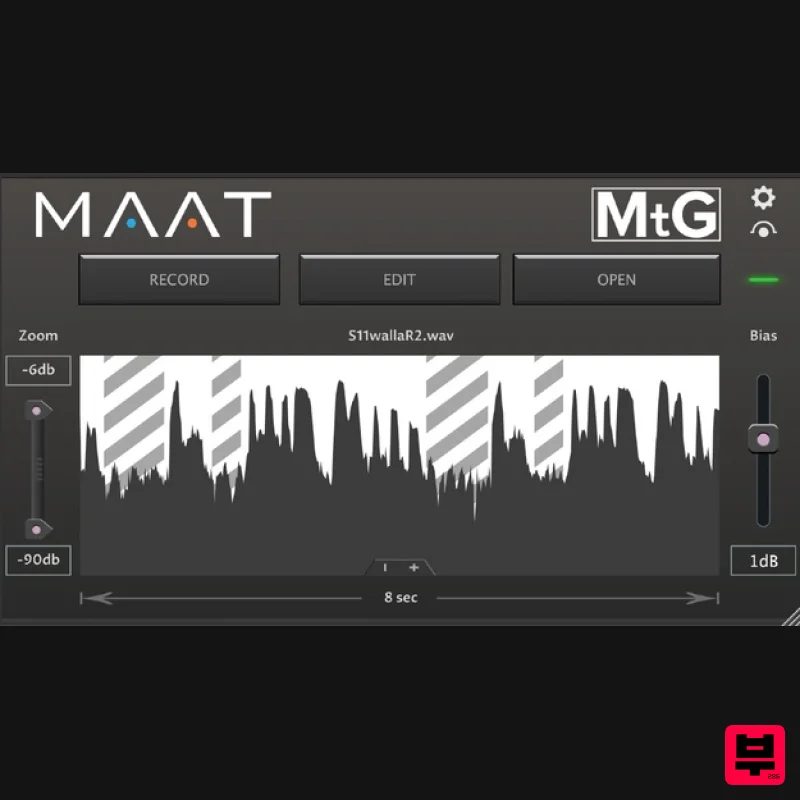
- Cut dialogue? You need MtG. MtG : : Cross-Platform Plugin Escape the drudgery of dialogue
- foley and effects editing. Your Sound
- Your Way Streamlining workflows for spoken word
- sound–for–picture
- podcast and broadcast production
- MtG automatically fills gaps
- of any length
- in edited tracks. The plugin supplies looped audio
- with controls for visualizing and defining loop fills
- along with gain controls to seamlessly integrate the looped audio into your material. Use MtG to speed up the creation of your music beds
- ambience
- actualities
- foley and
- of course
- radio and TV audio; anywhere continuous seamless repetitive audio is needed. A cross-platform plugin
- MtG works in your favourite DAW at whatever sample rate you need. For radio
- television and podcasting work
- go with 44.1 or 48k. For game audio
- cinematic production or whenever clarity and resolution are paramount
- MtG handles up to 384 kHz with ease. Not all DAWs behave the same
- and MtG knows that. It includes safeguards that inform you if your DAW isn’t ready to play nice with MtG
- reducing error and frustration. MtG also includes zoom controls to quickly identify any inaudible and undesirable material you may want to remove from your loop. Save Your Sanity
- Let MAAT Help MtG: easy to use
- built-in loop editor
- fills any length gaps. For dialogue
- demos
- music and EFX beds - Anytime you need to quickly loop a phrase or section and fill in empty gaps in your track. Download a demo and start making more organic
- better sounding content faster. Features Automatically loops and inserts user-defined content Quickly build music beds
- dialogue & foley backgrounds
- layered effects Works at HRA sample rates Integrated loop editor Fast and efficient Seamlessly fills gaps of any length System Requirements Mac: macOS 10.9 or later (Universal Binary 2) (64-bit only) PC: Windows 7 and newer (32 / 64-bit) Supported Formats: AAX Native (Pro Tools 10.3.10 and newer) AU
- VST 2
- VST 3 Sample rates from 44.1 to 384 kHz. Note: DRMeter MkII is used as the example Mac Installation 1. Download the .zip folder from your Plugin Boutique User Account and double-click it's contents. 2. Double-click the .dmg installer file to begin the installation process > Click 'Continue'. 3. Enter your name and Email > Click 'Register'. 4. Click 'Continue'. 5. Click 'Continue'. 6. Click 'Continue'. 7. Click 'Agree'. 8. Click 'Continue'. 9. Click 'Install'. 10. Click 'Close'. Mac Online Activation 1. Open MAAT DRMeter MKII as a standalone or inside of your DAW. > Click 'Activate/Deactivate License'. 2. Enter the Product Key that can be found in your Plugin Boutique User Account > Click 'Activate Online'. 3. Click 'Ok'. Your software has now been activated and is ready for use! Mac Offline Activation 1. Open MAAT DRMeter MKII as a standalone or inside of your DAW. > Click 'Activate/Deactivate License'. 2. Enter the Product Key that can be found in your Plugin Boutique User Account > Click 'Create License Request'. 3. Click 'OK'. 4. Choose a location for the License Request File to be saved > Click 'Open'. 5. Email the License Request File to [email protected] 6. Once you have received the .maatc confirmation file from MAAT open MAAT DRMeter MKII > Click 'Activate/Deactivate License'. 2. Click 'Activate Offline'. 3. Click 'OK'. 4. Find the .maatc confirmation file sent from MAAT > Click 'Open'. 5. Click 'Ok'. Your software has now been activated and is ready for use! Windows Installation 1. Download the .zip folder from your Plugin Boutique User Account and double-click it's contents. 2. Double-click the .exe installer file to begin the installation process. 3. Enter your name and Email > Click 'Register'. 4. Select 'I accept the agreement' > Click 'Next'. 5. Click 'Next'. 6. Click 'Next'. 7. Click 'Next'. 8. Click 'Next'. 9. Select the components you would like to install > Click 'Next'. 10. Click 'Install'. 11. Click 'Finish'. Windows Online Activation 1. Open MAAT DRMeter MKII as a standalone or inside of your DAW. > Click 'Activate/Deactivate License'. 2. Enter the Product Key that can be found in your Plugin Boutique User Account > Click 'Activate Online'. 3. Click 'Ok'. Your software has now been activated and is ready for use! Windows Offline Activation 1. Open MAAT DRMeter MKII as a standalone or inside of your DAW. > Click 'Activate/Deactivate License'. 2. Enter the Product Key that can be found in your Plugin Boutique User Account > Click 'Create License Request'. 3. Click 'OK'. 4. Choose a location for the License Request File to be saved > Click 'OK'. 5. Click 'OK' and email the License Request File to [email protected] 6. Once you have received the .maatc confirmation file
- open MAAT DRMeter MKII > Click 'Activate/Deactivate License'. 2. Click 'Activate Offline'. 3. Click 'OK'. 4. Find the .maatc confirmation file sent from MAAT > Click 'Open'. 5. Click 'Ok'. Your software has now been activated and is ready for use!
Additional Information
About the MAAT MtG
Experience the quality and tone that makes the MAAT MtG a popular choice for musicians.
Why Choose the MAAT MtG?
- •Authentic MAAT craftsmanship and design
- •Versatile sound suitable for multiple musical genres
- •Professional build quality and reliable performance
- •Part of MAAT's respected Utility lineup
Compare & Explore
Browse our complete selection of MAAT instruments or explore other Utility options. Use our comparison tools to find the perfect match for your musical style and budget.
Similar Products

Soundspear Luxor
Utility
$30
Luxor is the key if you want an instrument to stand out and spread in the mix. It will scoop your high frequencies to...

Audible Genius Building Blocks 2
Utility
$30
Music Theory & Composition Training Software for DAW-Based Music Makers Drum Patterns, Basslines, Chord Progressions,...

Inphonik RX950
Utility
$30
Legendary Grit and Crunch Meet the RX950 Classic AD/DA Converter, Inphonik’s first effect plug-in, designed to...

Audible Genius Building Blocks 1
Utility
$30
Music Theory & Composition Training Software for DAW-Based Music Makers Drum Patterns, Basslines, Chord Progressions,...

DDMF TheStrip
Utility
$30
What is it? The Strip is the essential channel strip: the finest EQ, gate and compressor bundled in one beautifully...

Acoustica Spin It Again
Utility
$30
Spin It Again is the easiest way to convert your LPs and cassettes to CD and MP3. Remember all those ‘oldies but...

Blue Cat Audio Blue Cat's Connector
Utility
$30
The Virtual Cable For Your Virtual Studio Blue Cat’s Connector is an audio & MIDI streaming plug-in that can be used...

Tonalic Tonalic Arranger - 30 Day Subscription
Utility
$30
Real Musicians. Real Feel. Adaptive Performance Instrument for Your DAW Bring authentic, human musicianship into your...
Frequently Asked Questions
The MAAT MtG stands out for its exceptional MAAT craftsmanship and innovative design.
Yes! With its affordable price point and quality construction, it's perfect for learning utility.
Browse the similar products section to see how it stacks up against other utility.

