
MAAT LINSurround
Professional music gear - detailed information and where to buy
Product Description
- LINSurround - MAAT's next-generation dithering tool Your Sound
- Your Way MAAT’s multi-channel LINSurround is your final link between production and delivery. Offering optional word length reduction and seven noise shaping spectra tailored to both analogue and digital delivery of assets
- LIN is highly adjustable to help create your own signature “sound.” In addition to TPD and weighted TPD
- LINSurround features four newly developed fifth
- eighth and ninth order psychoacoustic noise shaping choices. As with all dithering mechanisms
- LINSurround must be the very last plugin instance
- just prior to converting to the final
- fixed-point format. LINSurroundincorporates the latest advances in auditory and psychoacoustic research. Older
- outdated dithering engines rely on decades-old approaches to the problem. MAAT evaluated their original LINearise engine and realized that they could “do it” even better
- implementing a more accurate
- mathematically superior approach plus new thinking on both the User Experience (UX) and how you want your master to sound. Whether you’re delivering a 16 bit Red Book dupe master
- a 24 bit “high res” 88.2k file to today’s higher fidelity streaming services or multichannel 48k stems for video and motion picture surround work
- LINSurround will take you there with the best sounding tracks obtainable. Need More? LINSurround has it. As you’d expect
- automatic muting and variable bit depth
- 16 or 24 bits
- but also a choice of 8-bit output to instantly hear how your current choice “sounds.” In addition to Triangular Probability Density Function (TPDF) and High Passed TPDF
- rectangular dither is also available for educational or experimental exploration. Rounding performs fundamental linearization
- what can be thought of as very low amplitude distortion reduction
- by representing all former least significant bits with one single LSB in the resulting word length–reduced version. On the other hand
- truncation does not preserve any of that low amplitude information. Instead
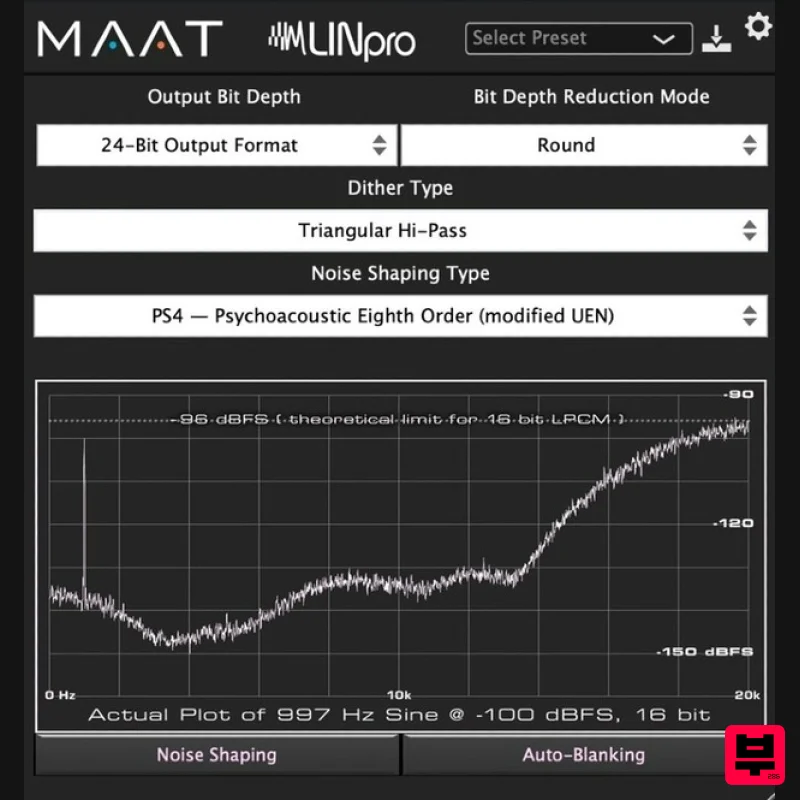
- it’s just thrown away. Eyes On It LINSurround brings visual certainty to the arcane art of dithering. MAAT has included real-world plots of each noise shape for your viewing pleasure. These are not MATLAB simulations
- they are actual plots generated by LINSurround's optimized dither engine. Notice that the -100dBFS input signal
- that spike at the left side of the plot
- is preserved even though the word length has been reduced to 16 bits. A 16–bit word can only encode or store 96dB of dynamic range. Any information quieter than -96dBFS should be lost when reducing the word length to 16 bits. With LIN
- up to the 19th bit of the input signal is preserved
- embedded in the resulting 16–bit word. Dither is a fundamental aspect of today’s DAWs. Although not usually thought of as such
- re-dithering is important DSP (Digital Signal Processing). In the distant past
- much of the pioneering research on dither was performed at Bell Labs. According to information theory
- you should add a pinch of noise to your digital audio every time you alter it to keep it distortion-free and to preserve program content by embedding it in the noise floor. That’s dither. Use it to make your digital audio less…“digital!” Key Features Redithering Triangular
- High Passed Triangular
- Rectangular Noise Shaping Bypass/Defeat Word Length Reduction 24
- 8 Significant Digits Round
- Truncate Spectrum & Weighting 1st Order Noise Shaping 2nd Order Noise Shaping 3rd Order Noise Shaping 5th Order Noise Shaping (improved E-weighting) 8th Order Noise Shaping (modified ITU 486) 8th Order Noise Shaping (modified UEN) 9th Order Noise Shaping (F-weighting) Additional Features Choice of 7 noise shapes Choice of 8
- 16 or 24 bit words Choice of rounding or truncation Choice of TDF
- HP TPDF or recatngular dither type 4 factory presets speed choice or customization Integrated
- real-world visual noise shaping plots Auto–blanking prevents “background” contamination Supports up to 128 channels System Requirements Operating Systems macOS 10.9 or newer(Universal Binary 2) (64-bit only) Windows 7 and newer (32 & 64 bit) Supported Platforms AAX Native (Pro Tools 10.3.10 and newer) AU
- VST 2
- VST 3 Sample rates from 44.1 to 384 kHz Note: DRMeter MkII is used as the example Mac Installation 1. Download the .zip folder from your Plugin Boutique User Account and double-click it's contents. 2. Double-click the .dmg installer file to begin the installation process > Click 'Continue'. 3. Enter your name and Email > Click 'Register'. 4. Click 'Continue'. 5. Click 'Continue'. 6. Click 'Continue'. 7. Click 'Agree'. 8. Click 'Continue'. 9. Click 'Install'. 10. Click 'Close'. Mac Online Activation 1. Open MAAT DRMeter MKII as a standalone or inside of your DAW. > Click 'Activate/Deactivate License'. 2. Enter the Product Key that can be found in your Plugin Boutique User Account > Click 'Activate Online'. 3. Click 'Ok'. Your software has now been activated and is ready for use! Mac Offline Activation 1. Open MAAT DRMeter MKII as a standalone or inside of your DAW. > Click 'Activate/Deactivate License'. 2. Enter the Product Key that can be found in your Plugin Boutique User Account > Click 'Create License Request'. 3. Click 'OK'. 4. Choose a location for the License Request File to be saved > Click 'Open'. 5. Email the License Request File to [email protected] 6. Once you have received the .maatc confirmation file from MAAT open MAAT DRMeter MKII > Click 'Activate/Deactivate License'. 2. Click 'Activate Offline'. 3. Click 'OK'. 4. Find the .maatc confirmation file sent from MAAT > Click 'Open'. 5. Click 'Ok'. Your software has now been activated and is ready for use! Windows Installation 1. Download the .zip folder from your Plugin Boutique User Account and double-click it's contents. 2. Double-click the .exe installer file to begin the installation process. 3. Enter your name and Email > Click 'Register'. 4. Select 'I accept the agreement' > Click 'Next'. 5. Click 'Next'. 6. Click 'Next'. 7. Click 'Next'. 8. Click 'Next'. 9. Select the components you would like to install > Click 'Next'. 10. Click 'Install'. 11. Click 'Finish'. Windows Online Activation 1. Open MAAT DRMeter MKII as a standalone or inside of your DAW. > Click 'Activate/Deactivate License'. 2. Enter the Product Key that can be found in your Plugin Boutique User Account > Click 'Activate Online'. 3. Click 'Ok'. Your software has now been activated and is ready for use! Windows Offline Activation 1. Open MAAT DRMeter MKII as a standalone or inside of your DAW. > Click 'Activate/Deactivate License'. 2. Enter the Product Key that can be found in your Plugin Boutique User Account > Click 'Create License Request'. 3. Click 'OK'. 4. Choose a location for the License Request File to be saved > Click 'OK'. 5. Click 'OK' and email the License Request File to [email protected] 6. Once you have received the .maatc confirmation file
- open MAAT DRMeter MKII > Click 'Activate/Deactivate License'. 2. Click 'Activate Offline'. 3. Click 'OK'. 4. Find the .maatc confirmation file sent from MAAT > Click 'Open'. 5. Click 'Ok'. Your software has now been activated and is ready for use!
Additional Information
About the MAAT LINSurround
The MAAT LINSurround represents excellent craftsmanship in the Utility category.
Why Choose the MAAT LINSurround?
- •Authentic MAAT craftsmanship and design
- •Versatile sound suitable for multiple musical genres
- •Professional build quality and reliable performance
- •Part of MAAT's respected Utility lineup
Compare & Explore
Browse our complete selection of MAAT instruments or explore other Utility options. Use our comparison tools to find the perfect match for your musical style and budget.
Similar Products

Blue Cat Audio Blue Cat's Connector
Utility
$30
The Virtual Cable For Your Virtual Studio Blue Cat’s Connector is an audio & MIDI streaming plug-in that can be used...

Audible Genius Building Blocks 1
Utility
$30
Music Theory & Composition Training Software for DAW-Based Music Makers Drum Patterns, Basslines, Chord Progressions,...

Acoustica Spin It Again
Utility
$30
Spin It Again is the easiest way to convert your LPs and cassettes to CD and MP3. Remember all those ‘oldies but...

Audible Genius Building Blocks 2
Utility
$30
Music Theory & Composition Training Software for DAW-Based Music Makers Drum Patterns, Basslines, Chord Progressions,...

Inphonik RX950
Utility
$30
Legendary Grit and Crunch Meet the RX950 Classic AD/DA Converter, Inphonik’s first effect plug-in, designed to...

Soundspear Luxor
Utility
$30
Luxor is the key if you want an instrument to stand out and spread in the mix. It will scoop your high frequencies to...

Tonalic Tonalic Arranger - 30 Day Subscription
Utility
$30
Real Musicians. Real Feel. Adaptive Performance Instrument for Your DAW Bring authentic, human musicianship into your...

DDMF TheStrip
Utility
$30
What is it? The Strip is the essential channel strip: the finest EQ, gate and compressor bundled in one beautifully...
Frequently Asked Questions
The MAAT LINSurround stands out for its exceptional MAAT craftsmanship and innovative design.
Yes! With its affordable price point and quality construction, it's perfect for learning utility.
Browse the similar products section to see how it stacks up against other utility.

