
Loot Audio Wavemeister 2
Professional music gear - detailed information and where to buy
Loot Audio
Wavemeister 2
Product Info
* Prices may vary. Check retailer for current pricing and availability.
Product Description
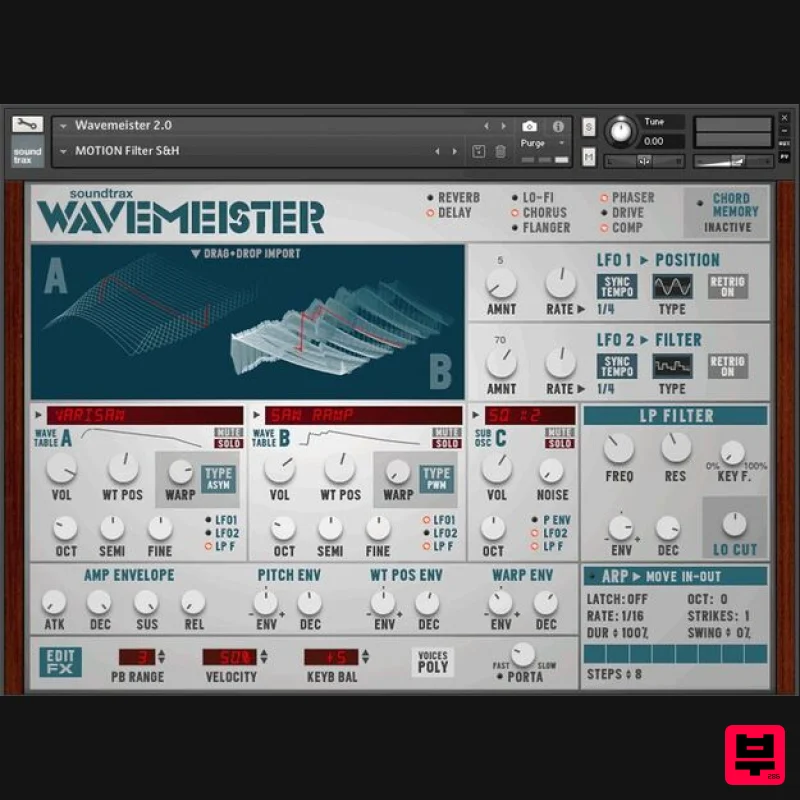
- Please Note: This product requires the FULL version of Kontakt. It will NOT work with the FREE Kontakt Player. Wavetable Synthesizer with Sample Import Wavemeister is a digital wavetable synthesizer taking full advantage of the latest Kontakt innovations
- like Drag & Drop sample import and high-quality onboard effects. Two independent wavetable engines and a sub oscillator are capable to produce a wide range of sounds - everything from raw and noisy to crystal clear is possible. It has countless modulation possibilities
- great sounding filters
- an Arpeggiator and Chord Memory - and is CPU friendly. Wavemeister is an indispensable instrument for contemporary electronic music
- modern sound design and for film scores. Features 2 Wavetable engines and 1 Sub Oscillator Drag and Drop Wavetable import (WAVs & AIFs at any sample rate
- Serum Wavetable import) 34 Factory Wavetables Realtime 3D and 2D wavetable displays Realtime controls and envelopes for Wavetable Position and Warping Controls for Octave
- Semitone and Finetune Sub OSC with 20 basic waveforms 2 independent LFOs for WT-position
- Filter
- Pitch and Pan modulation 12 dB Low Pass Ladder Filter 12 dB High Pass Ladder Filter Polyphonic / Monophonic switch
- Portamento Control Velocity Control and Keyboard Volume Balance Chord Memory Arpeggiator Onboard effects: Reverb
- Replika
- Lo-Fi
- Choral
- Phasis
- Flair
- Drive (Van 51)
- Comp (Supercharger GT) 100 Kontakt snapshots System Requirements Full Kontakt 6.6.0 and above Important Note: The FULL version of Kontakt 6.6.0 and above is required. Note: FameBoy is used as the example. Mac Installation 1. Download your software from your Plugin Boutique User Account. 2. Unpack the contents by double-clicking the .zip file. 3. Open Kontakt > Navigate to the folder titled 'Fame Boy'. 4. Click and the .nki file into the main Kontakt window to load the patch. Your Kontakt Instrument is now installed and ready to use in Kontakt. Windows Installation 1. Download your software from your Plugin Boutique User Account. 2. Unpack the contents by double-clicking the .zip file. 3. Open Kontakt > Navigate to the folder titled 'Fame Boy'. 4. Click and drag the .nki file into the main Kontakt window to load the patch. Your Kontakt Instrument is now installed and ready to use in Kontakt.
Additional Information
About the Loot Audio Wavemeister 2
Discover the distinctive sound and feel of the Loot Audio Wavemeister 2, a standout choice among Kontakt Instrument.
Why Choose the Loot Audio Wavemeister 2?
- •Authentic Loot Audio craftsmanship and design
- •Versatile sound suitable for multiple musical genres
- •Professional build quality and reliable performance
- •Part of Loot Audio's respected Kontakt Instrument lineup
Compare & Explore
Browse our complete selection of Loot Audio instruments or explore other Kontakt Instrument options. Use our comparison tools to find the perfect match for your musical style and budget.
Similar Products

Audiofier Sequi2r EX
Kontakt Instrument

DoubleBang Software Plugged
Kontakt Instrument

Rigid Audio Retrocade
Kontakt Instrument

The Beat House LE HITS THE ESSENTIALS
Kontakt Instrument

Audiofier Aerkord
Kontakt Instrument

Ecliptiq Audio Hexa Rhythm Designer
Kontakt Instrument

Aria Sounds Hybrichord
Kontakt Instrument

HD Instruments ZoneMatrix
Kontakt Instrument

