
Loot Audio Vektor
Professional music gear - detailed information and where to buy
Loot Audio
Vektor
Product Info
* Prices may vary. Check retailer for current pricing and availability.
Product Description
- Nova presents “Vektor” a unique stringed based cinematic Kontakt instrument thats sets a new standard for creating anything from dramatic epic cues to beautiful minimal tracks. “Vektor” allows multiple ways to morph and manipulate the sample sound sources through a unique set of parameters
- allowing any idea in your imagination to transfer to sound with ease. From its unique “Filter Movement” and “Source Movement” manipulations to its innovative “drag and drop” capabilities no sound is impossible. Each of the four sound sources can be independently adjusted through a whole range of parameters
- making possibilities endless. Overview Vektor is a powerful instrument crammed with exciting features and beautiful sounds. At the heart of “Vektor” is 3GBs of samples and 116 beautifully crafted instruments ranging from multi velocity Strings to long dramatic drones. Giving you the ability to push your music to the next level. These categories include: Organic Manipulated Organic Drones Synths FX Along with multiple organic recorded samples
- with instruments like the “Moanful Cello” and “Sul Tasto”
- there are wide ranges of manipulate samples that have been morphed by tape machines
- classic samplers
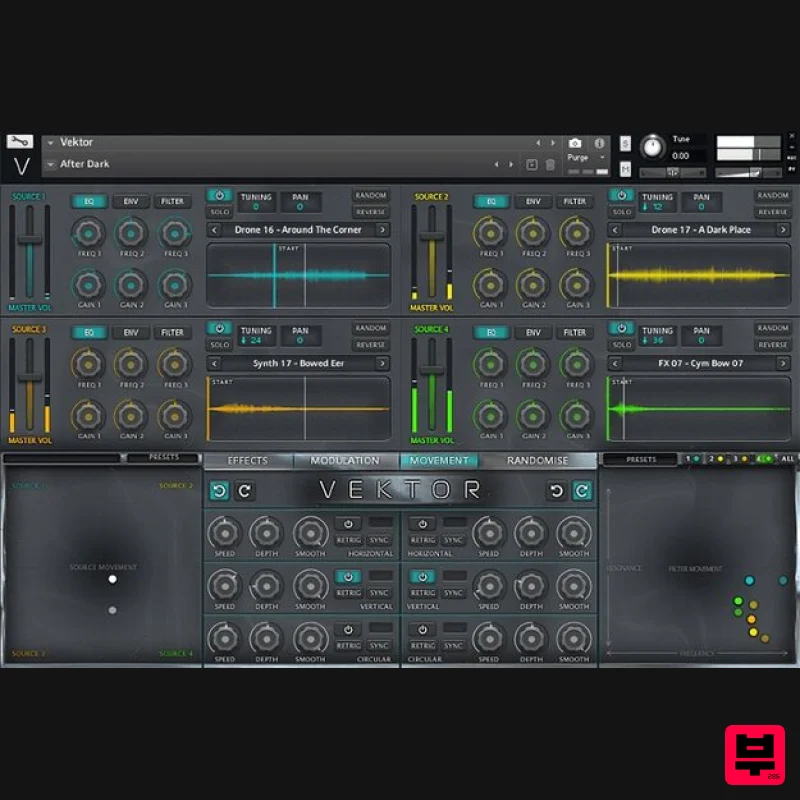
- amps and fx pedals to give you a whole range of tools at your disposal; some have even been re-recorded in a 13th-century abbey! Which makes them unique. “Vektor” comes with 201 diverse snapshots. All easily adaptable and are in the categories: Showcase Organic Organic Manipulated Rhythmic Drones String Toolkit Synths Trailer FX JP Randomise Favourite Picks Source Controls The main section of Vektor contains 4 distinct sources which can be blended together to create unique sounds. Each source has independent controls for EQ
- Envelope and Filter accessible by clicking the buttons at the top. Each source has a master volume slider control along with a power button and a solo button. next to these are your tuning (+/- 36 semitones) and panning (-100/+100) control - Click and drag to change the values. Next to these are the Random (Click to randomise the sound source) and the Reverse Buttons (click to play to current sample backwards) Finally
- you have the source select dropdown menu containing 116 instruments and below this
- you have the sample display window which shows the current playing waveform. Drag the Start slider to adjust the start position of the sample. Movement Page (Source) The movement panel allows you to dynamically and instantly transform your sound in a number of unique ways. Firstly you can click and drag the white dot inside the Source Movement XY pad to instantly blend between the 4 sound sources. This allows you to change the volume of each source in a relative manner very quickly. However
- you also have access to controls that will change the blend over time. You can choose to blend horizontally or vertically (or both at the same time) or in a circular motion. You can choose whether the movement should be in a clockwise or counterclockwise direction and you can choose whether the motion should be in sync with your DAWs tempo or free-running. Movement Page (Filters) The movement panel also allows you to control the filter frequency and resonance of each source independently or together. Subtle filter sweeps can be achieved with ease as well as complexity. Modulation Page The Modulation Panel gives you everything you need to create dynamic movements and modulation to your sounds. There are 4 LFOs and 4 Envelopes and each one can be assigned to a multitude of different controls. Effects Page The Effects Panel contains 9 powerful effects that operate on a global basis including: Chorus
- Distortion
- Spatial
- Phasis
- Flair
- Convolution
- Filter
- Replika delay and Lo-Fi Import Your Own Samples Vektor comes with an innovative and easy to use drag and drop function. Simply drag and drop your chosen sample into the source window
- and it automaps the sample into that source. It’s that easy. Randomisation Nearly every element of Vektor can be randomised in creative ways.Simply open up the randomisation page and select the elements you want to randomised by ticking the boxes. You can randomise: Source Voices: Will just randomise with the sample is loaded to each source Source Filters: Will randomise all 4 source filter types and settings All Sources: Will randomise all source samples and filters XY Motion: Will randomise the settings and position of the XY source panel XY Filter: Will randomise the settings and position of the XY filter panel Modulation: Will randomise the settings on the modulation page Effects: Will randomise the settings on the effects page Everything: Will randomise all of the above at the same time. Features Over 3GB of detailed and morphed unique strings instruments
- textures and sound design. 116 Instruments 201 Snapshots included 467 Beautifully Crafted Samples 10 Source Movement Presets 10 Filter Movement Presets ‘Source Movement’ Manipulation Pad
- controlling the Gain Distribution Ratio ‘Filter Movement’ Manipulation Pad
- controlling Filter Cutoff & Resonance on either all sources
- or per-source ‘Horizontal’
- ‘Vertical’ & ‘Circular’ Modulation Units
- for both Manipulation Pads ‘Modulation Page’
- containing 4 LFO Modules
- for modulating any source parameter
- alongside 4 Envelope Modules
- for controlling the dynamics of multiple different source parameters Each of the four sound sources can be independently controlled. (Pitch
- Filter
- Level ect) Solo
- Power
- Random and Reverse functions for each source. Adjustable start and end sample points. Auto mapping drag and drop
- with loop feature. 9 Effects to manipulate the sound (Chorus
- Reverb
- Delay
- Spatial
- Distortion
- Filter
- Phasis
- Flair and Lofi. Randomise Feature Tempo Synchronised System Requirements Full Kontakt 6.4.2 or above 4.1 GB available HD space Important Note: Full version of NI Kontakt 6.4.2 and above is required. Note: FameBoy is used as the example. Mac Installation 1. Download your software from your Plugin Boutique User Account. 2. Unpack the contents by double-clicking the .zip file. 3. Open Kontakt > Navigate to the folder titled 'Fame Boy'. 4. Click and the .nki file into the main Kontakt window to load the patch. Your Kontakt Instrument is now installed and ready to use in Kontakt. Windows Installation 1. Download your software from your Plugin Boutique User Account. 2. Unpack the contents by double-clicking the .zip file. 3. Open Kontakt > Navigate to the folder titled 'Fame Boy'. 4. Click and drag the .nki file into the main Kontakt window to load the patch. Your Kontakt Instrument is now installed and ready to use in Kontakt.
Additional Information
About the Loot Audio Vektor
Experience the quality and tone that makes the Loot Audio Vektor a popular choice for musicians.
Why Choose the Loot Audio Vektor?
- •Authentic Loot Audio craftsmanship and design
- •Versatile sound suitable for multiple musical genres
- •Professional build quality and reliable performance
- •Part of Loot Audio's respected Kontakt Instrument lineup
Compare & Explore
Browse our complete selection of Loot Audio instruments or explore other Kontakt Instrument options. Use our comparison tools to find the perfect match for your musical style and budget.
Similar Products

The Beat House LE HITS THE ESSENTIALS
Kontakt Instrument

HD Instruments ZoneMatrix
Kontakt Instrument

DoubleBang Software Plugged
Kontakt Instrument

Ecliptiq Audio Hexa Rhythm Designer
Kontakt Instrument

Audiofier Aerkord
Kontakt Instrument

Rigid Audio Retrocade
Kontakt Instrument

Aria Sounds Hybrichord
Kontakt Instrument

Audiofier Sequi2r EX
Kontakt Instrument

