
Loot Audio The Bosque Piano
Professional music gear - detailed information and where to buy
Loot Audio
The Bosque Piano
Product Info
* Prices may vary. Check retailer for current pricing and availability.
Product Description
- Please Note: This product requires the full version of Kontakt. It will not work with the free version of Kontakt Player. Longs
- Shorts
- Phrases
- and Accents The Bosque Piano is a very old upright piano that was discovered in a 100 year old college auditorium found in Bosque County Texas. Both the space itself and the piano had such amazing tones it was just begging to be sampled
- so Loot Audio did. This library contains multisampled longs
- multisampled shorts (hard and soft) and a slew of cinematic phrases and accents which ooze scores from the late 1960s and 1970s by composers such as Jerry Goldsmith and David Shire. To keep things as lightweight as possible within your DAW the instrument has a very footprint and only contains the four patches listed above to keep things as user friendly
- useable
- instantly inspiring
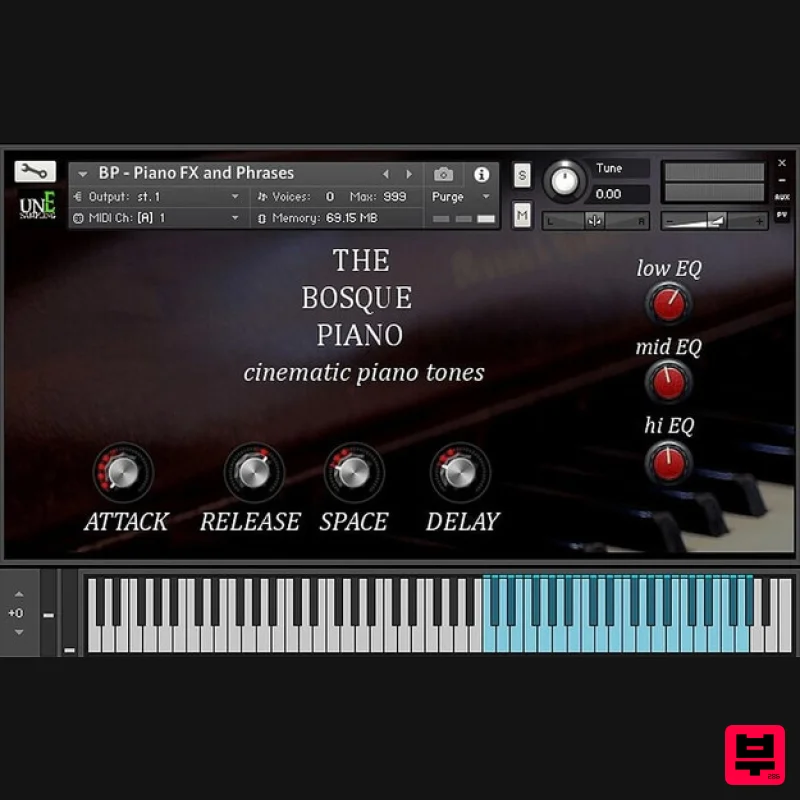
- and simple as possible. Core Controls The GUI has controls for EQ
- an added long reverb
- a nice delay
- as well as attack and release controls so you can make the sound what you need or want it to be. Loot Audio know there are loads of pianos out there
- but sought out to create something that is not only competitive in sound with the others out there
- but also something unique which sounds cinematic out of the box
- has tweakability
- and is as cost effective as possible for those of you on a budget. A piano doesn't need to have millions of samples to sound cinematc
- it just needs to have its own personality and a nice hall to record in. Unique Tone As The Bosque Piano was recorded within the hall it resides with a pair of high quality stereo mics from the middle of the room it has a very unique tone. The reverb is burned into the samples to give it a sense of space so there are no dry samples here and this library is geared towards scoring games and films. The phrase patch harkens back to a time when the piano was used within film scores in a much more avante garde / John Cage fashion so they have a unique vibe not found anywhere else. System Requirements Full Kontakt 5.6.8 and above Important Note: Full version of NI Kontakt 5.6.8 and above is required. Please Note: Pulse Downloader is used to download the software and must be installed. Mac 1. Visit the Pulse Downloader website by clicking the El Dorado: Legato Ambient Guitar 'Download' link in your Plugin Boutique User Account or by clicking HERE
- and download the correct installer for your system (either 'OS X or later' or 'M1 System'). 2. Open the downloaded file and run the installer 'Pulse-XX.X.X.dmg'. 3. Drag 'Pulse' to 'Applications'. 4. Log in to your Pulse account
- or create a new account by clicking 'Register' at the bottom of the window. 5. If registering
- input your email and password
- agree to the terms of use and click 'Register'. 6. Click the '+ Add a Product' button located in the top right-hand corner of the window. 7. Copy and paste your serial number from your My Account page
- click 'Install Now'
- then click 'Redeem'. 8. Select a location for Pulse to download the software by clicking the file icon on the right-hand side of the window. 9. Select the location you would like your software to download and install to. 10. Click 'Download and Install'. 11. The instrument is now downloading. 12. Once the instrument has finished downloading
- open Kontakt
- then open the 'Files' tab and navigate to the location that you downloaded the Kontakt Library to. Then click and drag the .nki file into the empty window. Your Kontakt instrument is now installed and ready to use. Windows 1. Visit the Pulse Downloader website by clicking the El Dorado: Legato Ambient Guitar 'Download' link in your Plugin Boutique User Account or by clicking HERE
- and download using the 'Download for Windows' link. 2. Open the downloaded file and run the installer 'Pulse Web Setup X.X.X.exe'. 2. Log in to your Pulse account
- or create a new account by clicking 'Register' at the bottom of the window. 3. If registering
- input your email and password
- agree to the terms of use and click 'Register'. 4. Click the '+ Add a Product' button located in the top right-hand corner of the window. 5. Copy and paste your serial number from your My Account page
- click 'Install Now'
- then click 'Redeem'. 6. Select a location for Pulse to download the software by clicking the file icon on the right-hand side of the window. 7. Select the location you would like your software to download and install to. 8. Click 'Download and Install'. 9. The instrument is now downloading. 10. Once the instrument has finished downloading
- open Kontakt
- then open the 'Files' tab and navigate to the location that you downloaded the Kontakt Library to. Then click and drag the .nki file into the empty window. Your Kontakt instrument is now installed and ready to use.
Additional Information
About the Loot Audio The Bosque Piano
The Loot Audio The Bosque Piano represents excellent craftsmanship in the Kontakt Instrument category.
Why Choose the Loot Audio The Bosque Piano?
- •Authentic Loot Audio craftsmanship and design
- •Versatile sound suitable for multiple musical genres
- •Professional build quality and reliable performance
- •Part of Loot Audio's respected Kontakt Instrument lineup
Compare & Explore
Browse our complete selection of Loot Audio instruments or explore other Kontakt Instrument options. Use our comparison tools to find the perfect match for your musical style and budget.
Similar Products

Ecliptiq Audio Hexa Rhythm Designer
Kontakt Instrument

The Beat House LE HITS THE ESSENTIALS
Kontakt Instrument

Aria Sounds Hybrichord
Kontakt Instrument

Rigid Audio Retrocade
Kontakt Instrument

HD Instruments ZoneMatrix
Kontakt Instrument

Audiofier Sequi2r EX
Kontakt Instrument

DoubleBang Software Plugged
Kontakt Instrument

Audiofier Aerkord
Kontakt Instrument

