
Loot Audio Cy-Kick
Professional music gear - detailed information and where to buy
Loot Audio
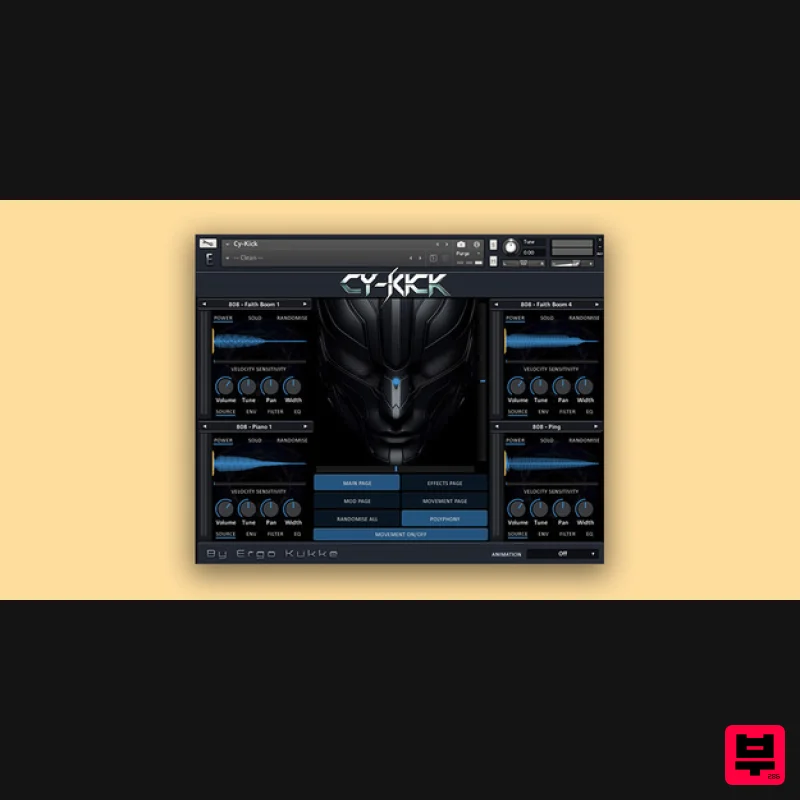
Cy-Kick
Product Info
* Prices may vary. Check retailer for current pricing and availability.
Product Description
- A New Era Starts Here Tired of the same old drum samples that make you sound like any bedroom producer? Want to finally stand out and claim your place in the music industry or
- as an already established producer
- take a bold step into the future
- 2077? With Cy-Kick
- immerse yourself in a world of gritty electrifying drums
- where the neon glow of the city pulses to the rhythm of the streets. Cy-Kick is your cybernetic side-kick in your next headbanger. What's Included 572 individual 32bit/48-96khz sounds and 1947 total WAV’s: 29 808’s 45 Claps 50 Epic Hits 69 FX & Layers 74 Hats
- Cymbals 104 Kicks 118 Percussion Hits 83 Snares WAV’s are categorized and usable without Kontakt if needed Works with Kontakt 7.5.0+ To get you producing quickly
- Cy-Kick comes with 55 Layered snapshots and 186 Single sound snapshots
- totalling 241 snapshots. It’s easy to modify them or make your own. Snapshots include 808
- Bass
- Clap
- Hats & Cymbals
- Epic Hits
- Fills
- Kick
- Lead
- Percussion and Snare. “I see where “human music” is heading and Cy-Kick will help you be a step ahead of the great artificial movement” - Ergo Kukke Unleash your Cy-Kick powers to teach the robots a lesson... System Requirements Full Kontakt 7.5.0 and above Important Note: Full version of NI Kontakt 7.5.0 and above is required. Note: FameBoy is used as the example. Mac Installation 1. Download your software from your Plugin Boutique User Account. 2. Unpack the contents by double-clicking the .zip file. 3. Open Kontakt > Navigate to the folder titled 'Fame Boy'. 4. Click and the .nki file into the main Kontakt window to load the patch. Your Kontakt Instrument is now installed and ready to use in Kontakt. Windows Installation 1. Download your software from your Plugin Boutique User Account. 2. Unpack the contents by double-clicking the .zip file. 3. Open Kontakt > Navigate to the folder titled 'Fame Boy'. 4. Click and drag the .nki file into the main Kontakt window to load the patch. Your Kontakt Instrument is now installed and ready to use in Kontakt.
Additional Information
About the Loot Audio Cy-Kick
Experience the quality and tone that makes the Loot Audio Cy-Kick a popular choice for musicians.
Why Choose the Loot Audio Cy-Kick?
- •Authentic Loot Audio craftsmanship and design
- •Versatile sound suitable for multiple musical genres
- •Professional build quality and reliable performance
- •Part of Loot Audio's respected Kontakt Instrument lineup
Compare & Explore
Browse our complete selection of Loot Audio instruments or explore other Kontakt Instrument options. Use our comparison tools to find the perfect match for your musical style and budget.
Similar Products

DoubleBang Software Plugged
Kontakt Instrument

Rigid Audio Retrocade
Kontakt Instrument

The Beat House LE HITS THE ESSENTIALS
Kontakt Instrument

Ecliptiq Audio Hexa Rhythm Designer
Kontakt Instrument

Audiofier Aerkord
Kontakt Instrument

HD Instruments ZoneMatrix
Kontakt Instrument

Audiofier Sequi2r EX
Kontakt Instrument

Aria Sounds Hybrichord
Kontakt Instrument

