
Loot Audio Constellation: Apollo 203A
Professional music gear - detailed information and where to buy
Loot Audio
Constellation: Apollo 203A
Product Info
* Prices may vary. Check retailer for current pricing and availability.
Product Description
- Constellation: Apollo 203A was in many ways a celebration of yet another successful resurrection of an old classic saved from the grave… This time it was a 1976 Polymoog model 203A most definitely rescued from a fate worse than death!… she could have become a coffee table! Well ok
- maybe not… In a similar manner to Monopolyphonix Loot Audio really didn’t want to sample the poor beast to death simply to produce another virtual offering so instead
- they captured over 500 samples directly from No.3211’s mix output
- often a sample per key
- and set about trying to make something a little different. To add to the mixing pot Loot Audio sampled a number of patches they'd recently created on their SE Omega 8 which they thought was kind of fitting in a way as it almost felt like a celebration of the last 30+ years of polyphonic synthesis. In order to make the two sing a little more sweetly together
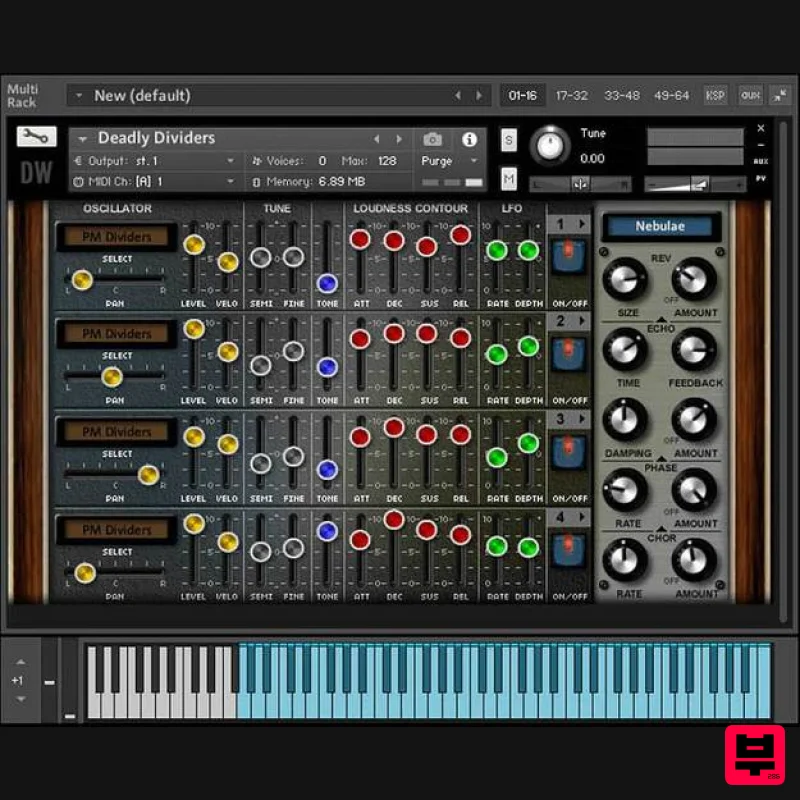
- Loot Audio decided to wash the Omega through an old analog stereo chorus unit and a tube equaliser. 4 Voice Layering Stephen Howell (Hollow Sun) and Mario Krušelj really outdid themselves this time with a superb GUI based on the 4-voice layering engine but now complete with independent velocity sensitivity controls on each channel… Features 660Mb library for Kontakt 4.2.4 and above (Not Kontakt Player) 551 Samples in 24-bits 24 multi-sampled voices available in 4-Voice layering engine with ability to save patches 32 Demo patches 16 Demo Multis System Requirements Full Kontakt 4.2.3 or above Important Note: Full version of NI Kontakt 4.2.3 and above is required. Will not function with the free NI Kontakt Player. Please Note: Pulse Downloader is used to download the software and must be installed. El Dorado: Legato Ambient Guitar is used as an example. Mac 1. Visit the Pulse Downloader website by clicking the El Dorado: Legato Ambient Guitar 'Download' link in your Plugin Boutique User Account or by clicking HERE
- and download the correct installer for your system (either 'OS X or later' or 'M1 System'). 2. Open the downloaded file and run the installer 'Pulse-XX.X.X.dmg'. 3. Drag 'Pulse' to 'Applications'. 4. Log in to your Pulse account
- or create a new account by clicking 'Register' at the bottom of the window. 5. If registering
- input your email and password
- agree to the terms of use and click 'Register'. 6. Click the '+ Add a Product' button located in the top right-hand corner of the window. 7. Copy and paste your serial number from your My Account page
- click 'Install Now'
- then click 'Redeem'. 8. Select a location for Pulse to download the software by clicking the file icon on the right-hand side of the window. 9. Select the location you would like your software to download and install to. 10. Click 'Download and Install'. 11. The instrument is now downloading. 12. Once the instrument has finished downloading
- open Kontakt
- then open the 'Files' tab and navigate to the location that you downloaded the Kontakt Library to. Then click and drag the .nki file into the empty window. Your Kontakt instrument is now installed and ready to use. Windows 1. Visit the Pulse Downloader website by clicking the El Dorado: Legato Ambient Guitar 'Download' link in your Plugin Boutique User Account or by clicking HERE
- and download using the 'Download for Windows' link. 2. Open the downloaded file and run the installer 'Pulse Web Setup X.X.X.exe'. 2. Log in to your Pulse account
- or create a new account by clicking 'Register' at the bottom of the window. 3. If registering
- input your email and password
- agree to the terms of use and click 'Register'. 4. Click the '+ Add a Product' button located in the top right-hand corner of the window. 5. Copy and paste your serial number from your My Account page
- click 'Install Now'
- then click 'Redeem'. 6. Select a location for Pulse to download the software by clicking the file icon on the right-hand side of the window. 7. Select the location you would like your software to download and install to. 8. Click 'Download and Install'. 9. The instrument is now downloading. 10. Once the instrument has finished downloading
- open Kontakt
- then open the 'Files' tab and navigate to the location that you downloaded the Kontakt Library to. Then click and drag the .nki file into the empty window. Your Kontakt instrument is now installed and ready to use.
Additional Information
About the Loot Audio Constellation: Apollo 203A
The Loot Audio Constellation: Apollo 203A represents excellent craftsmanship in the Kontakt Instrument category.
Why Choose the Loot Audio Constellation: Apollo 203A?
- •Authentic Loot Audio craftsmanship and design
- •Versatile sound suitable for multiple musical genres
- •Professional build quality and reliable performance
- •Part of Loot Audio's respected Kontakt Instrument lineup
Compare & Explore
Browse our complete selection of Loot Audio instruments or explore other Kontakt Instrument options. Use our comparison tools to find the perfect match for your musical style and budget.
Similar Products

Ecliptiq Audio Hexa Rhythm Designer
Kontakt Instrument

The Beat House LE HITS THE ESSENTIALS
Kontakt Instrument

DoubleBang Software Plugged
Kontakt Instrument

HD Instruments ZoneMatrix
Kontakt Instrument

Audiofier Sequi2r EX
Kontakt Instrument

Audiofier Aerkord
Kontakt Instrument

Aria Sounds Hybrichord
Kontakt Instrument

Rigid Audio Retrocade
Kontakt Instrument

