
Lese Slice
Professional music gear - detailed information and where to buy
Lese
Slice
Product Info
* Prices may vary. Check retailer for current pricing and availability.
Product Description
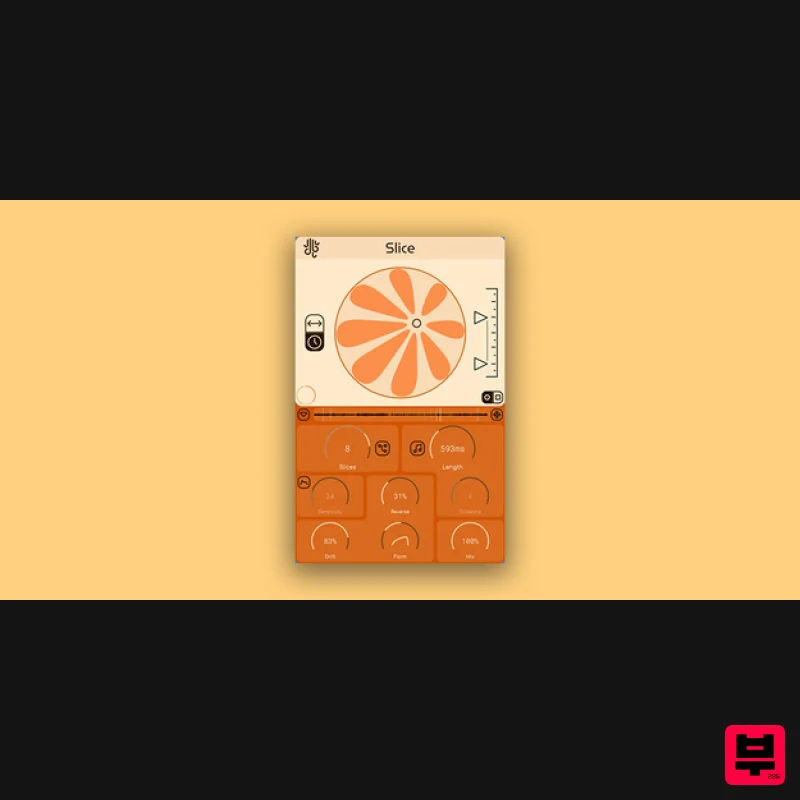
- Dynamic Slicer Slice is a Looper for happy accidents. Making use of multiple control systems
- Slice controls multiple granular “loopers” simultaneously
- over an audio buffer that can be frozen & resized in real time. Slice is designed to be controlled “loosely”
- similar to Frahm
- where the controls influence multiple sound processors at once
- but Slice also offers control schemes to control the loopers more precisely. Multiband Processing Slice is able to split the individual loopers into their own segments of the audible spectrum using a filterbank. Select “Split” mode on the interface to access this feature easily. Transient Snapping Slice is able to detect and mark incoming transients in the audio buffer in real time
- and can let your loopers snap their locations to the transient positions. The internal transient detector is also adjustable
- with it’s marking sensitivity available as a processing parameter. Multi Control If the more complex “Petal” method of controlling the loopers isn’t your thing
- there is an alternate XY pad that allows for the position & spread control of the loopers. The alternate XY control allows Slice to act as a more traditional sound granulator
- similar to Glow. Features Up to 9 simultaneous highly adjustable real-time sound loopers / granulators Adjustable drift & windowing shape Multiple looper control methods Shared audio buffer that can be frozen & length resized Fully vectorized
- resizable interface System Requirements Windows: Supports VST3 & AAX MacOS: Supports VST3
- AU & AAX (Intel and ARM) Please Note: Glow is used as an example Installation PC 1. Download the installer from your Plugin Boutique User Account > Double click the .exe file to begin installation. 2. Click 'Next'. 3. Click 'Next'. 4. Click 'Next'. 5. Click 'Next'. 6. Click 'Install'. 7. Click 'Finish'. 8. Open your DAW
- locate Glow
- and open it. 9. Enter the serial number found in your Plugin Boutique User Account > Click 'Unlock'. 10. Click 'Okay'. Your software is now activated and ready to be used within your DAW! Mac 1. Download the installer from your Plugin Boutique User Account > Double click the .pkg file to begin installation. 2. Click 'Continue'. 3. Click 'Install'. 4. Click 'Close'. 5. Open your DAW
- locate Glow
- and open it. 6. Enter the serial number found in your Plugin Boutique User Account > Click 'Unlock'. 7. Click 'Okay'. Your software is now activated and ready to be used within your DAW!
Additional Information
About the Lese Slice
Experience the quality and tone that makes the Lese Slice a popular choice for musicians.
Why Choose the Lese Slice?
- •Authentic Lese craftsmanship and design
- •Versatile sound suitable for multiple musical genres
- •Professional build quality and reliable performance
- •Part of Lese's respected Granular FX lineup
Compare & Explore
Browse our complete selection of Lese instruments or explore other Granular FX options. Use our comparison tools to find the perfect match for your musical style and budget.
Similar Products
Excite Audio Motion: Fractal Lite
Granular FX
Imaginando GRFX
Granular FX
Sound Particles Density | Educational Version
Granular FX

DataMind Audio Concatenator
Granular FX
W. A. Production Venom
Granular FX
Thenatan Audio Aura
Granular FX

DataMind Audio Combobulator
Granular FX
Thenatan Audio DelayGrain
Granular FX

