
KV331 Audio SynthMaster 3 Player
Professional music gear - detailed information and where to buy
KV331 Audio
SynthMaster 3 Player
Product Info
* Prices may vary. Check retailer for current pricing and availability.
Product Description
- SynthMaster 3 Player is a stripped down version of SynthMaster 3 tailored towards users who prefer tweaking existing presets over designing sounds from scratch. It comes with all factory presets of SynthMaster One
- SynthMaster 2 and SynthMaster 3 software synthesizers. It is much more than a ROMpler though: Users can edit layer voice
- zone
- arpeggiator and sequencer parameters
- and load presets into new layers to create multi-layer patches or drum kits. Features Rich Factory Content: with 4450 factory presets designed by a world class team of sound designers: Arksun
- Aiyn Zahev
- Bluffmunkey
- Brian Transeau
- BigTone
- Cipryan Bot
- Davide Puxeddu
- Demis Hellen
- Electronisounds
- Francis Preve
- Gercek Dorman
- Insigna
- Howard Kevin Schroeder
- Kurt Ader
- Mirko Ruta
- NatLife
- New Loops
- Nori Ubukata
- Rob Lee
- Selcuk Ergen
- Xenos Soundworks
- Ufuk Kevser
- Venus Theory
- Vandalism
- Vorpalsound and Yuli Yolo. Rich Expansion Content: SynthMaster 3 Player can load SynthMaster One
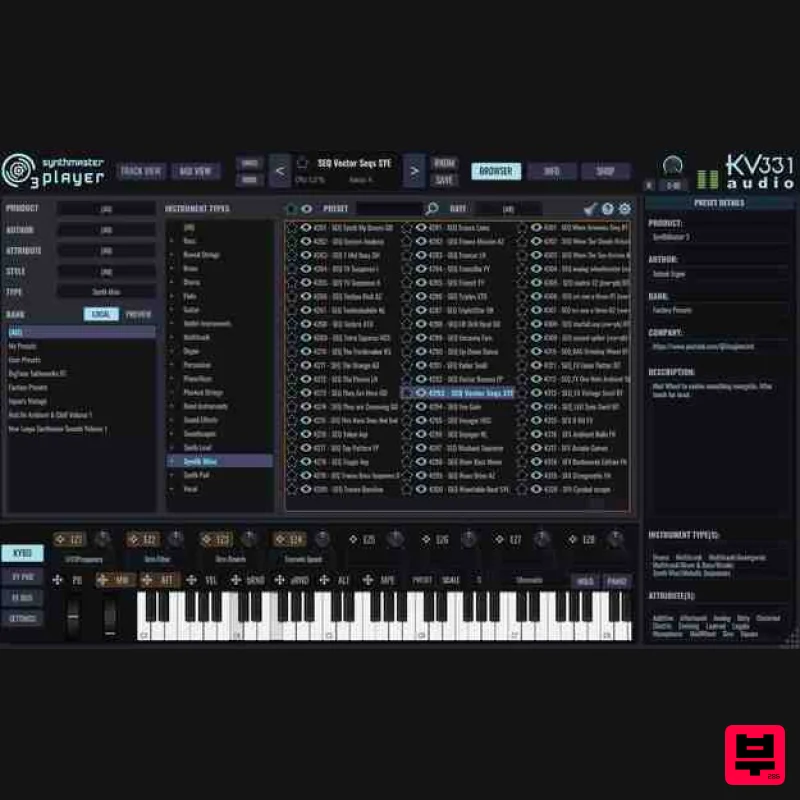
- SynthMaster 2 or SynthMaster 3 expansions. There are currently 58 expansion banks for a wide range of genres to choose from. Users can easily preview the presets in those banks and purchase them through the In-App Shop inside the plugin user interface. Multiple Views for Editing: SynthMaster 3 Player provides 2 different types of views to edit layer parameters. Track View: This view is used for editing keyboard zones
- velocity zones
- voicing
- unison
- arpeggiator and sequencer parameters of multiple layers. Mix View: This view is used for editing insert FX and FX send parameters of multiple layers. Arpeggiator / Sequencer: Each layer in SynthMaster 3 Player has a separate arpeggiator and sequencer. The MIDI input signal first goes through the sequencer followed by the arpeggiator. Each step in an arpeggiator / sequencer can have random values for trigger
- hold and slide parameters. Preset Browser: SynthMaster 3 Player features an intuitive preset browser with advanced search features. Presets can be filtered by Product
- Author
- Bank
- Instrument Type
- Attributes
- Styles (Genres)
- Preset name
- Release Date or Favourite. NKS Support: SynthMaster 3 Player is compatible with Native Kontrol Standard (NKS). All factory presets are tagged according to NKS and can be browsed inside Komplete Kontrol / Maschine. In App Shop: SynthMaster 3 Player features a Shop page where multiple products are displayed with their individual price and sale details. Users can easily purchase our products through this page. <iframe allow="autoplay" frameborder="no" height="450" src="https://w.soundcloud.com/player/?url=https%3A//api.soundcloud.com/playlists/soundcloud%253Aplaylists%253A2080225788&color=%23ff5500&auto_play=false&hide_related=false&show_comments=true&show_user=true&show_reposts=false&show_teaser=true" width="100%"></iframe> kv331synthmaster · SynthMaster 3 Player Factory Presets CPU: 2.0 Ghz
- Intel SSE3 instruction set RAM: 2 GB Windows: Windows 7 and above Mac: MacOSX 10.9 and above For AAX: ProTools 11 and above Note: Synthmaster One is used as an example. Mac Installation 1. Download the installer from within your Plugin Boutique account and double-click the zip file to extract the contents > Open the .pkg file and click 'Continue'. 2. Click 'Continue'. 3. Click 'Agree' 4. Click 'Continue'. 5. Click 'Install'. 6. Enter your computer Username and Password > Click 'Install Software'. 7. Click 'Close'. Activation 1. Open your DAW > Enter your Email Address
- Full Name and Serial Number
- found in your Plugin Boutique account > Click 'Register'. 2. Click 'OK'. Your software is now activated and ready to use within your DAW. Windows Installation 1. Double-click the downloaded .zip file from within your Plugin Boutique account and double-click the .zip file to extract the contents > Double-click the .exe file and click 'Next'. 2. Click 'Next'. 3. Select 'I Accept the Agreement' > Click 'Next'. 4. Click 'Next'. 5. Click 'Next'. 6. Click 'Next'. 7. Click 'Install'. 8. Click 'Yes'. 9. Click 'Finish'. Activation 1. Open your DAW > Enter your Email Address
- Full Name and Serial Number
- found in your Plugin Boutique account > Click 'Register'. 2. Click 'OK'. Your software is now activated and ready to use within your DAW.
Additional Information
About the KV331 Audio SynthMaster 3 Player
Discover the distinctive sound and feel of the KV331 Audio SynthMaster 3 Player, a standout choice among Synth.
Why Choose the KV331 Audio SynthMaster 3 Player?
- •Authentic KV331 Audio craftsmanship and design
- •Versatile sound suitable for multiple musical genres
- •Professional build quality and reliable performance
- •Part of KV331 Audio's respected Synth lineup
Compare & Explore
Browse our complete selection of KV331 Audio instruments or explore other Synth options. Use our comparison tools to find the perfect match for your musical style and budget.
Similar Products

AngelicVibes ELITE PIANIST
Synth
$30
Your next go-to virtual instrument. Real piano recordings with unique sound and effects 50 high-quality presets for...

Reflekt Audio Xonex
Synth
$30
Xonex is a futuristic plugin that we have used time and time again to make a variety of beats. Xonex has offered me a...

discoDSP Discovery Pro
Synth
$30
discoDSP’s Discovery was one of the company’s first and finest efforts. Heavily inspired by Clavia’s Nord Lead...

discoDSP OPL
Synth
$30
The OPL is a digital sound synthesis chip developed by Yamaha in the mid 1980s. Among other products, it was used in...

ThaLoops Templetone
Synth
$30
The Ultimate Hip-Hop Production Plugin – Featuring a Vast Collection of Hip-Hop Sounds. Choose between wild drums,...

discoDSP OB-Xd
Synth
$30
OB-Xd is based on the Oberheim OB-X. It attempts to recreate its sound and behavior, but as the original was very...

discoDSP Discovery
Synth
$30
Discovery is a virtual analog Nord Lead 2 inspired synthesizer featuring multi-layering, a morphing engine, high...

Thenatan Audio Poizen VST
Synth
$30
Thenatan and Global Audio Tools have teamed up again to bring music makers across the globe a jam packed powerful tool...
Frequently Asked Questions
The KV331 Audio SynthMaster 3 Player stands out for its exceptional KV331 Audio craftsmanship and innovative design.
Yes! With its affordable price point and quality construction, it's perfect for learning synth.
Browse the similar products section to see how it stacks up against other synth.

