
Klevgrand Rum
Professional music gear - detailed information and where to buy
Product Description
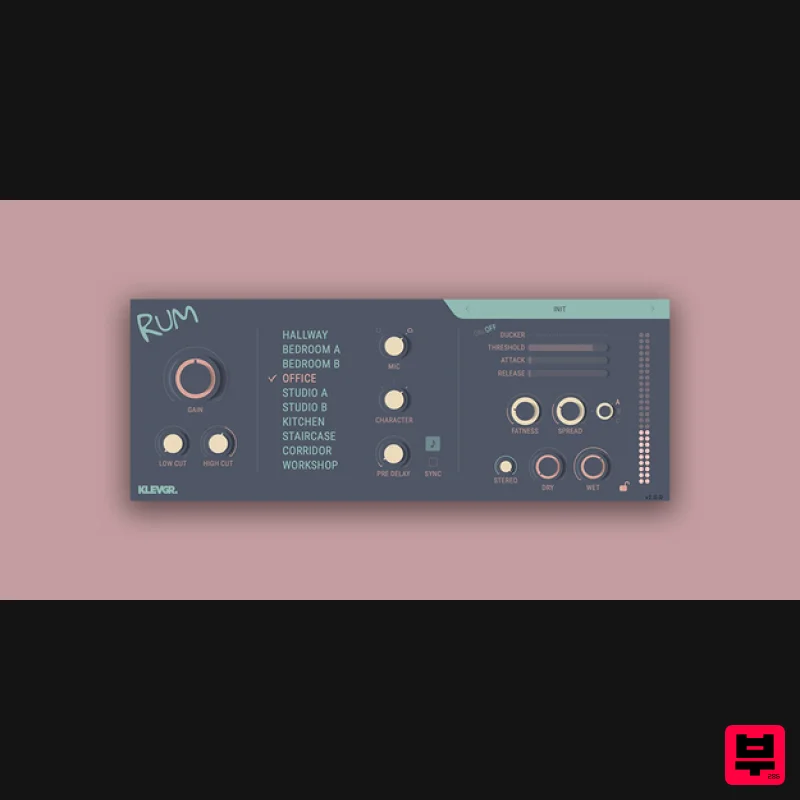
- Room Simulator Plenty good room for everyone Rum simulates different kinds of rooms – from acoustically treated studio booths to spaces found in an ordinary home. Think of this plug-in as if the audio source was recorded in stereo from the other side of the room
- a common technique for recording acoustic instruments in order to breathe life into a dry sound source. In addition to the ten multi-recorded rooms (with different mic settings and characters that can be cross combined) there’s an advanced stereo spread and modulation unit for even more tweakability. This plug-in also comes with low cut and high cut filters
- pre-delay (with tempo sync)
- a full set of factory presets
- and a built-in ducker making it easy to tame transients on the wet signal. Anatomy 1. Make an entrance - Input gain + filter. 2. Go to your go-to room - Choose between 10 carefully sampled rooms. 3. Make it yours - Choose mic setting + different characters of the room. 4. Move away from the walls - Simulate how far from the walls your sound source is by setting a pre-delay. 5. Need a duck? - Taming the transients in a more natural way. 6. Spread with butter - Modulation & stereo-spreader to set the final width. Features 10 different rooms with 6 variants each 3 different types of stereo spread algorithms Modulation control Ducker (compression) for the wet signal Pre-delay with tempo synchronization Low cut and high cut filters Plenty of factory presets System Requirements macOS 10.15 or later (optimized for the M1-processor) Windows 10 or later AU
- VST-2
- VST-3
- AAX Important note: When accessing this software via a Rent to Own plan or the Beatport Studio membership
- it's installed and run through the Beatport Access portal. An internet connection is required every 30 days to validate your license. Please Note: Pana is used as the example: Mac License Redemption 1. Navigate to https://klevgrand.com/redeem > Paste your 16 digit redemption code found in your Plugin Boutique User Account > Click 'Submit!'. 2. Your redemption code has been accepted > Scroll down to Step 2. 3. Click either 'Sign in' if you already have a Klevgrand account
- or 'Create new account' if you do not > Fill in your personal details > Click 'I'm ready'. 4. Your account has now been created. 5. Navigate to your email inbox and locate the activation email that you should have received from Klevgrand > Click 'Let me in!' to activate your account. 6. Create a password for your account > Click 'Enter Klevgrand'. 7. Your software and serial number is now available within your Klevgrand account > Click the Apple logo to download the installer file. Installation 1. Launch the pana_x_x_x_macOS.dmg installer file. 2. Double click the KLEVGR. logo to launch the installer. 3. Click 'Continue'. 4. Click 'Continue'. 5. Click 'Agree'. 6. Click 'Install'. 7. Enter your system password > Click 'Install Software'. 8. Click 'Close'. 9. Navigate back to your Klevgrand My Account page > Click on the serial number to copy it to your clipboard. 10. Launch your DAW > Create a new audio track > Insert Pana onto the channel > Paste your serial number into the box. Your software is now activated and ready to use within your DAW Windows License Redemption 1. Navigate to https: //klevgrand.com/redeem > Paste your 16 digit redemption code found in your Plugin Boutique User Account > Click 'Submit!'. 2. Your redemption code has been accepted > Scroll down to Step 2. 3. Click either 'Sign in' if you already have a Klevgrand account
- or 'Create new account' if you do not > Fill in your personal details > Click 'I'm ready'. 4. Your account has now been created. 5. Navigate to your email inbox and locate the activation email that you should have received from Klevgrand > Click 'Let me in!' to activate your account. 6. Create a password for your account > Click 'Enter Klevgrand'. 7. Your software and serial number is now available within your Klevgrand account > Click the Windows logo to download the installer file. Installation 1. Unpack the pana_x_x_x_win.zip installer file > Launch the pana_x_x_x_win.exe file. 2. Click 'I accept the agreement' > Click 'Next'. 3. Click 'Next'. 4. Click 'Next'. 5. Click 'Next'. 6. Click 'Install'. 7. Click 'Finish'. 8. Navigate back to your Klevgrand My Account page > Click on the serial number to copy it to your clipboard. 9. Launch your DAW > Create a new audio track > Insert Pana onto the channel > Paste your serial number into the box. Your software is now activated and ready to use within your DAW
Additional Information
About the Klevgrand Rum
The Klevgrand Rum combines traditional design with modern performance for Reverb enthusiasts.
Why Choose the Klevgrand Rum?
- •Authentic Klevgrand craftsmanship and design
- •Versatile sound suitable for multiple musical genres
- •Professional build quality and reliable performance
- •Part of Klevgrand's respected Reverb lineup
Compare & Explore
Browse our complete selection of Klevgrand instruments or explore other Reverb options. Use our comparison tools to find the perfect match for your musical style and budget.
Similar Products

DDMF Envelope
Reverb
$30
Envelope is a true stereo reverb plugin featuring 8 different room simulations, all of which can be adjusted for size,...

DDMF MagicVerb
Reverb
$30
MagicVerb is the latest result of the collaboration between MagicDeathEye aka Ian Sefchick and DDMF. This journey was...

Initial Audio AR1 Reverb
Reverb
$30
Quality Algorithmic Reverb Plugin AR1 is an algorithmic reverb plugin designed to sound great on all types of...

PSP Audioware PSP EasyVerb
Reverb
$30
PSP EasyVerb is a reverberation effect plug-in (VST, RTAS and AAX for Windows; VST, AudioUnit, RTAS and AAX for Mac OS...

Vegas Audio Fabricverb
Reverb
$30
Get the signature sound of the UK’s most famous nightclub on your digital audio workstation! Our new convolution...

PSP Audioware PSP Nexcellence
Reverb
$30
PSP Nexcellence is a rich-sounding, spring reverb emulation inspired by and modeled after classic “necklace-type”...

XHUN Audio ShineVerb
Reverb
$30
Creative Reverb Processor ShineVerb is a creative tool specially designed for reverberation, spatialization and sound...

PSP Audioware PSP Pianoverb 2
Reverb
$30
PSP PianoVerb2 is a redesigned and improved creative resonant reverb plug-in based on our famous and beloved freeware...
Frequently Asked Questions
The Klevgrand Rum stands out for its exceptional Klevgrand craftsmanship and innovative design.
Yes! With its affordable price point and quality construction, it's perfect for learning reverb.
Browse the similar products section to see how it stacks up against other reverb.

