
Klevgrand Richter
Professional music gear - detailed information and where to buy
Klevgrand
Richter
Product Info
* Prices may vary. Check retailer for current pricing and availability.
Product Description
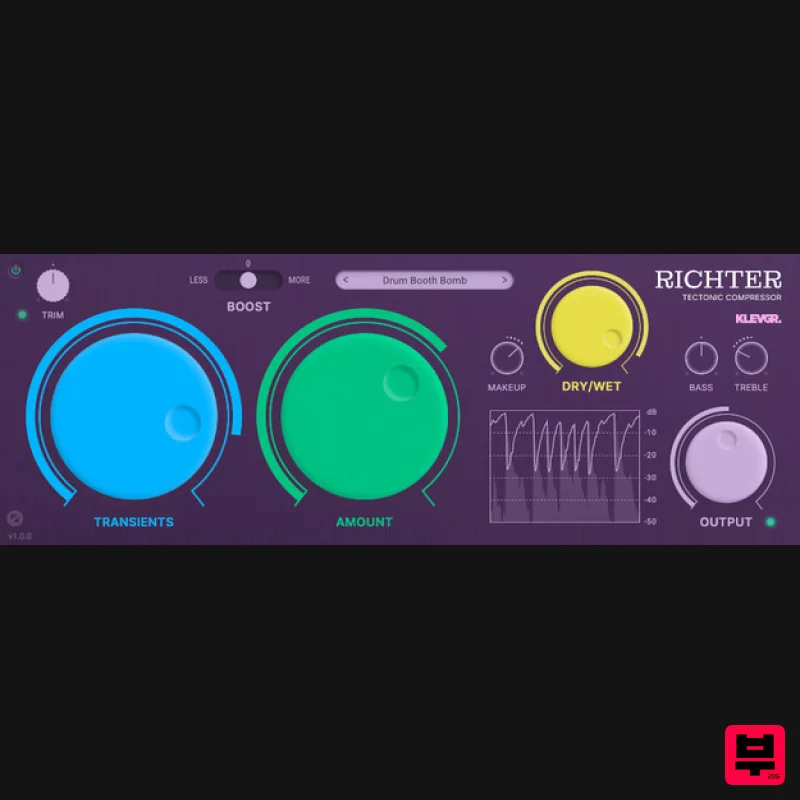
- Tectonic Compressor A compressor beyond the ordinary Richter is a tectonic compressor
- designed to achieve heavy compression with a minimal amount of artifacts. It is the result of many years of experimenting in the Klevgrand labs. Normally a heavily compressed audio signal gets distorted
- often with a nasty "zipper noise" artifact because of how the internal envelope followers are engineered. The experiments led to a brand new approach resulting in a compressor that empowers you to squeeze every bit of sonic perfection out of your tracks. Use it for meaty mixes
- punchy drums or transparent vocal tracks. Due to how the algorithm is designed
- there are a few unconventional controls to tame Richter. First of all: one single parameter controls how much compression will get applied. The other (important) parameter controls how the internal envelope follower will react to transients vs continuous/lasting sounds. These two parameters make Richter a highly intuitive compressor where the user quickly will be able to dial in the wanted sound. On top of that there’s a boost switch that literally makes the amount span go to eleven. And
- as the name suggests
- earthquake levels are possible. Features Superheavy compression with minimal unwanted artifacts Intuitive Transients and Amount dials Real time graph visualization Tonal control Three-step boost switch Input trim control Makeup gain
- Dry/Wet mix and Output control System Requirements macOS 10.10 or later (optimized for the M1-processor) Windows 7 (SP1) or later AU
- VST or AAX compatible 64-bit host Please Note: Pana is used as the example: Mac License Redemption 1. Navigate to https://klevgrand.com/redeem > Paste your 16 digit redemption code found in your Plugin Boutique User Account > Click 'Submit!'. 2. Your redemption code has been accepted > Scroll down to Step 2. 3. Click either 'Sign in' if you already have a Klevgrand account
- or 'Create new account' if you do not > Fill in your personal details > Click 'I'm ready'. 4. Your account has now been created. 5. Navigate to your email inbox and locate the activation email that you should have received from Klevgrand > Click 'Let me in!' to activate your account. 6. Create a password for your account > Click 'Enter Klevgrand'. 7. Your software and serial number is now available within your Klevgrand account > Click the Apple logo to download the installer file. Installation 1. Launch the pana_x_x_x_macOS.dmg installer file. 2. Double click the KLEVGR. logo to launch the installer. 3. Click 'Continue'. 4. Click 'Continue'. 5. Click 'Agree'. 6. Click 'Install'. 7. Enter your system password > Click 'Install Software'. 8. Click 'Close'. 9. Navigate back to your Klevgrand My Account page > Click on the serial number to copy it to your clipboard. 10. Launch your DAW > Create a new audio track > Insert Pana onto the channel > Paste your serial number into the box. Your software is now activated and ready to use within your DAW Windows License Redemption 1. Navigate to https: //klevgrand.com/redeem > Paste your 16 digit redemption code found in your Plugin Boutique User Account > Click 'Submit!'. 2. Your redemption code has been accepted > Scroll down to Step 2. 3. Click either 'Sign in' if you already have a Klevgrand account
- or 'Create new account' if you do not > Fill in your personal details > Click 'I'm ready'. 4. Your account has now been created. 5. Navigate to your email inbox and locate the activation email that you should have received from Klevgrand > Click 'Let me in!' to activate your account. 6. Create a password for your account > Click 'Enter Klevgrand'. 7. Your software and serial number is now available within your Klevgrand account > Click the Windows logo to download the installer file. Installation 1. Unpack the pana_x_x_x_win.zip installer file > Launch the pana_x_x_x_win.exe file. 2. Click 'I accept the agreement' > Click 'Next'. 3. Click 'Next'. 4. Click 'Next'. 5. Click 'Next'. 6. Click 'Install'. 7. Click 'Finish'. 8. Navigate back to your Klevgrand My Account page > Click on the serial number to copy it to your clipboard. 9. Launch your DAW > Create a new audio track > Insert Pana onto the channel > Paste your serial number into the box. Your software is now activated and ready to use within your DAW
Additional Information
About the Klevgrand Richter
Discover the distinctive sound and feel of the Klevgrand Richter, a standout choice among Compressor.
Why Choose the Klevgrand Richter?
- •Authentic Klevgrand craftsmanship and design
- •Versatile sound suitable for multiple musical genres
- •Professional build quality and reliable performance
- •Part of Klevgrand's respected Compressor lineup
Compare & Explore
Browse our complete selection of Klevgrand instruments or explore other Compressor options. Use our comparison tools to find the perfect match for your musical style and budget.
Similar Products

DDMF Comprezzore
Compressor

MeldaProduction MEssentialsFXBundle
Compressor

DDMF LinComp
Compressor

W. A. Production BIGGIFIER
Compressor

Soundspear Supertube
Compressor

PSP Audioware PSP Vintage Warmer 2
Compressor

Initial Audio IA-LA1
Compressor

Korneff Audio Pawn Shop Comp
Compressor

