
Kiive Audio XBus
Professional music gear - detailed information and where to buy
Kiive Audio
XBus
Product Info
* Prices may vary. Check retailer for current pricing and availability.
Product Description
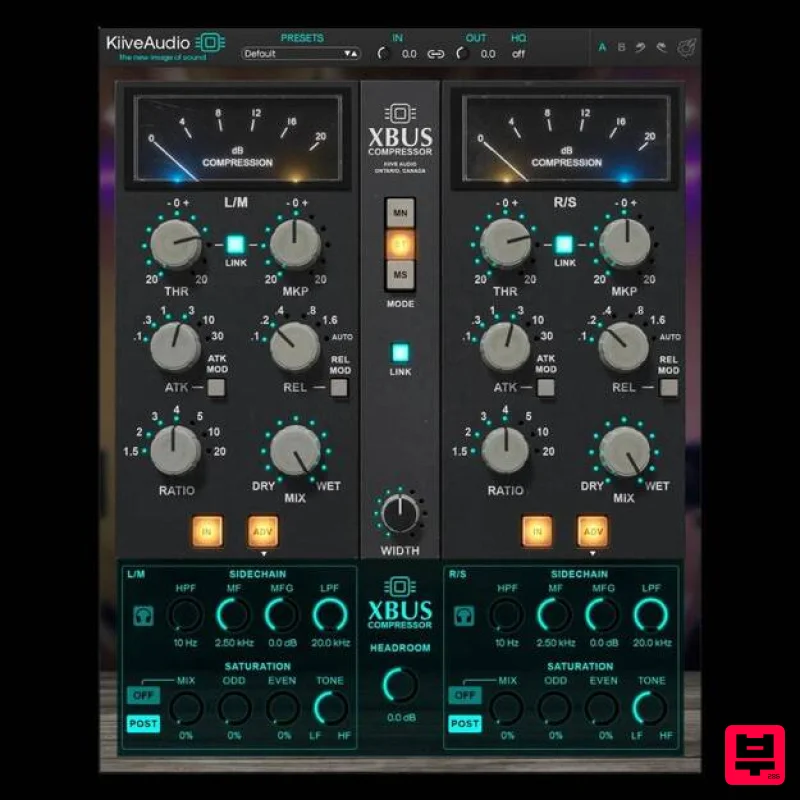
- Make Your Mixes Sound Like a Record. There’s a reason engineers call this compression style the “mixbus cheat code.” Whether on a console master section or in modern rack gear
- this iconic circuit has remained the go-to for gluing a mix together with power
- cohesion
- and vibe. XBus gives you all of the musicality of a classic VCA style compression that is known to glue your mix together
- with extra flexibility and an added head room knob allowing you to drive into the compression. Features Classic VCA Bus Compression – Inspired by a modern revision of the legendary mixbus compressor. Punchy
- Musical Sound – Enhances transients
- stereo cohesion
- and overall energy. Headroom Control – Push into compression for added character and saturation. Advanced Sidechain Filtering – Tailor the response to your mix’s low-end or dynamic needs. Optional Saturation – Add harmonic warmth for vocals
- drums
- or masters. Modern ITB Integration – All the flexibility and nuance required for today’s workflows. Mac OS: OS X 10.7 or higher
- 10.14 or higher recommended Mac 64bit / M1 Native: VST3
- AA 4GB of RAM Windows 64bit: Windows 7 & Above VST3
- AAX 1 GHz Intel Dual Core Processor or AMD equivalent (PC) 4GB of RAM Please note: Lunchbox Amp Sim is used as an example. Mac Installation 1. Download the .pkg file from your Plugin Boutique account > Open the .dmg installer > Click Continue. 2. Read the Software License Agreement > Click Continue. 3. Click Agree. 4. Select the installation destination > Click Continue. 5. Click Install. 6. Click Close. 7. Open your new software in your DAW > Enter the serial number found in your Plugin Boutique account > Click SUBMIT. Your software is now activated and ready to use in your DAW. Windows Installation 1. Download the .zip folder from your Plugin Boutique account. 2. Extract the contents of the folder. 3. For VST
- copy the .dll file > Paste it into your VST folder which could be one of the following: C:\Program Files\VstPlugins C:\Program Files\Steinberg\VstPlugins C:\Program Files\Common Files\VST2 C:\Program Files\Common Files\Steinberg\VST2 For AAX
- copy the AAX plugin folder > Paste it into your AAX folder which should be: C:\Program Files\Common Files\Avid\Audio\Plug-Ins 4. Open your DAW and load your new software > Enter the serial number found in your Plugin Boutique account > Click SUBMIT. Your software is now activated and ready to use in your DAW.
Additional Information
About the Kiive Audio XBus
Discover the distinctive sound and feel of the Kiive Audio XBus, a standout choice among Compressor.
Why Choose the Kiive Audio XBus?
- •Authentic Kiive Audio craftsmanship and design
- •Versatile sound suitable for multiple musical genres
- •Professional build quality and reliable performance
- •Part of Kiive Audio's respected Compressor lineup
Compare & Explore
Browse our complete selection of Kiive Audio instruments or explore other Compressor options. Use our comparison tools to find the perfect match for your musical style and budget.
Similar Products

Soundspear Supertube
Compressor

MeldaProduction MEssentialsFXBundle
Compressor

DDMF Comprezzore
Compressor

Korneff Audio Pawn Shop Comp
Compressor

Initial Audio IA-LA1
Compressor

DDMF LinComp
Compressor

PSP Audioware PSP Vintage Warmer 2
Compressor

W. A. Production BIGGIFIER
Compressor

