
Kiive Audio ADC1 Compressor
Professional music gear - detailed information and where to buy
Kiive Audio
ADC1 Compressor
Product Info
* Prices may vary. Check retailer for current pricing and availability.
Product Description
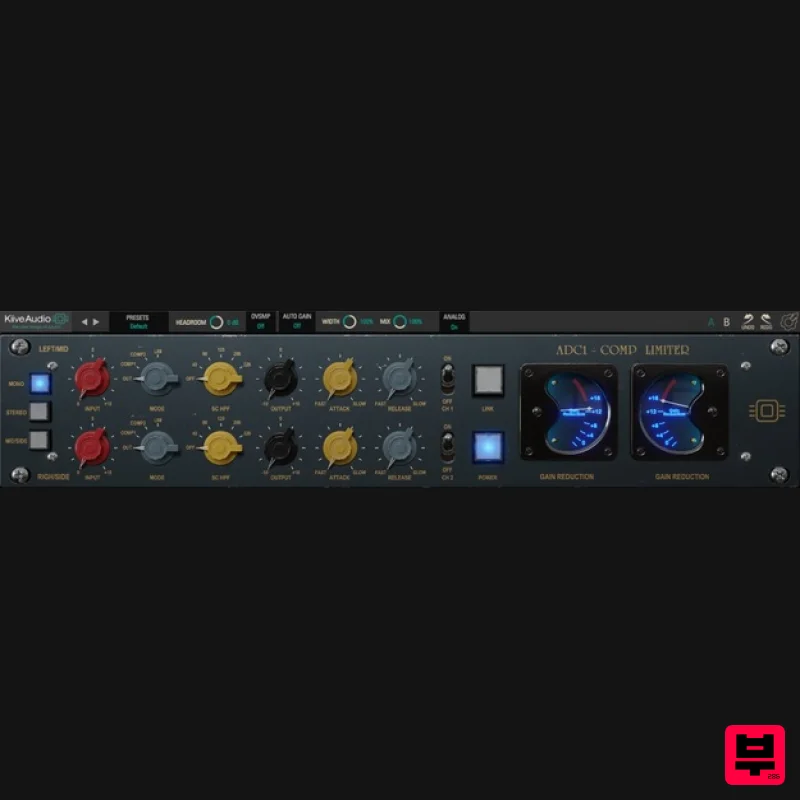
- Kiive Audio is proud to release the ADC1 Compressor / Limiter! Inspired by 2 of the most iconic compressors / limiters made during the 50’s and 60’s
- The ADC1 Compressor / Limiter gives you so much spank and gooey compression
- perfect for mix bus
- slamming drums
- vocals and so much more! Features Aggressive compression and saturation! The ultimate drum and mix bus compressor Other features include Mix knobs for each chanel
- undo
- I/O trim
- resizable GUI Stereo
- mid /side
- dual mono
- and mono modes Available in AAX
- VST3
- and AU formats. Compatible with macOS X 10.7 & higher (M1 and Monterey native)
- Windows 7 & higher (Pro Tools 11 and above). 14 day Free trial version System Requirements Mac Mac OS X 10.7 or higher (macOS 10.14 or higher recommended) (64-bit only) Compatible with M1 Native Processor: 1 GHz Intel Dual Core or higher 4 GB RAM Screen Resolution - 1024 x 768 or higher Formats - VST
- AAX Windows Windows 7 and above (64-bit only) Processor: 1 GHz Intel Dual Core Processor or AMD equivalent 4 GB RAM Screen Resolution - 1024 x 768 or higher Formats - VST
- AAX Please note: Lunchbox Amp Sim is used as an example. Mac Installation 1. Download the .pkg file from your Plugin Boutique account > Open the .dmg installer > Click Continue. 2. Read the Software License Agreement > Click Continue. 3. Click Agree. 4. Select the installation destination > Click Continue. 5. Click Install. 6. Click Close. 7. Open your new software in your DAW > Enter the serial number found in your Plugin Boutique account > Click SUBMIT. Your software is now activated and ready to use in your DAW. Windows Installation 1. Download the .zip folder from your Plugin Boutique account. 2. Extract the contents of the folder. 3. For VST
- copy the .dll file > Paste it into your VST folder which could be one of the following: C:\Program Files\VstPlugins C:\Program Files\Steinberg\VstPlugins C:\Program Files\Common Files\VST2 C:\Program Files\Common Files\Steinberg\VST2 For AAX
- copy the AAX plugin folder > Paste it into your AAX folder which should be: C:\Program Files\Common Files\Avid\Audio\Plug-Ins 4. Open your DAW and load your new software > Enter the serial number found in your Plugin Boutique account > Click SUBMIT. Your software is now activated and ready to use in your DAW.
Additional Information
About the Kiive Audio ADC1 Compressor
Experience the quality and tone that makes the Kiive Audio ADC1 Compressor a popular choice for musicians.
Why Choose the Kiive Audio ADC1 Compressor?
- •Authentic Kiive Audio craftsmanship and design
- •Versatile sound suitable for multiple musical genres
- •Professional build quality and reliable performance
- •Part of Kiive Audio's respected Compressor lineup
Compare & Explore
Browse our complete selection of Kiive Audio instruments or explore other Compressor options. Use our comparison tools to find the perfect match for your musical style and budget.
Similar Products

W. A. Production BIGGIFIER
Compressor

Initial Audio IA-LA1
Compressor

Soundspear Supertube
Compressor

MeldaProduction MEssentialsFXBundle
Compressor

PSP Audioware PSP Vintage Warmer 2
Compressor

DDMF LinComp
Compressor

DDMF Comprezzore
Compressor

Korneff Audio Pawn Shop Comp
Compressor

