
Karanyi Sounds Electric Keys
Professional music gear - detailed information and where to buy
Karanyi Sounds
Electric Keys
Product Info
* Prices may vary. Check retailer for current pricing and availability.
Product Description
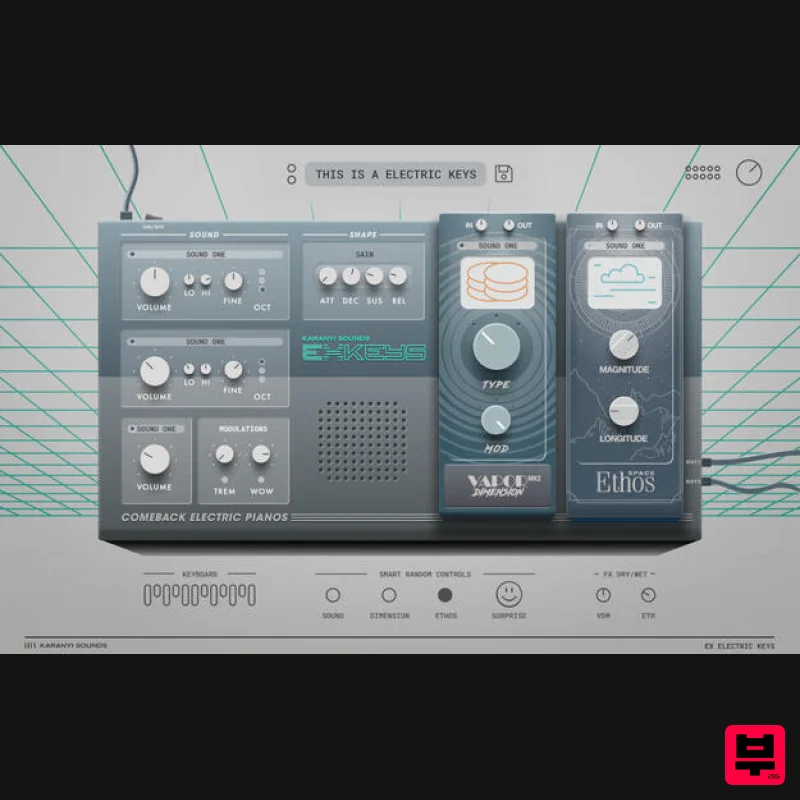
- Your Custom Electric Piano Immerse yourself in the sonic essence of retro with Electric Keys – the plugin that revives the beloved tones of classic FM electric pianos! Crafted for the neo-80s music connoisseur
- it offers iconic presets and dual built-in DSP effect units to sculpt the perfect vintage sound. Features 10+ Factory presets 4 sound sources from the iconic Japanese FM synthesizer Authentic 80s and 90s electric piano sounds including the famous Los Angeles Electric Piano sound! 3 sound layers for enhanced sound design Streamlined set of controls (all MIDI-learnable) including: Volme ADSR Sound layer controls: volume
- fine tune
- octave
- tone eq Modulators: Tremolo; Wow Main Gain Effect rack including: Vapor Dimension MK2 – 10 DSP algorithms Ethos – 20 lush reverb algorithms designed to transform your sounds into cinematic and ambient masterpieces. Effect presets for easy dial-in Dry/wet knobs for mix In/Out Gain for each effect Randomizer technology
- including: Random instrument sources (Modules) Random Sound controls (ADSR
- modulators
- etc.) Random effects (2 FX modules separately) Surprise ( Random All) System Requirements Mac OS X 10.11 or higher is recommended Windows 8 or higher 4 GB of RAM
- 8 GB is recommended 2 GHz CPU with at least 4 cores 64 bit DAW 700 MB free disk space Note: Space is used as the example Product Installation Windows 1. Download the Windows installer from within your Plugin Boutique account. 2. Double-click the downloaded .exe file to begin the installation process. 3. Click 'Next'. 4. Click 'I accept the agreement'
- then click 'Next'. 5. Click 'Install'. 6. Once installation has completed
- click 'Finish'. 7. Open Space in your DAW 8. Your software is now ready to use in your DAW! Mac 1. Download the macOS installer from within your Plugin Boutique account. 2. Double-click the downloaded .zip file to open it > Double click the .pkg file to begin the installation process. 3. Click ‘Continue’. 4. Click ‘Continue’. 5. Click ‘Agree’. 6. Click ‘Install’. 7. Once installation has completed
- click ‘Close’. 8. Open Space in your DAW 9. Your software is now ready to use in your DAW!
Additional Information
About the Karanyi Sounds Electric Keys
Discover the distinctive sound and feel of the Karanyi Sounds Electric Keys, a standout choice among Synth.
Why Choose the Karanyi Sounds Electric Keys?
- •Authentic Karanyi Sounds craftsmanship and design
- •Versatile sound suitable for multiple musical genres
- •Professional build quality and reliable performance
- •Part of Karanyi Sounds's respected Synth lineup
Compare & Explore
Browse our complete selection of Karanyi Sounds instruments or explore other Synth options. Use our comparison tools to find the perfect match for your musical style and budget.
Similar Products

discoDSP OB-Xd
Synth
$30
OB-Xd is based on the Oberheim OB-X. It attempts to recreate its sound and behavior, but as the original was very...

AngelicVibes ELITE PIANIST
Synth
$30
Your next go-to virtual instrument. Real piano recordings with unique sound and effects 50 high-quality presets for...

Reflekt Audio Xonex
Synth
$30
Xonex is a futuristic plugin that we have used time and time again to make a variety of beats. Xonex has offered me a...

ThaLoops Templetone
Synth
$30
The Ultimate Hip-Hop Production Plugin – Featuring a Vast Collection of Hip-Hop Sounds. Choose between wild drums,...

Thenatan Audio Poizen VST
Synth
$30
Thenatan and Global Audio Tools have teamed up again to bring music makers across the globe a jam packed powerful tool...

discoDSP OPL
Synth
$30
The OPL is a digital sound synthesis chip developed by Yamaha in the mid 1980s. Among other products, it was used in...

discoDSP Discovery
Synth
$30
Discovery is a virtual analog Nord Lead 2 inspired synthesizer featuring multi-layering, a morphing engine, high...

discoDSP Discovery Pro
Synth
$30
discoDSP’s Discovery was one of the company’s first and finest efforts. Heavily inspired by Clavia’s Nord Lead...
Frequently Asked Questions
The Karanyi Sounds Electric Keys stands out for its exceptional Karanyi Sounds craftsmanship and innovative design.
Yes! With its affordable price point and quality construction, it's perfect for learning synth.
Browse the similar products section to see how it stacks up against other synth.

