
HY-Plugins HY-POLY
Professional music gear - detailed information and where to buy
HY-Plugins
HY-POLY
Product Info
* Prices may vary. Check retailer for current pricing and availability.
Product Description
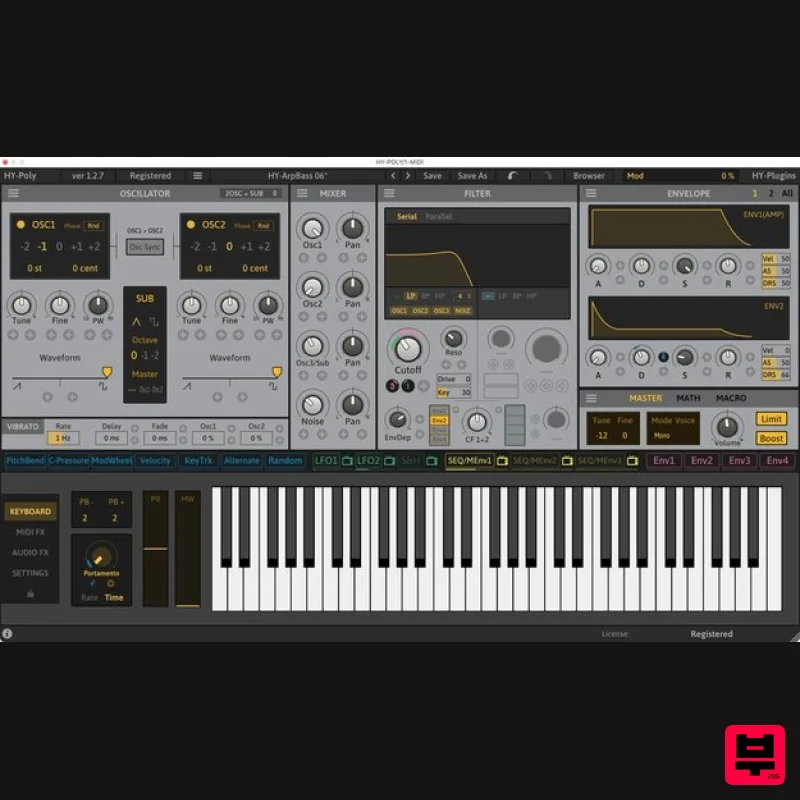
- Polyphonic Synth HY-POLY is a subtractive type polyphonic synthesizer with MIDI and audio effects. Many of the synth and audio fx parameters can be modulated with drag and drop modulation assignment. It can also create a wide variety of sounds and works well for most genres of music. Oscillator Types 2Osc + Sub 3Osc Mod Osc PD Osc Vector Osc MIDI FX 8 MIDI FX units available (Arpeggiator
- Octave
- Transpose
- Harmonizer
- Scaler
- Velocity
- Note Chance
- Note Echo). Audio FX 25 Audio FX units available Features 5 oscillator types Dual multi-mode filters Drag and drop modulation assignment 24 modulation sources 9 midi effect units 25 audio effect units Midi learn Preset browser Resizable interface System Requirements Mac macOS 10.12 or higher (Intel / M1 Apple Silicon supported (64-bit only) VST2
- VST3
- AU Windows Windows 7 or higher (32 / 64-bit) VST2
- VST3 Note: HY-Delay4 is used as an example. Mac Installation 1. Download the .zip folder from your Plugin Boutique User Account and double-click it to extract the .dmg file. 2. Double-click the .pkg file to begin the installation process. 3. Click 'Continue'. 4. Read the License Agreement and click ‘Continue’. 5. Click 'Agree'. 6. Select the disk you want to install HY-Delay4 on
- then click 'Continue'. 7. Choose which packages to install
- then click 'Continue'. 8. Click 'Install'. 9. Click 'Close' Activation 1. Open HY-Delay4 in your DAW > Click the 'Demo' dropdown and then click 'Register'. 2. Enter your serial from your Plugin Boutique User Account > Click 'Register'. 3. Your serial will have now been registered. Your software is now activated and ready for use in your DAW. Windows Installation 1. Download the .zip folder from your Plugin Boutique User Account and double-click it to extract the .exe installer file. 2. Double-click the .exe installer file to begin the installation process. 3. Select which folder you'd like to install and click ‘Next’. 4. Select which components you would like to install. 5. Click 'Install'. 6. Click 'Finish" Activation 1. Open HY-Delay4 in your DAW > Click the 'Demo' dropdown and then click 'Register'. 2. Enter your serial from your Plugin Boutique User Account > Click 'Register'. 3. Your serial will have now been registered. Your software is now activated and ready for use in your DAW.
Additional Information
About the HY-Plugins HY-POLY
The HY-Plugins HY-POLY combines traditional design with modern performance for Synth enthusiasts.
Why Choose the HY-Plugins HY-POLY?
- •Authentic HY-Plugins craftsmanship and design
- •Versatile sound suitable for multiple musical genres
- •Professional build quality and reliable performance
- •Part of HY-Plugins's respected Synth lineup
Compare & Explore
Browse our complete selection of HY-Plugins instruments or explore other Synth options. Use our comparison tools to find the perfect match for your musical style and budget.
Similar Products

AngelicVibes ELITE PIANIST
Synth
$30
Your next go-to virtual instrument. Real piano recordings with unique sound and effects 50 high-quality presets for...

Reflekt Audio Xonex
Synth
$30
Xonex is a futuristic plugin that we have used time and time again to make a variety of beats. Xonex has offered me a...

ThaLoops Templetone
Synth
$30
The Ultimate Hip-Hop Production Plugin – Featuring a Vast Collection of Hip-Hop Sounds. Choose between wild drums,...

discoDSP OPL
Synth
$30
The OPL is a digital sound synthesis chip developed by Yamaha in the mid 1980s. Among other products, it was used in...

discoDSP Discovery
Synth
$30
Discovery is a virtual analog Nord Lead 2 inspired synthesizer featuring multi-layering, a morphing engine, high...

discoDSP Discovery Pro
Synth
$30
discoDSP’s Discovery was one of the company’s first and finest efforts. Heavily inspired by Clavia’s Nord Lead...

Thenatan Audio Poizen VST
Synth
$30
Thenatan and Global Audio Tools have teamed up again to bring music makers across the globe a jam packed powerful tool...

discoDSP OB-Xd
Synth
$30
OB-Xd is based on the Oberheim OB-X. It attempts to recreate its sound and behavior, but as the original was very...
Frequently Asked Questions
The HY-Plugins HY-POLY stands out for its exceptional HY-Plugins craftsmanship and innovative design.
Yes! With its affordable price point and quality construction, it's perfect for learning synth.
Browse the similar products section to see how it stacks up against other synth.

