
HOFA-Plugins 4U Project Time
Professional music gear - detailed information and where to buy
HOFA-Plugins
4U Project Time
Product Info
* Prices may vary. Check retailer for current pricing and availability.
Product Description
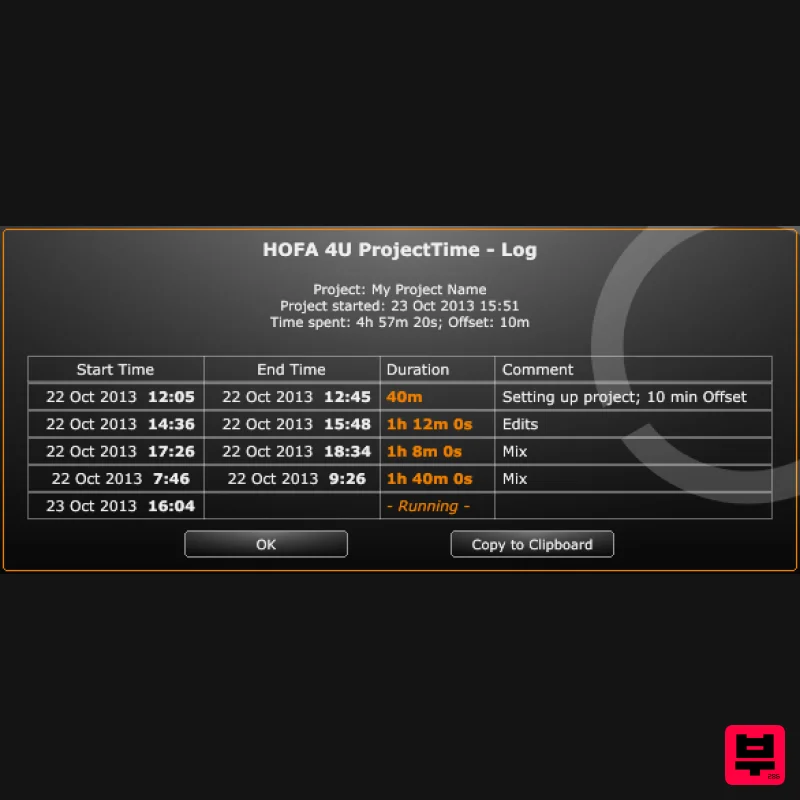
- Features Shows the time which has passed during a DAW project Time measurement in hours
- minutes
- seconds Pause function Writes log to see when you worked on the project Every log entry can be commented Works on Windows and Mac with any DAW HOFA 4U ProjectTime starts the time measurement as soon as it gets loaded into a plug-in slot in your DAW (Cubase
- Pro Tools
- Studio One
- Reaper …). The stopped time is saved with the closing of the project. The time measurement resumes by reopening this project. System Requirements HOFA Plugins work with Windows 7/8/10
- Vista and WinXP
- as well as Intel-Mac from OS X 10.6. Audio Unit
- VST3
- RTAS and AAX
- 32 and 64 Bit. HOFA Plugins are tested constantly on the following DAWs: Steinberg Cubase/Nuendo/Wavelab
- MOTU Digital Performer
- Ableton Live
- Apple Logic
- Magix Samplitude/Sequoia
- Avid Pro Tools
- Cakewalk Sonar
- Presonus Studio One
- Cockos Reaper
- FL Studio Note: 4U+ DynamicTiltEQ is used as the example. Mac Installation 1. Go to the HOFA Download Area
- scroll down and enter your email address > Click 'Proceed to Download'. 2. Select the correct format for your operating system to begin the download. 3. Open the downloaded plugin manager. 4. Scroll to the bottom and check the box next to '4U+ DynamicTiltEQ' > Click 'Install'. 5. Click 'Start'. 6. Click 'Accept'. 7. Enter your computer's Username and Password > Click 'Ok'. 8. Your installation is complete > Click 'Done'. Your software is now ready to use within your DAW! Windows Installation 1. Go to the HOFA Download Area
- scroll down and enter your email address > Click 'Proceed to Download'. 2. Select the correct format for your operating system to begin the download. 3. Open the downloaded plugin manager. 4. Scroll to the bottom and check the box next to '4U+ DynamicTiltEQ' > Click 'Install'. 5. Click 'Start'. 6. Click 'Accept'. 7. Your installation is complete > Click 'Done'. Your software is now ready to use within your DAW!
Additional Information
About the HOFA-Plugins 4U Project Time
The HOFA-Plugins 4U Project Time combines traditional design with modern performance for Utility enthusiasts.
Why Choose the HOFA-Plugins 4U Project Time?
- •Authentic HOFA-Plugins craftsmanship and design
- •Versatile sound suitable for multiple musical genres
- •Professional build quality and reliable performance
- •Part of HOFA-Plugins's respected Utility lineup
Compare & Explore
Browse our complete selection of HOFA-Plugins instruments or explore other Utility options. Use our comparison tools to find the perfect match for your musical style and budget.
Similar Products

Inphonik RX950
Utility

Tonalic Tonalic Arranger - 30 Day Subscription
Utility

Audible Genius Building Blocks 2
Utility

DDMF TheStrip
Utility

Acoustica Spin It Again
Utility

Soundspear Luxor
Utility

Audible Genius Building Blocks 1
Utility

Blue Cat Audio Blue Cat's Connector
Utility

