
Heavyocity NOVO Modern Strings
Professional music gear - detailed information and where to buy
Heavyocity
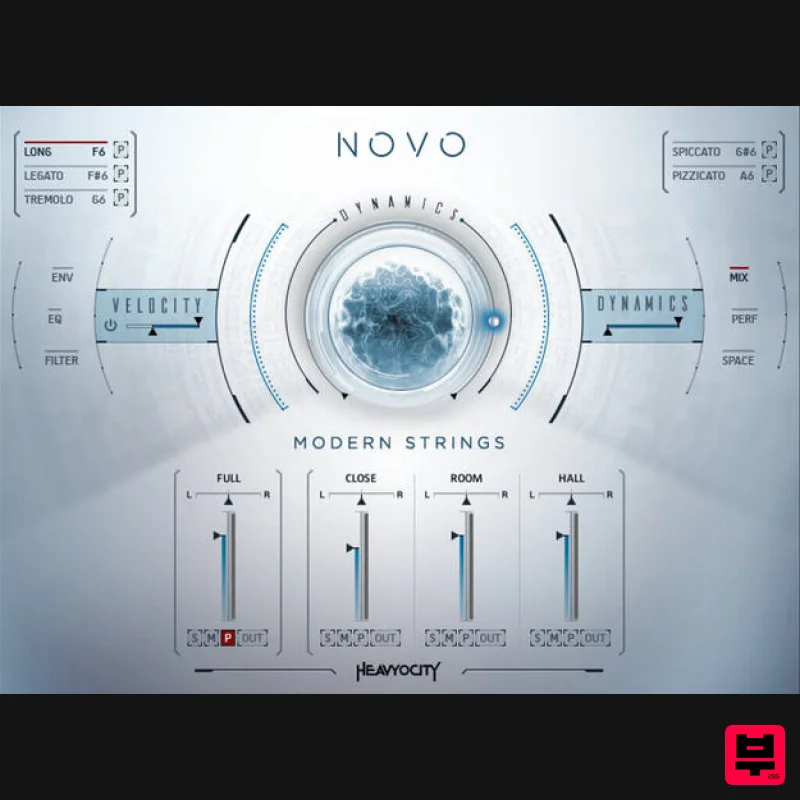
NOVO Modern Strings
Product Info
* Prices may vary. Check retailer for current pricing and availability.
Product Description
- Past. Present. Future. Heavyocity had one goal in mind when they set out to create NOVO: “make strings new again.” Recorded at the famous Eastwood Scoring Stage at Warner Bros. Studios
- of course NOVO is a world-class
- deeply-sampled orchestral strings instrument. But that’s where its similarities to other orchestral VI’s end. Beyond the almost 40GB of fully-customizable sound-designed string samples
- NOVO enables composers to tweak
- process
- layer
- and sequence like no virtual instrument ever has before. Imagine the possibility of fusing superior orchestral strings with Heavyocity’s signature sound design; it’s a new frontier in hybrid film
- game
- and television scoring. Simply put
- there has never been a cinematic strings instrument quite like NOVO. And in all likelihood
- there probably never will be. Traditional At its core
- NOVO is a sonically superior orchestral string library. Featuring full orchestral violin
- viola
- cello
- and bass ensembles
- NOVO delivers the sought-after string sound of famed composers like Hans Zimmer and Danny Elfman. The Eastwood Scoring Stage at Warner Bros. is in and of itself a Hollywood legend -- where classics like the thrilling theme from Jaws and the driving strings from Mad Max: Fury Road
- were captured in stunning detail. Combined with performances from the finest players in Los Angeles (Cinema Scoring Group)
- and collaboration with acclaimed Film Score Mixer Satoshi Mark Noguchi (Lion
- Midnight Special)
- and you have the makings of a string instrument that sets new standards for beauty
- lushness
- and aggression. And with NOVO’s unparalleled sound also comes unparalleled control. For the first time in a string VI
- NOVO features auto down-and-up bowing for the most natural-sounding staccato and spiccato string performances you’ve ever heard. With close
- room
- and hall mic positions and a core set of key articulations. Evolved Since releasing Evolve in 2008
- Heavyocity has built their reputation on equipping the modern composer with cutting-edge hybrid cinematic scoring elements. NOVO takes that ethos to the next level. Armed with the sonic potential of a 50-piece orchestra
- Heavyocity employed their signature sound-design techniques: tweaking
- processing
- mangling
- and mashing up these pristine sources into the most inspired
- most dynamic
- and most evocative elements they’ve ever created. Add in the functionalities of the innovative NOVO engine
- and the cinematic composer now has access to the most dynamic sound-shaping functionality a strings instrument has ever offered. Simply put
- NOVO is Modern Strings. CYCLE NOVO delivers a vast library that sounds great right ‘out-of-the-box’
- but what truly gives NOVO its power is the level of control and sound manipulation provided by the interface. Enter CYCLE
- a brand new dynamic playback engine from Heavyocity. The product of years of in-house development
- CYCLE boasts a set of controls that can quickly create rhythmic pulses
- swells
- stutters
- and glitch effects
- as well as effectual granular-style pads for ambient drones and textures. CYCLE can be used to add subtle motion to a sustained pad
- or to completely transform a sound into glitchy mayhem. Long
- evolving sequences can be crafted by chaining up to eight patterns together. The possibilities for sound design with CYCLE are virtually limitless; proceed with caution. Macros With the multitude of sound-shaping controls available in NOVO
- wouldn’t it be nice to consolidate them all into one
- assignable knob? We thought so too. Introducing MACRO CONTROL
- the front-and-center control knob for the String Designer and Loop Designer. It can be assigned to control multiple parameters across each channel including volume
- envelope
- and various effects. Using the MACRO sequencer
- you can program swells
- stutters
- and sequenced effects for subtly evolving timbres or frenetic
- aggressive modulation. Each preset comes with a unique set of MACRO knob assignments
- allowing you to instantly alter each sound to your specific needs. Loops It is Heavyocity’s mission to deliver world-class production-ready sound sources to enable workflow and enhance creativity. The LOOP DESIGNER is the epitome of that mission. Packed with over 400 loops laid out across three individual channels
- the LOOP DESIGNER enables efficient sketching and cue-building for the deadline-driven composer. Craft complex rhythms
- multi-layered motifs
- and ambient textures with ease
- using NOVO’s unparalleled string and hybrid sound sources. Looking for more control? Mold and shape each unique loop channel with independent control over volume
- tuning
- and start point. If you’re looking for instant inspiration for your cinematic composition
- or a great place to start for writing cues
- NOVO’s cutting edge LOOP DESIGNER is the solution. Features 38 GB uncompressed (25 GB on Disk with NI lossless compression) Available as direct download only 21
- 254 Samples 308 Snapshot Presets 57 NKAs 8 NKIs 6 Traditional Sections (Violin
- Viola
- Cello
- Bass
- High Ensemble
- Low Ensemble) String Designer Loop Designer Intuitive Sample Browser CYCLE page for advanced granular & rhythmic playback MACRO knob for dynamic multi-parameter control Stand-alone
- AAX System Requirements Mac: OS X 10.10 or higher
- Intel Core 2 Duo
- 4 GB RAM PC: Windows 7 or higher (latest Service Pack
- 32/64 Bit
- Intel Core Duo or AMD Athlon 64 X2
- 4GB RAM) Powered by the Kontakt 5 Engine Kontakt 5 (Player) ver 5.6.6 or later Komplete Kontrol integrated (NKS-ready) Note: This software requires the Kontakt 5 Engine (full) or free Kontakt 5 Player (ver 5.6.6 or later). Sound on Sound "Maybe the greatest compliment I can pay to this library is to say that it often seems to be a source of inspiration in and of itself". AskAudio “What Heavyocity has built is simply genius… I loved every second that I spent with NOVO.” ProducerSpot "It doesn't just sound amazing... it's incredibly deep
- as well as providing a wonderful depth and possibility for sound design." Notes: This product requires a Native Instruments Account and a free copy of Native Instruments Kontakt Player
- which you can download here. NOVO Essentials is used as the example. Mac Registration 1. Visit https: //heavyocity.com/my-account/ and fill out the account registration form > Click 'Register'. Installation 1. Download the Heavyocity Product Portal Installer from within your Plugin Boutique User Account 2. Double-click the .pkg file to begin the installation > Click 'Continue'. 3. Click 'Continue'. 4. Click 'Agree'. 5. Click 'Install'. 6. Enter your computer Username and Password > Click 'Install Software'. 7. Click 'Close'. 8. Open the Heavyocity Portal and enter your Heavyocity-registered Username (Email Address) and Password > Click 'Login'. 9. Click 'Register Now'
- located at the bottom of the Product Portal. 10. Complete the form and enter the serial number found in your Plugin Boutique User Account > Click 'Register'. 11. Click 'Install' on the far right of the portal. 12. Select an installation location for your Heavyocity product > Click 'Install'. Activation 1. Log in to Native Access. 2. Click 'Add a serial' in the top left corner of Native Access. 3. Enter the serial number found in your Plugin Boutique User Account > Click 'Add Serial'. 4. Click 'Close'. 5. Click the 'Not Installed' tab on the left-hand side of Native Access. 6. Locate NOVO Essentials > Click 'Add Library'. 7. Click 'browse' and locate the recently installed product > Click 'Install'. Your product is now activated and ready to use. Windows Registration 1. Visit https: //heavyocity.com/my-account/ and fill out the account registration form > Click 'Register'. Installation 1. Download the Heavyocity Product Portal Installer from within your Plugin Boutique User Account > Double-click the .zip file to extract the contents. 2. Double-click the .exe file to begin the installation > Click 'Next'. 3. Select 'I accept the terms in the license agreement' > Click 'Next'. 4. Click 'Next'. 5. Click 'Install'. 6. Click 'Finish'. 7. Enter your Heavyocity-registered Username (Email Address) and Password > Click 'Login'. 8. Click 'Register Now'
- located at the bottom of the Product Portal. 9. Complete the form and enter the serial number found in your Plugin Boutique User Account > Click 'Register'. 10. Click 'Install' on the far right of the portal. 11. Select the installation location for your Heavyocity product > Click 'Ok'. 12. Click 'Install'. Activation 1. Log in to Native Access. 2. Click 'Add a serial' in the top left corner of Native Access. 3. Enter the serial number found in your Plugin Boutique User Account > Click 'Add Serial'. 4. Click 'Close'. 5. Click the 'Not Installed' tab on the left-hand side of Native Access. 6. Locate NOVO Essentials > Click 'Add Library'. 7. Click 'browse' and locate the recently installed product > Click 'Install'. Your product is now activated and ready to use.
Additional Information
About the Heavyocity NOVO Modern Strings
The Heavyocity NOVO Modern Strings combines traditional design with modern performance for Kontakt Instrument enthusiasts.
Why Choose the Heavyocity NOVO Modern Strings?
- •Authentic Heavyocity craftsmanship and design
- •Versatile sound suitable for multiple musical genres
- •Professional build quality and reliable performance
- •Part of Heavyocity's respected Kontakt Instrument lineup
Compare & Explore
Browse our complete selection of Heavyocity instruments or explore other Kontakt Instrument options. Use our comparison tools to find the perfect match for your musical style and budget.
Similar Products

Audiofier Aerkord
Kontakt Instrument

DoubleBang Software Plugged
Kontakt Instrument

Ecliptiq Audio Hexa Rhythm Designer
Kontakt Instrument

The Beat House LE HITS THE ESSENTIALS
Kontakt Instrument

Aria Sounds Hybrichord
Kontakt Instrument

Audiofier Sequi2r EX
Kontakt Instrument

HD Instruments ZoneMatrix
Kontakt Instrument

Rigid Audio Retrocade
Kontakt Instrument

