
Heavyocity Mosaic Keys
Professional music gear - detailed information and where to buy
Heavyocity
Mosaic Keys
Product Info
* Prices may vary. Check retailer for current pricing and availability.
Product Description
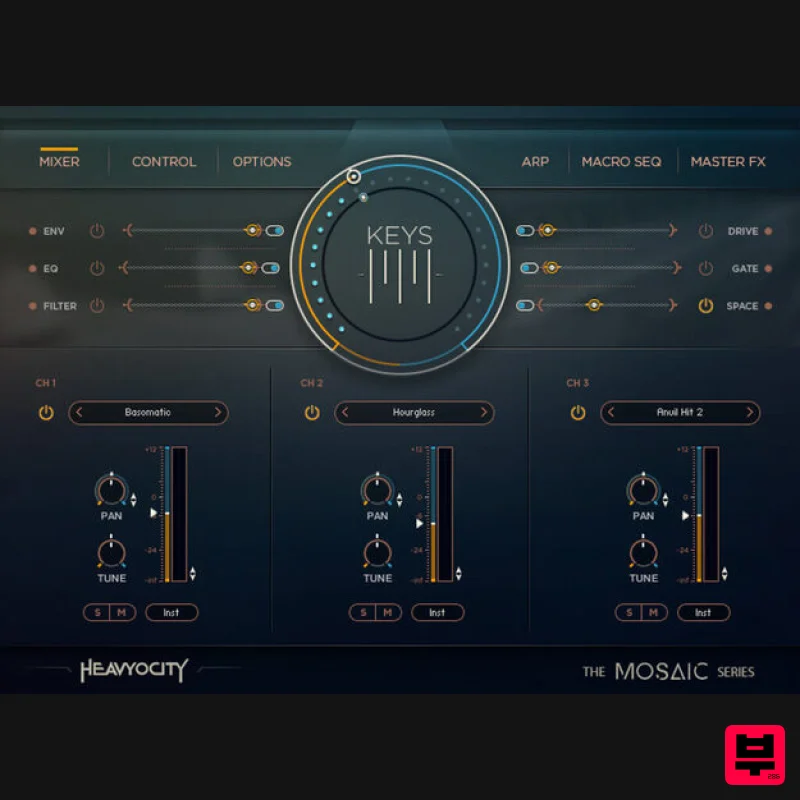
- Overview The Mosaic Series was conceived to keep composers creative: Each instrument features a unique set of foundational elements
- designed to be combined and layered into lush
- cinematic textures. Mosaic Keys explores the sonic warmth of electric keys
- delivering moving synthetic keyboards
- organic found sounds
- and effectual sound design elements. Synthetic Keys Featuring over 130 snapshots designed by the Heavyocity team
- Mosaic Keys re-envisions electric keys: Empowering composers to quickly and easily layer lyrical melodies over rich
- cinematic soundscapes and pulsing rhythmic beds. With over 5 GB of production-ready content
- Mosaic Keys will invigorate your toolkit of keys
- pushing the traditional forward into a complex scoring tool. Mosaic Engine Mosaic Keys does offer a truly dynamic set of electric keys content
- but the real power of the instrument comes in the thrilling combinations created by layering these sources across the Mosaic Engine’s three channels. Rhythmic
- lyrical
- sparse
- emotional
- eclectic. The possibilities are truly endless -- especially considering Mosaic Keys contains 130 carefully-crafted Snapshots to get you started. Features Designed Electric Keys: Layer lyrical melodies over Warm Cinematic Soundscapes Synthetic Keys: Combine organic found sounds and intricate noise layers to create Lush
- Modern Textures Includes 180 Snapshot Presets carefully crafted by the Heavyocity team System Requirements Powered by the Kontakt 6 Engine Kontakt 6 (Player) or later Komplete Kontrol integrated (NKS-ready) Minimum System Requirements Mac: macOS 10.12
- 10.13 or 10.14 (latest update)
- i5 PC: Windows 7
- Windows 8
- or Windows 10 (latest Service Pack)
- Intel Core i5 or equivalent CPU
- 2 GB RAM Germaine Franco "Mosaic Keys is an incredibly inspiring and intuitive tool. With such an expansive range of textures and colours
- it will no doubt find its way into many of my future projects." Kevin Riepl "Mosaic Keys is packed with endless combinations of inspiring sounds and underlying movement. I find it to be a great springboard for ideas
- whether it be the foundations of a cue or a song." Tori Letzler "As with all Heavyocity lines
- Mosaic Keys is another great addition to my growing toolkit. The ability to isolate various parts of each sample opens up a world of possibilities." Notes: This product requires a Native Instruments Account and a free copy of Native Instruments Kontakt Player
- which you can download here. NOVO Essentials is used as the example. Mac Registration 1. Visit https: //heavyocity.com/my-account/ and fill out the account registration form > Click 'Register'. Installation 1. Download the Heavyocity Product Portal Installer from within your Plugin Boutique User Account 2. Double-click the .pkg file to begin the installation > Click 'Continue'. 3. Click 'Continue'. 4. Click 'Agree'. 5. Click 'Install'. 6. Enter your computer Username and Password > Click 'Install Software'. 7. Click 'Close'. 8. Open the Heavyocity Portal and enter your Heavyocity-registered Username (Email Address) and Password > Click 'Login'. 9. Click 'Register Now'
- located at the bottom of the Product Portal. 10. Complete the form and enter the serial number found in your Plugin Boutique User Account > Click 'Register'. 11. Click 'Install' on the far right of the portal. 12. Select an installation location for your Heavyocity product > Click 'Install'. Activation 1. Log in to Native Access. 2. Click 'Add a serial' in the top left corner of Native Access. 3. Enter the serial number found in your Plugin Boutique User Account > Click 'Add Serial'. 4. Click 'Close'. 5. Click the 'Not Installed' tab on the left-hand side of Native Access. 6. Locate NOVO Essentials > Click 'Add Library'. 7. Click 'browse' and locate the recently installed product > Click 'Install'. Your product is now activated and ready to use. Windows Registration 1. Visit https: //heavyocity.com/my-account/ and fill out the account registration form > Click 'Register'. Installation 1. Download the Heavyocity Product Portal Installer from within your Plugin Boutique User Account > Double-click the .zip file to extract the contents. 2. Double-click the .exe file to begin the installation > Click 'Next'. 3. Select 'I accept the terms in the license agreement' > Click 'Next'. 4. Click 'Next'. 5. Click 'Install'. 6. Click 'Finish'. 7. Enter your Heavyocity-registered Username (Email Address) and Password > Click 'Login'. 8. Click 'Register Now'
- located at the bottom of the Product Portal. 9. Complete the form and enter the serial number found in your Plugin Boutique User Account > Click 'Register'. 10. Click 'Install' on the far right of the portal. 11. Select the installation location for your Heavyocity product > Click 'Ok'. 12. Click 'Install'. Activation 1. Log in to Native Access. 2. Click 'Add a serial' in the top left corner of Native Access. 3. Enter the serial number found in your Plugin Boutique User Account > Click 'Add Serial'. 4. Click 'Close'. 5. Click the 'Not Installed' tab on the left-hand side of Native Access. 6. Locate NOVO Essentials > Click 'Add Library'. 7. Click 'browse' and locate the recently installed product > Click 'Install'. Your product is now activated and ready to use.
Additional Information
About the Heavyocity Mosaic Keys
Experience the quality and tone that makes the Heavyocity Mosaic Keys a popular choice for musicians.
Why Choose the Heavyocity Mosaic Keys?
- •Authentic Heavyocity craftsmanship and design
- •Versatile sound suitable for multiple musical genres
- •Professional build quality and reliable performance
- •Part of Heavyocity's respected Kontakt Instrument lineup
Compare & Explore
Browse our complete selection of Heavyocity instruments or explore other Kontakt Instrument options. Use our comparison tools to find the perfect match for your musical style and budget.
Similar Products

Audiofier Aerkord
Kontakt Instrument

DoubleBang Software Plugged
Kontakt Instrument

Audiofier Sequi2r EX
Kontakt Instrument

Aria Sounds Hybrichord
Kontakt Instrument

HD Instruments ZoneMatrix
Kontakt Instrument

The Beat House LE HITS THE ESSENTIALS
Kontakt Instrument

Ecliptiq Audio Hexa Rhythm Designer
Kontakt Instrument

Rigid Audio Retrocade
Kontakt Instrument

