
Heavyocity Ensemble Drums Collection
Professional music gear - detailed information and where to buy
Heavyocity
Ensemble Drums Collection
Product Info
* Prices may vary. Check retailer for current pricing and availability.
Product Description
- What is Ensemble Drums? Overview Master Sessions is Heavyocity’s boutique line of scoring tools for the pro composer. Recorded in New York City
- the Master Sessions series focuses on specific instruments and ensembles housed in Heavyocity’s award-winning engine (powered by Kontakt). Master Sessions delivers an epic sound without the epic price! Master Sessions: Ensemble Drums delivers 7 unique multi-sampled drum ensembles and over 300 tempo-synced loops. Each ensemble consists of up to 10 different drums
- performed simultaneously by 5 players. Through creative processing and mixing
- Heavyocity’s team composed banks of loops to be inspiring and immediately useful. Ensemble Drums - Kits The 7 ensembles contain a mixture of taikos
- roto toms
- field bass drums and snares
- concert bass drums
- floor toms
- and large containers. These massive
- punchy ensembles are presented in both menu and single kit presets
- providing complete control over your sound. Heavyocity has further tweaked and affected the kits
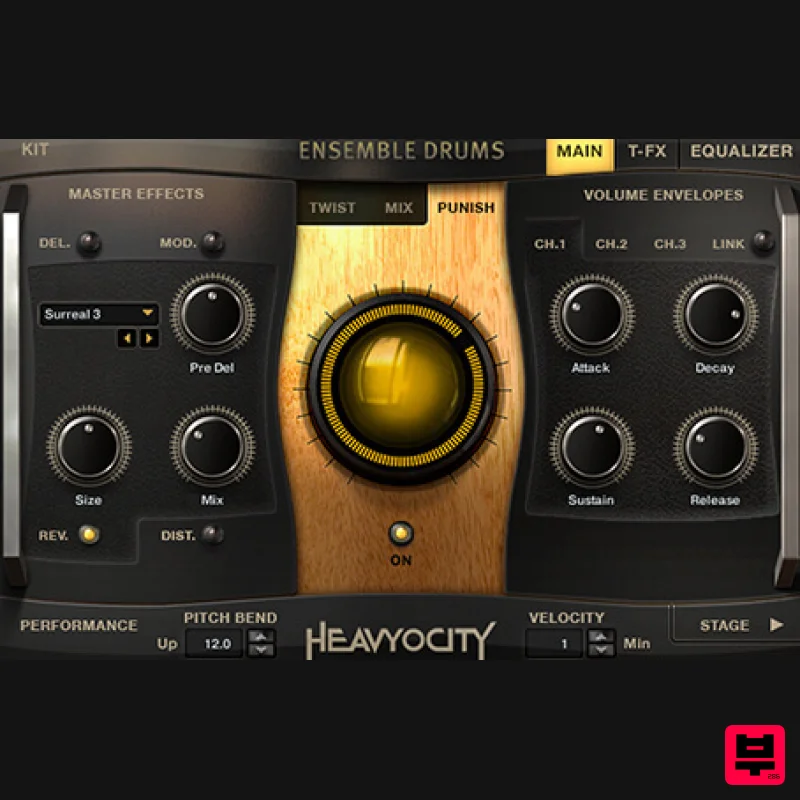
- creating an additional 24 presets with a more aggressive edge. Mix and shape your sound using Heavyocity’s proprietary interface containing global effects (reverb
- delay
- distortion
- and chorus mod)
- per-drum EQ
- per-channel ADSR
- TriggerFX
- and the signature Punish and Twist knobs. Ensemble Drums - Loops Ensemble Drums - Loops contains over 300 tempo-synced phrases arranged in menu and single loop presets. As an exciting new feature
- the content is now divided into straight and triplet loops. It is a veritable “Barrage - à - Trois”. Rearrange and adjust the loops by slice with Heavyocity’s signature “Loop Mutator”. Dial in the Trigger FX
- master effects
- filter modulation and ADSR for radical sonic results. Layer massive kits with hybrid loops to create huge walls of percussion. Mix and match loop “stems” to build your own unique combinations of tempo-synced rhythms. Collection Details Control Your Sound Master Sesssions: Ensemble Drums’ user interface was designed FOR composers and sound designers BY composers and sound designers
- providing simple
- intuitive ways to alter the sounds without leaving the interface. Three levels of effects are intrinsically bound to the Kit and Loop components — apply effects globally
- engage the Trigger-FX
- or tweak individual sounds. Twist
- Punish
- Effect Globally affect the preset with one of the 4 Master FX (Delay
- Drive
- and Convolution). You have control over four effect-specific parameters (like effect amount
- rate
- size
- or depth). Dial in the aggression with the signature “Punish” Knob
- a combination of saturation
- distortion
- and compression. Or
- modulate the shape of the sound with the “Twist” knob. EQ
- Filter
- Modulate Sculpt your sound with per-channel and per-loop EQs or add sizzle and punch with the 4-band Master EQ. Control the modulation of filters with an envelope or LFO in Ensemble Drums - Loops
- altering the amount and rate of an LFO
- or trigger the Filter with an ADSR envelope. Ensemble Drums - Kits The Mixer Page The Mixer provides tune
- and level control for each of it’s 3 channels. Adjust the faders for the right blend of close
- room and hall channels. Tap into per channel (or linkable) ADSR envelopes and per channel solo/mute buttons to isolate and adjust individual sounds if desired
- or “Purge” individual channels to turn them off
- reducing the instrument’s memory footprint. Staging The Stage is a 3-dimensional representation of the stereo field
- useful for visually placing the drums in your kit. You can place individual drums at any one of the 35 positions across the stereo field. Real-time visual feedback of playing sounds allows you to adjust drum placements quickly and easily. Shift-click to assign all drums to one stage position or trigger each drum and click to assign it’s position in the hall. Ensemble Drums - Loops The Loop Mutator™ The Loop Mutator™ allows you to re-compose and re-imagine 300+ loops with spectacular results. Take full control over number of steps
- time signature
- step subdivision (straight
- dotted
- or triplet)
- individual step duration
- Loop/Slice selection
- and velocity. Use the randomize option to quickly generate intricate patterns and beats. Eight fully customizable and linkable patterns per preset allow you to create complex grooves and sequences (up to 128 steps) of full rhythmic loops (in the Menus). Activate the Loop Mutator with a Single Loop preset to quickly re-compose or change the timing of any loop. Use any of Ensemble Drums’ percussion loops as they are or turn on the Loop Mutator™ and create unique sequences that are completely your own. Loop Control Ensemble Drums - Loops offers 300+ carefully sculpted percussion loops arranged into 2 main categories: Loop Menus and Single Loops. These loops
- comprised of both straight and triplet grooves
- are perfect for composing in any rhythmic environment. The Loop Menus are intelligently mapped and formatted into “breakout” presets
- allowing you to perform the full loop in a single key or mix and match individual layers. Single Loop presets provide level
- and tuning for each slice
- and allow you to quickly recompose your groove via midi drag-and-drop. The Sound of the Collection Bunker Studios Bunker Studios in Brooklyn
- NY by John Davis (not of Korn). The 3
- 000 square foot recording studio utilizes a wide array of analog gear
- including an SSL 4040e mixing console
- BAE microphone Pre’s
- and a massive collection of vintage and modern microphones. The pinewood room of Studio A
- boasting a huge 25’ ceiling
- was the ideal environment for achieving the tight
- punchy impact we desired for the Ensemble Drums Collection. Ensemble Performances The Heavyocity team performed all the percussion found in Ensemble Drums collection. Each ensemble consists of round-robin performances at multiple velocities. Close
- room and ceiling-mounted X-Y mics created the perfect capturing environment for the massive ensembles. Creative Processing All content was mixed and mastered through Heavyocity’s high end signal chain of analog and digital equipment. In addition to the crisp
- organic percussion
- we tweaked
- eq’ed
- filtered
- and modulated the content to produce grittier
- overdriven sounds and loops. Features 3.5 GB uncompressed (1.9GB on Disk with NI lossless compression) Available as direct download only 1
- 650+ samples 470+ NKIs 30+ Kits 27 Loop Menus 400+ Single Loop Presets 5 Multis The Stage for easy stereo placement Playable Trigger FX™ for real-time control Loop Mutator™ for real-time re-composing of loops Stand-alone
- AAX System Requirements Powered by the Kontakt Engine Kontakt 5 (Player) Version 5.5.1.451 or higher required. Komplete Kontrol integrated (NKS-ready) Minimum System Requirements Mac: OS X 10.9
- Intel Core Duo
- 2 GB RAM PC: Windows 7 (latest Service Pack
- 32/64 Bit
- Intel Core Duo or AMD Athlon 64 X2
- 2GB RAM Joe Trapanese "It's ease of use and impressive sonic quality provides an excellent foundation for modern film music production." Clinton Shorter 'Another killer sounding
- sleek and deceivingly deep product from Heavyocity.' Cris Velasco "Extra low end punch that blends perfectly with your other libraries. These are samples that you didn't know you need
- but that now you can't live without". Notes: This product requires a Native Instruments Account and a free copy of Native Instruments Kontakt Player
- which you can download here. NOVO Essentials is used as the example. Mac Registration 1. Visit https: //heavyocity.com/my-account/ and fill out the account registration form > Click 'Register'. Installation 1. Download the Heavyocity Product Portal Installer from within your Plugin Boutique User Account 2. Double-click the .pkg file to begin the installation > Click 'Continue'. 3. Click 'Continue'. 4. Click 'Agree'. 5. Click 'Install'. 6. Enter your computer Username and Password > Click 'Install Software'. 7. Click 'Close'. 8. Open the Heavyocity Portal and enter your Heavyocity-registered Username (Email Address) and Password > Click 'Login'. 9. Click 'Register Now'
- located at the bottom of the Product Portal. 10. Complete the form and enter the serial number found in your Plugin Boutique User Account > Click 'Register'. 11. Click 'Install' on the far right of the portal. 12. Select an installation location for your Heavyocity product > Click 'Install'. Activation 1. Log in to Native Access. 2. Click 'Add a serial' in the top left corner of Native Access. 3. Enter the serial number found in your Plugin Boutique User Account > Click 'Add Serial'. 4. Click 'Close'. 5. Click the 'Not Installed' tab on the left-hand side of Native Access. 6. Locate NOVO Essentials > Click 'Add Library'. 7. Click 'browse' and locate the recently installed product > Click 'Install'. Your product is now activated and ready to use. Windows Registration 1. Visit https: //heavyocity.com/my-account/ and fill out the account registration form > Click 'Register'. Installation 1. Download the Heavyocity Product Portal Installer from within your Plugin Boutique User Account > Double-click the .zip file to extract the contents. 2. Double-click the .exe file to begin the installation > Click 'Next'. 3. Select 'I accept the terms in the license agreement' > Click 'Next'. 4. Click 'Next'. 5. Click 'Install'. 6. Click 'Finish'. 7. Enter your Heavyocity-registered Username (Email Address) and Password > Click 'Login'. 8. Click 'Register Now'
- located at the bottom of the Product Portal. 9. Complete the form and enter the serial number found in your Plugin Boutique User Account > Click 'Register'. 10. Click 'Install' on the far right of the portal. 11. Select the installation location for your Heavyocity product > Click 'Ok'. 12. Click 'Install'. Activation 1. Log in to Native Access. 2. Click 'Add a serial' in the top left corner of Native Access. 3. Enter the serial number found in your Plugin Boutique User Account > Click 'Add Serial'. 4. Click 'Close'. 5. Click the 'Not Installed' tab on the left-hand side of Native Access. 6. Locate NOVO Essentials > Click 'Add Library'. 7. Click 'browse' and locate the recently installed product > Click 'Install'. Your product is now activated and ready to use.
Additional Information
About the Heavyocity Ensemble Drums Collection
Discover the distinctive sound and feel of the Heavyocity Ensemble Drums Collection, a standout choice among Kontakt Instrument.
Why Choose the Heavyocity Ensemble Drums Collection?
- •Authentic Heavyocity craftsmanship and design
- •Versatile sound suitable for multiple musical genres
- •Professional build quality and reliable performance
- •Part of Heavyocity's respected Kontakt Instrument lineup
Compare & Explore
Browse our complete selection of Heavyocity instruments or explore other Kontakt Instrument options. Use our comparison tools to find the perfect match for your musical style and budget.
Similar Products

Ecliptiq Audio Hexa Rhythm Designer
Kontakt Instrument

Audiofier Sequi2r EX
Kontakt Instrument

Rigid Audio Retrocade
Kontakt Instrument

The Beat House LE HITS THE ESSENTIALS
Kontakt Instrument

Audiofier Aerkord
Kontakt Instrument

Aria Sounds Hybrichord
Kontakt Instrument

HD Instruments ZoneMatrix
Kontakt Instrument

DoubleBang Software Plugged
Kontakt Instrument

