
Heavyocity Analog Hybrid Drums
Professional music gear - detailed information and where to buy
Heavyocity
Analog Hybrid Drums
Product Info
* Prices may vary. Check retailer for current pricing and availability.
Product Description
- A new era of DAMAGE percussion fusing maximum impact with raw intensity. Crafted from iconic analog equipment and organic recordings
- meticulously curated and aggressively sculpted
- Analog Hybrid Drums epitomizes refined aggression fused with organic playability and cutting-edge analog gear. Containing over 200 deeply sampled sources and over 575 loops all housed in the notorious Damage 2 engine
- Analog Hybrid Drums delivers a punchy
- man-meets-machine made
- artistically curated sound palette infused with attitude and aggression
- making it an essential for modern music production. Much like Damage 2
- all of the content in Analog Hybrid Drums works in three distinct instruments (Ensemble Designer
- Loop Designer
- and Kit Designer)
- each providing a uniquely inspiring and customizable workflow. Analog Hybrid Drums boasts an extensive library of over 25
- 000 samples and 16 GB of meticulously crafted sounds
- offering an unparalleled range of percussive possibilities. From heavy-hitting tracks to cinematic masterpieces
- these drums redefine the boundaries of percussion and explore a new generation of music-making. Hand-picked by the Heavyocity team
- each sound is methodically captured from highly sought-after analog equipment and organic percussion elements
- ensuring a contemporary edge. Synths like the Soma Pulsar-23
- Metasonix R54
- R51 modules
- and Moog Minitaur
- DFAM
- Mother-32
- and Make Noise Modules were carefully utilized
- alongside outboard effects gear such as the Sherman Filterbank II
- Metasonix TX-3
- Thermionic Culture Vulture
- and Black Box HG-2 and more. Injected with Heavyocity's renowned sound design techniques
- the result is a collection of unique
- character-rich percussion that pushes the boundaries of creativity. Features 24
- 585 Samples 217 different Deeply Sampled Percussion Sources 576 Creative Loops 84 Custom-Designed Presets (33 Kits
- 38 Loop Designer Presets
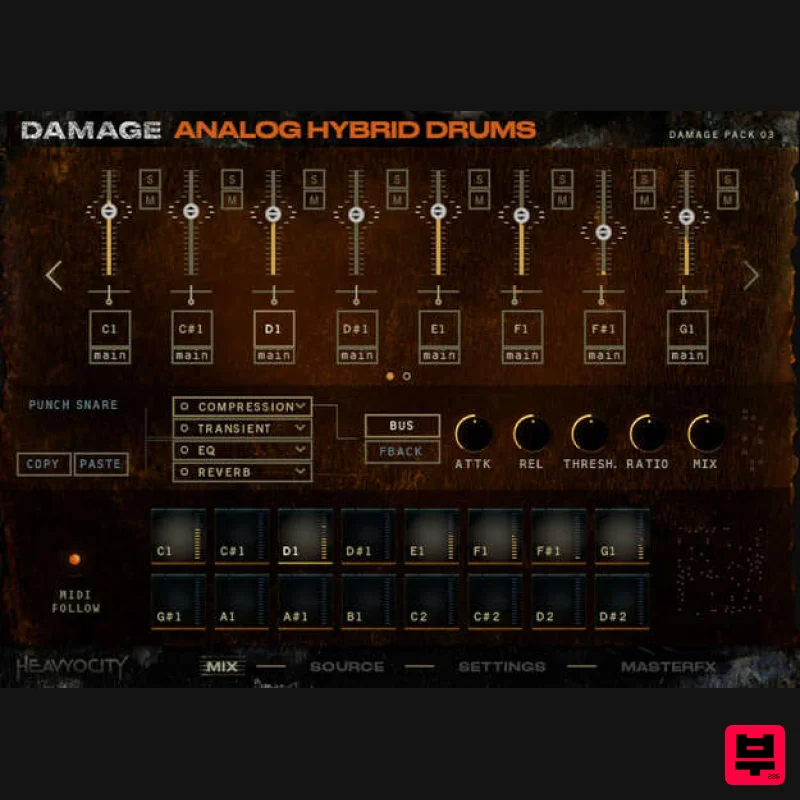
- 13 Ensemble Designer Presets) 3 Unique Engines: Kit Designer 16-voice Drum Kit layout for quick and easy groove creation Intuitive browser to load in sound sources to each key Independent FX chains for every voice – add compression
- reverb
- saturation
- and more to each of the 16 voices Ensemble Designer Intuitive Browser to load in 235+ sources in octave banks and individual sounds Instant 3D positioning with updated Stage Five discrete mic positions (Close
- OverHead
- Room
- Hall
- and LFE) Create realistic patterns
- rolls
- crescendos
- and more with custom MIDI Performance Tool Redesigned Punish Knob with three unique flavors (Gently Now
- Hurt Me Plenty
- Nightmare) Customizable Master FX chain Loop Designer 576 Loops (144 loops with 4 stems each) 144 Synth Straight (36 with 4 stems) 144 Synth Triplet (36 with 4 stems) 144 Hybrid Straight (36 with 4 stems) 144 Hybrid Triplet (36 with 4 stems) Add modulation and effects to individual loops via Unique Send FX layer System Requirements 16.2 GB uncompressed (7.89 GB on Disk with NI lossless compression) Powered by the Kontakt 6.8 Engine Kontakt 6.8 (Player) or later Komplete Kontrol integrated (NKS-ready) Available as direct download only Stand-alone
- VST3
- AAX Mac: macOS 10.14
- 10.15
- or 13 (latest update) Apple Silicon Macs (via Rosetta 2 & natively on ARM in Standalone or in hosts that support it): macOS 11
- or 13 (latest update) PC: Windows 10 or 11 (latest Service Pack)
- Intel Core i5 or equivalent CPU
- 2 GB RAM Notes: This product requires a Native Instruments Account and a free copy of Native Instruments Kontakt Player
- which you can download here. NOVO Essentials is used as the example. Mac Registration 1. Visit https: //heavyocity.com/my-account/ and fill out the account registration form > Click 'Register'. Installation 1. Download the Heavyocity Product Portal Installer from within your Plugin Boutique User Account 2. Double-click the .pkg file to begin the installation > Click 'Continue'. 3. Click 'Continue'. 4. Click 'Agree'. 5. Click 'Install'. 6. Enter your computer Username and Password > Click 'Install Software'. 7. Click 'Close'. 8. Open the Heavyocity Portal and enter your Heavyocity-registered Username (Email Address) and Password > Click 'Login'. 9. Click 'Register Now'
- located at the bottom of the Product Portal. 10. Complete the form and enter the serial number found in your Plugin Boutique User Account > Click 'Register'. 11. Click 'Install' on the far right of the portal. 12. Select an installation location for your Heavyocity product > Click 'Install'. Activation 1. Log in to Native Access. 2. Click 'Add a serial' in the top left corner of Native Access. 3. Enter the serial number found in your Plugin Boutique User Account > Click 'Add Serial'. 4. Click 'Close'. 5. Click the 'Not Installed' tab on the left-hand side of Native Access. 6. Locate NOVO Essentials > Click 'Add Library'. 7. Click 'browse' and locate the recently installed product > Click 'Install'. Your product is now activated and ready to use. Windows Registration 1. Visit https: //heavyocity.com/my-account/ and fill out the account registration form > Click 'Register'. Installation 1. Download the Heavyocity Product Portal Installer from within your Plugin Boutique User Account > Double-click the .zip file to extract the contents. 2. Double-click the .exe file to begin the installation > Click 'Next'. 3. Select 'I accept the terms in the license agreement' > Click 'Next'. 4. Click 'Next'. 5. Click 'Install'. 6. Click 'Finish'. 7. Enter your Heavyocity-registered Username (Email Address) and Password > Click 'Login'. 8. Click 'Register Now'
- located at the bottom of the Product Portal. 9. Complete the form and enter the serial number found in your Plugin Boutique User Account > Click 'Register'. 10. Click 'Install' on the far right of the portal. 11. Select the installation location for your Heavyocity product > Click 'Ok'. 12. Click 'Install'. Activation 1. Log in to Native Access. 2. Click 'Add a serial' in the top left corner of Native Access. 3. Enter the serial number found in your Plugin Boutique User Account > Click 'Add Serial'. 4. Click 'Close'. 5. Click the 'Not Installed' tab on the left-hand side of Native Access. 6. Locate NOVO Essentials > Click 'Add Library'. 7. Click 'browse' and locate the recently installed product > Click 'Install'. Your product is now activated and ready to use.
Additional Information
About the Heavyocity Analog Hybrid Drums
Discover the distinctive sound and feel of the Heavyocity Analog Hybrid Drums, a standout choice among Kontakt Instrument.
Why Choose the Heavyocity Analog Hybrid Drums?
- •Authentic Heavyocity craftsmanship and design
- •Versatile sound suitable for multiple musical genres
- •Professional build quality and reliable performance
- •Part of Heavyocity's respected Kontakt Instrument lineup
Compare & Explore
Browse our complete selection of Heavyocity instruments or explore other Kontakt Instrument options. Use our comparison tools to find the perfect match for your musical style and budget.
Similar Products

Rigid Audio Retrocade
Kontakt Instrument

The Beat House LE HITS THE ESSENTIALS
Kontakt Instrument

HD Instruments ZoneMatrix
Kontakt Instrument

Audiofier Sequi2r EX
Kontakt Instrument

DoubleBang Software Plugged
Kontakt Instrument

Aria Sounds Hybrichord
Kontakt Instrument

Audiofier Aerkord
Kontakt Instrument

Ecliptiq Audio Hexa Rhythm Designer
Kontakt Instrument

