
Have Audio UCHRONIA
Professional music gear - detailed information and where to buy
Have Audio
UCHRONIA
Product Info
* Prices may vary. Check retailer for current pricing and availability.
Product Description
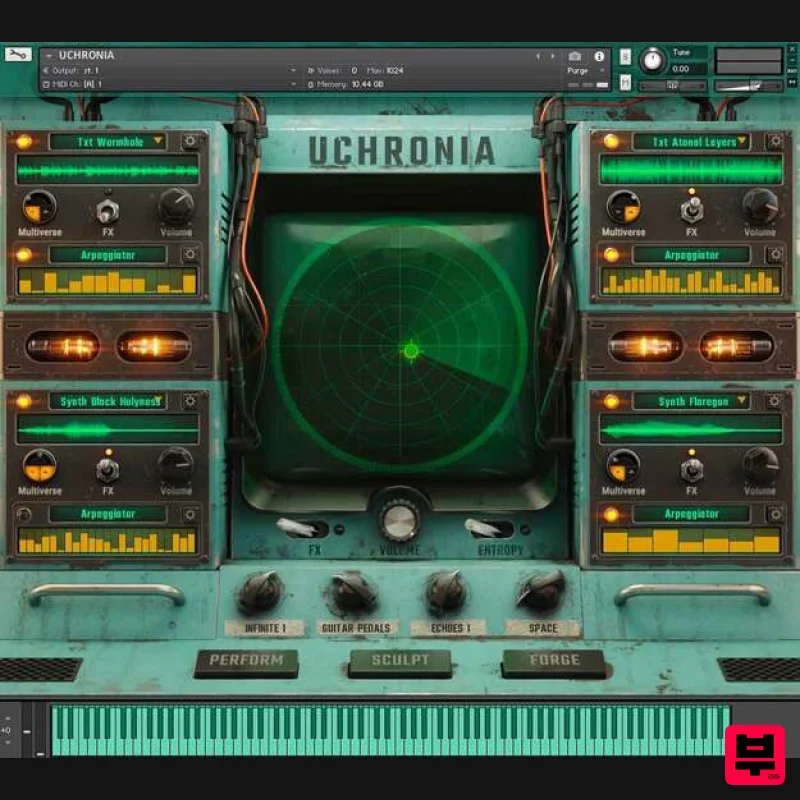
- Parallel sonic realities are just a few clicks away! UCHRONIA is a unique and powerful granular synthesis instrument for Kontakt 6+. Through its 4 independent granular engines and arpeggiators
- radar XY pad
- 3 playback modes
- tons of fully controllable FXs
- and its unique Entropy randomizer
- you will be able to deconstruct
- sculpt and redesign any type of sound - from loops
- playable synths
- and textures
- ambient soundscapes
- up to complex rhythms and playable pads and
- of course
- your own sounds. You can drag & drop up to 32 samples for each engine for a total of 128 imported samples. Any sound source can be turned into complex rhythmic sequences and evolving soundscapes in just a few clicks. Let Uchronia inspire you and take you to unexplored musical territories! Features 3 playback modes: normal verse
- reverse
- multiverse (normal and reverse at the same time) 4 independent granular engines Granular controls: position
- pitch
- grain size
- density
- envelope
- spray
- spread
- atomic structure
- speed
- tone 4 arpeggiators (4 pattern modes
- up to 32 steps
- 3 octaves + and -
- 16 rhythmic subdivision rates) ENTROPY: randomizer to generate infinite aleatoric sound combinations and FX settings Tape reel noises sampled from authentic analog tape devices 72 patches (one-shots
- playable
- textures
- loops) 78 Entropies - snapshots (playable
- rhythmic
- sound design) 9 built-in FXs 3 additional controls for the Master bus: 72 convolution reverbs and creative FXs for each granular engine System Requirements Granular synthesis requires a fast CPU in order to work properly 8GB RAM minimum is required (16GB+ recommendable) Kontakt Full Version 6.6+ required (not compatible with the free Kontakt Player) Please note: This instrument will not work with the free Kontakt Player and will show the demo mode message. Please note: Nordisk Kontrabass is used as an example as the installation process is the same for all Have products. Mac Installation 1. Go to https://pulsedownloader.com/ > Click 'Download for Mac OS' to download the Pulse application installer. 2. Open the .dmg file > Click and drag the application icon into the applications folder. 3. Open the Pulse application > Click 'Register' 4. Enter your Email Address and Password > Check the box that states 'I agree to the terms of use and privacy policy' > Click 'Register'. 5. Click 'Add a Product'. 6. Enter your 32-digit serial key
- found within the serial number section of your Plugin Boutique User Account > Click 'Redeem'. 7. Click 'Install'. 8. Click the folder icon to select the installation location for your library. 9. Choose your installation location > Click 'Open'. 10. Click 'Download and Install'. 11. Open Kontakt > Select the 'Files' tab and navigate to your installed Kontakt library > Click and drag the .nki file into the empty window. Your Kontakt Instrument is now installed and ready to use. Batch Re-save Instructions 1. Within Kontakt
- click the floppy disk icon. 2. From the drop-down menu
- click 'Batch re-save'. 3. Click 'Yes'. 4. Navigate to the installation location for your Kontakt library > Click 'Open'. Batch re-save is now complete and you can expect to see quicker loading times for your Kontakt Instrument. Windows Installation 1. Go to https: //pulsedownloader.com/ > Click 'Download for Windows' to download the Pulse application installer. 2. Open the .exe file to install the Pulse application > Open Pulse and click 'Register'. 3. Enter your Email Address and Password > Check the box that states 'I agree to the terms of use and privacy policy' > Click 'Register'. 4. Click 'Add a Product'. 5. Enter your 32-digit serial key
- found within the serial number section of your Plugin Boutique User Account > Click 'Redeem'. 6. Click 'Install'. 7. Click the folder icon to select the installation location for your library. 8. Choose your installation location > Click 'Select Folder'. 9. Click 'Download and Install'. 10. Open Kontakt > Select the 'Files' tab and navigate to your installed Kontakt library > Click and drag the .nki file into the empty window. Your Kontakt Instrument is now installed and ready to use. Batch Re-save Instructions 1. Within Kontakt
- click the floppy disk icon. 2. From the drop-down menu
- click 'Batch re-save'. 3. Click 'Yes'. 4. Navigate to the installation location for your Kontakt library > Click 'Ok'. Batch re-save is now complete and you can expect to see quicker loading times for your Kontakt Instrument.
Additional Information
About the Have Audio UCHRONIA
The Have Audio UCHRONIA combines traditional design with modern performance for Kontakt Instrument enthusiasts.
Why Choose the Have Audio UCHRONIA ?
- •Authentic Have Audio craftsmanship and design
- •Versatile sound suitable for multiple musical genres
- •Professional build quality and reliable performance
- •Part of Have Audio's respected Kontakt Instrument lineup
Compare & Explore
Browse our complete selection of Have Audio instruments or explore other Kontakt Instrument options. Use our comparison tools to find the perfect match for your musical style and budget.
Similar Products

Audiofier Sequi2r EX
Kontakt Instrument

DoubleBang Software Plugged
Kontakt Instrument

The Beat House LE HITS THE ESSENTIALS
Kontakt Instrument

HD Instruments ZoneMatrix
Kontakt Instrument

Ecliptiq Audio Hexa Rhythm Designer
Kontakt Instrument

Aria Sounds Hybrichord
Kontakt Instrument

Rigid Audio Retrocade
Kontakt Instrument

Audiofier Aerkord
Kontakt Instrument

