
Have Audio Sax Fury
Professional music gear - detailed information and where to buy
Have Audio
Sax Fury
Product Info
* Prices may vary. Check retailer for current pricing and availability.
Product Description
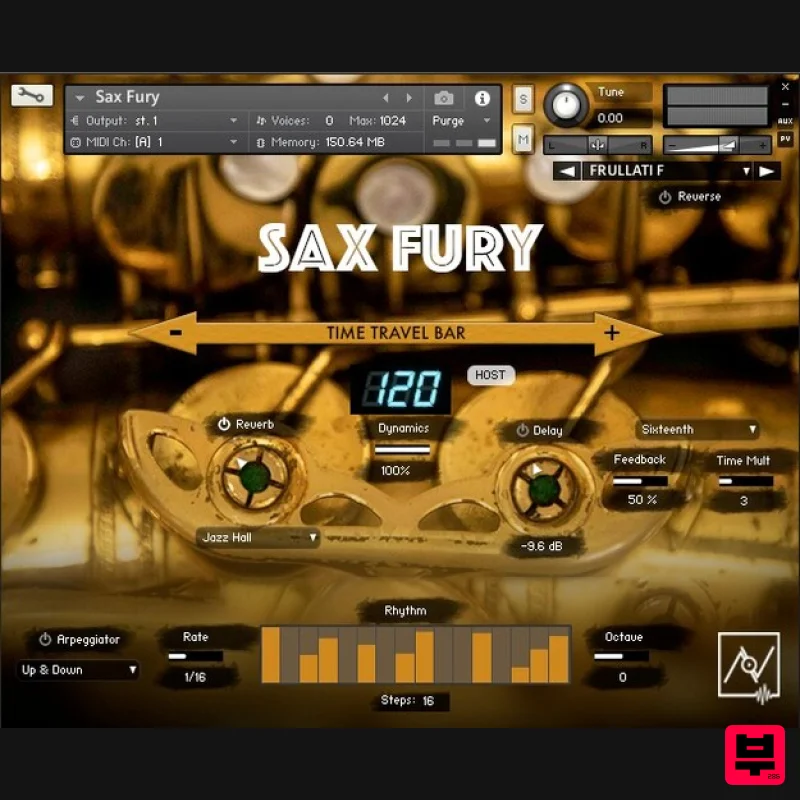
- Sax Fury is a new library designed for filmcomposers and producers looking for powerful and original sax extended techniques and textures. It offers a wide range of melodic and atmospheric textures
- Coltrane inspired sheets of sounds synched to tempo
- multiphonics as well as frullati
- vibrato
- slap samples and sounds processed by analog pedal effects. A great tool to trigger your creativity. Get inspired by difference to make a difference! Features Built-in Effects: Arpeggiator Reverse Time Travel Bar (realtime controllable Time Stretch) Selection of 9 top class reverbs Delay Articulation List: Melodic Frullati Key noises Multiphonics Slap Vibrato Textures Air Circular breathing Free textures (melodic
- combined
- key noises
- slap
- tremolo
- etc.) Frullati textures Key noise textures Key noise rises System Requirements Requires full version of KONTAKT 5.6.8+ Approx. 0.5 GB free harddrive space 8 GB of RAM or more is recommended Note: Nordisk Kontrabass is used as the example. Mac Installation 1. Go to https://pulsedownloader.com/ > Click 'Download for Mac OS' to download the Pulse application installer. 2. Open the .dmg file > Click and drag the application icon into the applications folder. 3. Open the Pulse application > Click 'Register' 4. Enter your Email Address and Password > Check the box that states 'I agree to the terms of use and privacy policy' > Click 'Register'. 5. Click 'Add a Product'. 6. Enter your 32-digit serial key
- found within the serial number section of your Plugin Boutique User Account > Click 'Redeem'. 7. Click 'Install'. 8. Click the folder icon to select the installation location for your library. 9. Choose your installation location > Click 'Open'. 10. Click 'Download and Install'. 11. Open Kontakt > Select the 'Files' tab and navigate to your installed Kontakt library > Click and drag the .nki file into the empty window. Your Kontakt Instrument is now installed and ready to use. Batch Re-save Instructions 1. Within Kontakt
- click the floppy disk icon. 2. From the drop-down menu
- click 'Batch re-save'. 3. Click 'Yes'. 4. Navigate to the installation location for your Kontakt library > Click 'Open'. Batch re-save is now complete and you can expect to see quicker loading times for your Kontakt Instrument. Windows Installation 1. Go to https: //pulsedownloader.com/ > Click 'Download for Windows' to download the Pulse application installer. 2. Open the .exe file to install the Pulse application > Open Pulse and click 'Register'. 3. Enter your Email Address and Password > Check the box that states 'I agree to the terms of use and privacy policy' > Click 'Register'. 4. Click 'Add a Product'. 5. Enter your 32-digit serial key
- found within the serial number section of your Plugin Boutique User Account > Click 'Redeem'. 6. Click 'Install'. 7. Click the folder icon to select the installation location for your library. 8. Choose your installation location > Click 'Select Folder'. 9. Click 'Download and Install'. 10. Open Kontakt > Select the 'Files' tab and navigate to your installed Kontakt library > Click and drag the .nki file into the empty window. Your Kontakt Instrument is now installed and ready to use. Batch Re-save Instructions 1. Within Kontakt
- click the floppy disk icon. 2. From the drop-down menu
- click 'Batch re-save'. 3. Click 'Yes'. 4. Navigate to the installation location for your Kontakt library > Click 'Ok'. Batch re-save is now complete and you can expect to see quicker loading times for your Kontakt Instrument.
Additional Information
About the Have Audio Sax Fury
The Have Audio Sax Fury combines traditional design with modern performance for Kontakt Instrument enthusiasts.
Why Choose the Have Audio Sax Fury?
- •Authentic Have Audio craftsmanship and design
- •Versatile sound suitable for multiple musical genres
- •Professional build quality and reliable performance
- •Part of Have Audio's respected Kontakt Instrument lineup
Compare & Explore
Browse our complete selection of Have Audio instruments or explore other Kontakt Instrument options. Use our comparison tools to find the perfect match for your musical style and budget.
Similar Products

Ecliptiq Audio Hexa Rhythm Designer
Kontakt Instrument

Audiofier Sequi2r EX
Kontakt Instrument

HD Instruments ZoneMatrix
Kontakt Instrument

Audiofier Aerkord
Kontakt Instrument

Rigid Audio Retrocade
Kontakt Instrument

DoubleBang Software Plugged
Kontakt Instrument

Aria Sounds Hybrichord
Kontakt Instrument

The Beat House LE HITS THE ESSENTIALS
Kontakt Instrument

