
Have Audio Nordic Metal Cello
Professional music gear - detailed information and where to buy
Have Audio
Nordic Metal Cello
Product Info
* Prices may vary. Check retailer for current pricing and availability.
Product Description
- Set your music on fire with Nordic Metal Cello
- the new expansion for the best-selling instrument Nørdic Cello. Inspired by the powerful and distorted cello playing made famous by bands like Apocalyptica
- Two Cellos and filmscores such as Wonder Woman
- Dune
- Joker etc.
- Nordic Metal Cello is a MUST HAVE for those who both love the deep sound of the North and Heavy Metal. Playable powerchords to create your incendiary grooves
- Pitched/Tempo-synced loops
- 370+ epic cinematic phrases
- string scratch FXs and 4 screaming articulations to craft your nordic metal melodies. You can solo
- mute or mix together the acoustic sound of the cello and the distorted channel
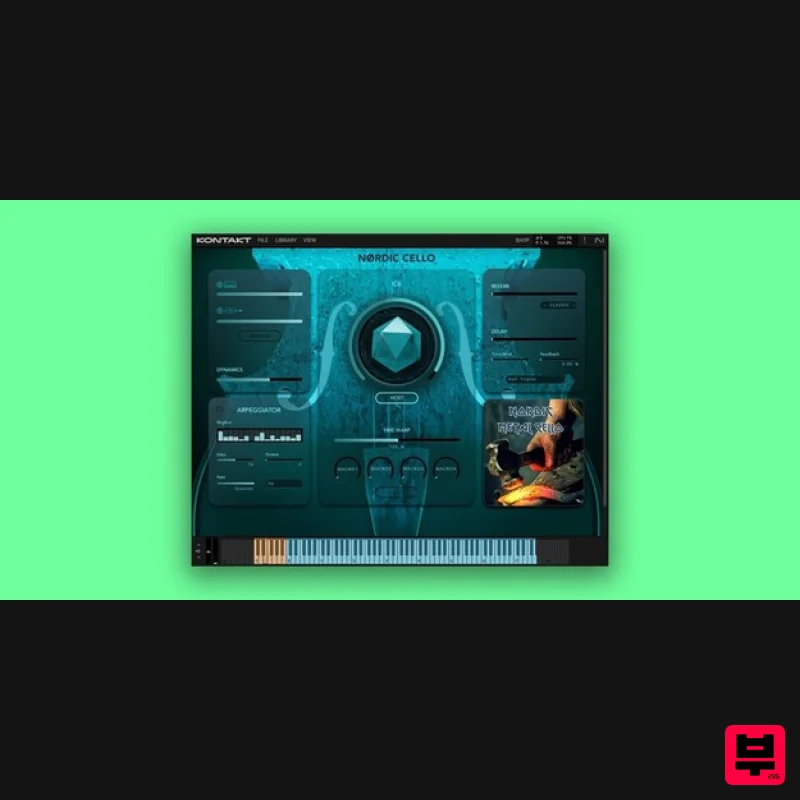
- processed through 2 high-gain amplifiers to give you 2 different and powerful sonic flavors. Mic/Source Options Natural (acoustic sound of the cello) Distortion (sound processed throughout 2 high-gain amplifiers) Built-in Effects & Controllers ICE: it blends multiple sound design samples for big
- cinematic results HOST: it syncs your loops to DAW-tempo Time Warp: it allows you to slow down/speed up tempo
- both in HOST mode and free mode. Arpeggiator (5 arpeggiation modes
- up to 32 steps and 4 octaves) Reverse Effect Dynamics Control 82 Convolution Reverbs/IR Effects Top class Delay algorithm 6 additional FX (EQ
- Compression
- Saturation
- Chorus
- Phaser
- Leslie) with 3 controls each 4 FX Macros ADSR Envelope Controls Nordic Metal Cello contains 4 NKIs: NORDIC METAL CELLO AMP ONE NORDIC METAL CELLO AMP TWO A collection of amazing loops
- single strokes
- articulations and Heavy Metal Special FXs organized into 8 keyswitches to set your music on fire! Keyswitches/Articulations List: Keyswitch #1: Powerchord - Single Strokes (Short - Power Snaps - Pizzicato Snaps - Long) Keyswitch #2: Powerchord Loops (3 sets) Keyswitch #3: Powerchord Loops (3 sets) Keyswitch #4: Metal Sustain Notes Keyswitch #5: Metal Cello Bends Keyswitch #6: Metal Double Bends Keyswitch #7: Power (sliding) Tremolos Keyswitch #8: Metal FXs (string scratch/scraping etc.) NORDIC METAL PHRASES AMP ONE NORDIC METAL PHRASES AMP TWO An extensive collection of tempo-synced phrases and textures organized into 12 keyswiches according to their reference pedal note. Keyswitches/Articulations List: Keyswitch #1: Phrases built on C pedal tone. Keyswitch #2: Phrases built on C# pedal tone. Keyswitch #3: Phrases built on D pedal tone. Keyswitch #4: Phrases built on D# pedal tone. Keyswitch #5: Phrases built on E pedal tone. Keyswitch #7: Phrases built on F# pedal tone. Kevswitch #8: Phrases built on G pedal tone. Keyswitch #9: Phrases built on G# pedal tone. Keyswitch #10: Phrases built on A pedal tone. Keyswitch #11: Phrases built on A# pedal tone. Keyswitch #12: Phrases built on B pedal tone. <iframe allow="autoplay" frameborder="no" height="300" src="https://w.soundcloud.com/player/?url=https%3A//api.soundcloud.com/playlists/1897687203&color=%23ff5500&auto_play=false&hide_related=false&show_comments=true&show_user=true&show_reposts=false&show_teaser=true&visual=true" width="100%"></iframe> HAVEAUDIO · Nordic Metal Cello Credits Instrument: Cello Musician: Jean-Philippe Feiss Sound Engineer: Santiago Quizhpe Palomeque Recorded and mixed at HAVE Studio
- Madrid
- Spain Legacy UI: Kovdra Bureau Additional Design: Have Studio & Martina Primavera System Requirements Uncompressed Size: 6.4 GB 3879 samples in ncw. format Requires full version of KONTAKT 6.6.1+ (not compatible with Free Kontakt Player). Please note: this product will not work in Kontakt Player Please note: Nordisk Kontrabass is used as an example as the installation process is the same for all Have products. Mac Installation 1. Go to https://pulsedownloader.com/ > Click 'Download for Mac OS' to download the Pulse application installer. 2. Open the .dmg file > Click and drag the application icon into the applications folder. 3. Open the Pulse application > Click 'Register' 4. Enter your Email Address and Password > Check the box that states 'I agree to the terms of use and privacy policy' > Click 'Register'. 5. Click 'Add a Product'. 6. Enter your 32-digit serial key
- found within the serial number section of your Plugin Boutique User Account > Click 'Redeem'. 7. Click 'Install'. 8. Click the folder icon to select the installation location for your library. 9. Choose your installation location > Click 'Open'. 10. Click 'Download and Install'. 11. Open Kontakt > Select the 'Files' tab and navigate to your installed Kontakt library > Click and drag the .nki file into the empty window. Your Kontakt Instrument is now installed and ready to use. Batch Re-save Instructions 1. Within Kontakt
- click the floppy disk icon. 2. From the drop-down menu
- click 'Batch re-save'. 3. Click 'Yes'. 4. Navigate to the installation location for your Kontakt library > Click 'Open'. Batch re-save is now complete and you can expect to see quicker loading times for your Kontakt Instrument. Windows Installation 1. Go to https: //pulsedownloader.com/ > Click 'Download for Windows' to download the Pulse application installer. 2. Open the .exe file to install the Pulse application > Open Pulse and click 'Register'. 3. Enter your Email Address and Password > Check the box that states 'I agree to the terms of use and privacy policy' > Click 'Register'. 4. Click 'Add a Product'. 5. Enter your 32-digit serial key
- found within the serial number section of your Plugin Boutique User Account > Click 'Redeem'. 6. Click 'Install'. 7. Click the folder icon to select the installation location for your library. 8. Choose your installation location > Click 'Select Folder'. 9. Click 'Download and Install'. 10. Open Kontakt > Select the 'Files' tab and navigate to your installed Kontakt library > Click and drag the .nki file into the empty window. Your Kontakt Instrument is now installed and ready to use. Batch Re-save Instructions 1. Within Kontakt
- click the floppy disk icon. 2. From the drop-down menu
- click 'Batch re-save'. 3. Click 'Yes'. 4. Navigate to the installation location for your Kontakt library > Click 'Ok'. Batch re-save is now complete and you can expect to see quicker loading times for your Kontakt Instrument.
Additional Information
About the Have Audio Nordic Metal Cello
Discover the distinctive sound and feel of the Have Audio Nordic Metal Cello , a standout choice among Kontakt Instrument.
Why Choose the Have Audio Nordic Metal Cello ?
- •Authentic Have Audio craftsmanship and design
- •Versatile sound suitable for multiple musical genres
- •Professional build quality and reliable performance
- •Part of Have Audio's respected Kontakt Instrument lineup
Compare & Explore
Browse our complete selection of Have Audio instruments or explore other Kontakt Instrument options. Use our comparison tools to find the perfect match for your musical style and budget.
Similar Products

The Beat House LE HITS THE ESSENTIALS
Kontakt Instrument

DoubleBang Software Plugged
Kontakt Instrument

Ecliptiq Audio Hexa Rhythm Designer
Kontakt Instrument

Rigid Audio Retrocade
Kontakt Instrument

Audiofier Sequi2r EX
Kontakt Instrument

Aria Sounds Hybrichord
Kontakt Instrument

Audiofier Aerkord
Kontakt Instrument

HD Instruments ZoneMatrix
Kontakt Instrument

